
Leave your address - as soon as the price of the product goes down, you'll know about it right away
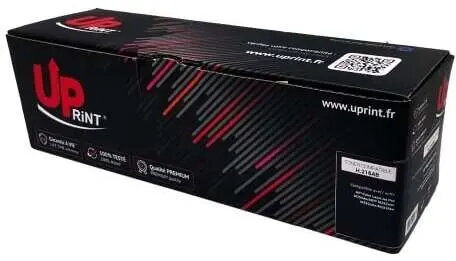
Toner cartridge DD-Print Uprint HP W2410A Black compatible with HP W2410A
In cart {{totalProductsCount}} item(s)
Your cart is empty
Toner cartridge DD-Print Uprint HP W2410A Black compatible with HP W2410A
Leave your address - as soon as the price of the product goes down, you'll know about it right away
Toner cartridge DD-Print Uprint HP W2410A Black compatible with HP W2410A
Toner DD-Print Uprint HP W2410A Black compatible with HP W2410A is a replacement black toner cartridge intended for monochrome laser printing. It supplies black toner for everyday document output, supporting standard office and home printing tasks. The cartridge is designed as a direct-fit alternative to original consumables and aims to maintain consistent text quality for letters, reports and internal documents.
This black toner cartridge delivers clear, legible text and stable page yield suitable for standard monochrome printing. It is manufactured to fit printers compatible with the W2410A series and offers a straightforward installation process. The cartridge is designed to minimize downtime by providing reliable toner delivery and consistent print density across typical office workloads.
Before installation, power off the printer and open the toner access panel according to the printer manual. Remove the packaging and protective seals from the cartridge, then insert the cartridge into the designated slot until it clicks into place. Close the access panel and power on the printer. Run a test print or alignment procedure if prompted by the device to ensure correct installation and optimal print quality.
Store the cartridge in a dry, cool place away from direct sunlight and strong heat sources. For best results, use the cartridge within the period recommended by the supplier and handle it gently to avoid spills or damage to the toner drum. If print quality issues occur, perform standard printer maintenance such as cleaning the paper path and running a cartridge alignment or calibration.
{{highlightedFeature.featureTitle}}:
{{getProductFeatureValueById(product, highlightedFeature.featureId)}}