
{{ totalProductsCount }}

In cart {{totalProductsCount}} item(s)

Total:
{{sum | formatAmount}}

Your cart is empty

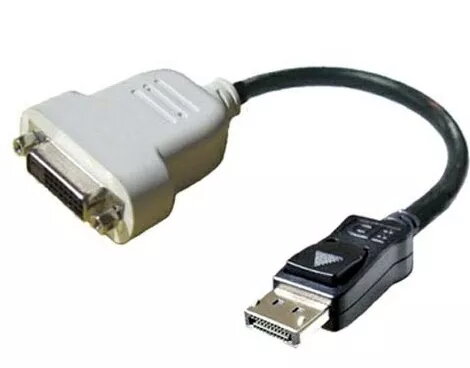
header-product DisplayPort to DVI-D Cable DELL 023NVR 0.23m Black White

DisplayPort to DVI-D Cable DELL 023NVR 0.23m Black White

DisplayPort to DVI-D Cable DELL 023NVR Photo 1
Out of stock.
View similar!

Short description

The DELL DisplayPort to DVI-D cable (0.23 m) connects your DisplayPort-enabled device to a DVI-D display. It features a durable design with a black and white finish, ensuring compatibility and reliability for high-quality video output. Ideal for connecting laptops or desktops to monitors, this cable supports resolutions up to 1920x1200, making it perfect for both work and entertainment.
Warranty: 2 Years
SKU: 593356

delivery
Information regarding the items availability for purchase will be posted on this site
price
Item cost information will be published on this site
Together cheaper
{{product.price | formatAmount}}
{{product.title}}
{{productBundle.reference.specialPrice | formatAmount}}
{{productBundle.title}}
{{productBundlePreviousPrice | formatAmount}}
{{productBundleSpecialPrice | formatAmount}}

You saving {{productBundleYouSave | formatAmount}}

Product information

Description

The Dell DisplayPort to DVI-D Cable (0.23 m) connects a DisplayPort-enabled computer or graphics source to a DVI-D monitor or projector. The short, purpose-built cable carries digital video signals from a DisplayPort output to a single-link DVI-D input, delivering clear images up to 1920x1200 resolution. Its compact length and two-tone black-and-white finish suit desktop setups where a direct, low-profile connection is required without excess cable slack.

Advantages

This cable provides a simple, passive conversion from DisplayPort to DVI-D with a reliable physical fit and a compact form factor. The short 0.23 m length reduces clutter and signal degradation for close-proximity connections. Constructed to Dell’s quality standards, the cable supports stable digital video transmission and is compatible with a broad range of laptops and desktop graphics cards featuring DisplayPort outputs.

Suitable for

  • Connecting a laptop or desktop DisplayPort output to a DVI-D monitor or projector
  • Short, tidy connections in office workstations or home desktop setups
  • Replacing a damaged or missing short display cable

Key specifications

  • Connector type: DisplayPort (source) to DVI-D (display)
  • Supported maximum resolution: up to 1920 x 1200 (single-link DVI-D)
  • Cable length: 0.23 meters
  • Signal type: digital video only (no audio)
  • Colour: black and white

How to use

Power off both devices if recommended by the manufacturer, then insert the DisplayPort connector into the computer’s DisplayPort output and the DVI-D connector into the display’s DVI-D input. Ensure both connectors are fully seated for a secure connection. Power on the display and computer, then select the appropriate input on the monitor if it does not switch automatically. Adjust display settings in your operating system to set resolution and display arrangement as needed.

Usage recommendations

Use this short cable for situations where the source and display are close together to minimize cable clutter. Because this is a passive DisplayPort-to-DVI-D connection, verify that the graphics output supports legacy DVI signaling if using certain adapters or older devices. For longer runs or multi-monitor setups, consider a longer cable or an active adapter that supports higher resolutions and additional features.

Specifications

Connector 2 gender: The gender of the second connector of the product. Each half of a pair of mating connectors is assigned the designation male or female, the indented one or the one fitting around the other being called female.
Male
Connector 1 gender: The gender of the first connector of the product. Each half of a pair of mating connectors is assigned the designation male or female, the part bearing one or which fits into another being called male.
Male
Connector 2: This is the second connector in the device.
DisplayPort
Connector 1: This is the first connector in the device.
DVI-D
Cable length: How long the cable is.
0.23 m
All features

Logistics data

Harmonized System (HS) code:
84733080

Features

Product colour: The colour e.g. red, blue, green, black, white.
Black, White
Connector 2 gender: The gender of the second connector of the product. Each half of a pair of mating connectors is assigned the designation male or female, the indented one or the one fitting around the other being called female.
Male
Connector 1 gender: The gender of the first connector of the product. Each half of a pair of mating connectors is assigned the designation male or female, the part bearing one or which fits into another being called male.
Male
Connector 2: This is the second connector in the device.
DisplayPort
Connector 1: This is the first connector in the device.
DVI-D
Cable length: How long the cable is.
0.23 m

Description

Machine translation. Load original

Similar products

{{product.title}}
Show details Hide details

{{highlightedFeature.featureTitle}}:

{{getProductFeatureValueById(product, highlightedFeature.featureId)}}

{{product.price | formatAmount}}
Might be useful
{{product.manufacturerName}}
{{product.categoryName}}
{{product.title}}
{{product.specialPrice}}
{{product.price}}

Customer reviews

Customer questions

FAQ

What payment options are available?

AiO.lv offers several payment methods: Bank transfer. All transactions are 100% secure and encrypted.

Can this product be purchased for a company (with VAT)?

Yes. AiO.lv works with legal entities in Latvia and across Europe. The product price already includes VAT. For certain product categories, as well as for companies from other EU countries with a valid VAT number, a 0% VAT rate may apply. We issue the invoice immediately after the order is placed, support electronic BIS invoices, and automatically generate all necessary accounting documents. You can complete the purchase for a company online — simply select the company profile and choose bank transfer as the payment method during checkout.

What is the warranty period?

All Dell products come with an official 2 Years warranty. It covers all manufacturing defects and malfunctions that may occur during use. The warranty is valid at all authorized Dell service centers and through AiO.lv

Can the product be returned after purchase?

Yes, you can return the product within 14 days of purchase if you bought it as a consumer (not a legal entity). Returns are possible without giving any reason — the main condition is that the product retains its original appearance and full set of accessories. We will make the process as simple and convenient as possible: just contact our customer support team, and we will help you arrange the return.

Where should I contact for warranty service?

For warranty-related questions you can contact the AiO.lv (SIA VSPRO) customer support team. We will assist with consultation, warranty claim processing, and coordination with certified service centers.

How can I tell if this product suits my needs?

When making a choice, we recommend paying attention to the key features: connector 2 gender, connector 1 gender, connector 2, connector 1, cable length, compatibility with your devices or usage conditions, material quality, functionality, and warranty terms. These characteristics will help you determine how well the model meets your needs.
warranty
14-Day Return Policy We are confident in our quality, but if the purchase doesn’t fit — you have 14 days to return the product with peace of mind.
shipping
Fast Delivery Get your orders as quickly as possible — right to your door, parcel lockers, or pickup points across Latvia and the EU.
payment
Secure Payment Pay the way you prefer: cash, VISA, MasterCard, Apple Pay, Google Pay, bank transfer, or 0% installment plan.
warranty
Quality Since 2008 AiO.lv has been on the market for over 18 years and has earned trust — with more than 6000 genuine positive reviews on Google.