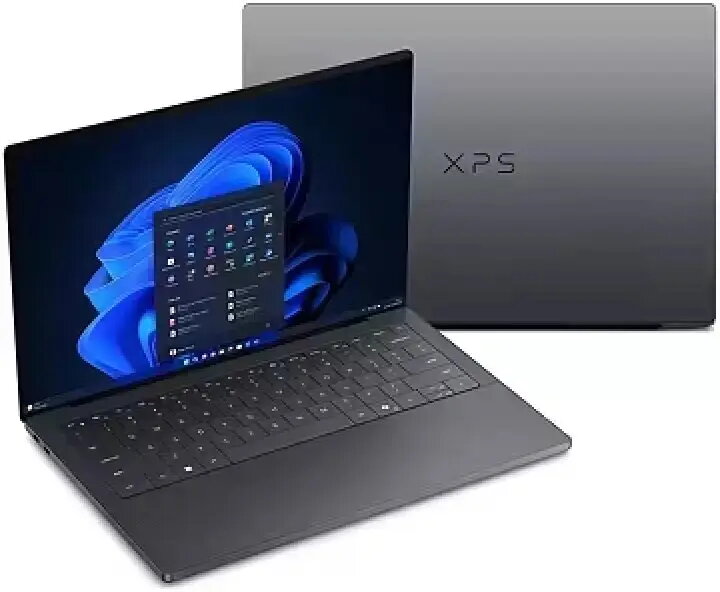
The Dell XPS 16 DA16260 is a high-performance laptop designed for professional multitasking and content creation. It is powered by an Intel Core Ultra X7 358H processor and equipped with 32GB of RAM and a 1TB solid-state drive, delivering responsive performance for demanding applications. The 16-inch 3.2K touch display offers a spacious workspace with touch input, and Intel Arc graphics provide additional rendering capability for visual workflows. The system runs Windows 11 Pro and includes features such as a fingerprint reader, integrated camera and microphone, a backlit keyboard and a three-cell battery. A three-year ProSupport plan is included for extended technical support.
Advantages
The combination of an Intel Core Ultra X7 358H processor, 32GB RAM and a 1TB SSD provides fast system responsiveness, smooth multitasking and ample local storage for projects. The 16" 3.2K touch display supports precise touch interaction and delivers high-resolution visuals suitable for detailed editing and review. Intel Arc graphics enhance on-device graphics performance for content creation, light 3D work and hardware-accelerated video tasks. Hardware conveniences such as the fingerprint reader, built-in camera and microphone, and backlit keyboard improve security, communication and usability in varied lighting conditions. The included three-year ProSupport offers a longer support horizon for business use.
Suitable for
- Professional multitasking and office productivity with many simultaneous applications
- Photo and video editing, color grading and preview on a high-resolution touch screen
- Software development, data analysis and virtual machines that benefit from 32GB RAM
- Presentations and client meetings requiring a portable yet capable workstation
When it may not be suitable
This Dell XPS 16 configuration is not focused on extreme gaming workloads; while Intel Arc graphics support gaming and GPU-accelerated tasks, very high-end gaming performance or specialized workstation GPUs for certain professional 3D applications may be limited. Users who require maximum battery life for all-day unplugged use should verify real-world runtimes for their typical workloads, as the three-cell battery prioritizes balance between size and capacity.
Key specifications
- Processor: Intel Core Ultra X7 358H
- Memory: 32GB RAM
- Storage: 1TB solid-state drive (SSD)
- Display: 16" 3.2K touch screen
- Graphics: Intel Arc integrated graphics
- Operating system: Windows 11 Pro
- Security: Fingerprint reader
- Input/output: Backlit keyboard
- Audio/video: Built-in camera and microphone
- Battery: 3-cell battery
- Support: 3-year ProSupport included
How to use
Power on the laptop and complete the Windows 11 Pro initial setup, including account configuration and security options such as fingerprint enrollment. Use the 16" touch display for direct interaction with touch-enabled apps and touch gestures; combine with the keyboard for traditional input. Store projects and applications on the 1TB SSD for fast access and use 32GB of RAM to run multiple professional tools simultaneously. For best thermal performance, operate the laptop on a flat, hard surface and keep vents unobstructed. Connect external displays, storage or peripherals via available ports when larger workspaces or additional connectivity are required. Use the built-in camera and microphone for video calls and the fingerprint reader for quick secure sign-in.
What to consider before purchase
- Confirm that 32GB RAM and 1TB SSD meet your long-term storage and multitasking needs
- Evaluate whether Intel Arc graphics meet the performance level required for your specific creative or gaming workloads
- Check port selection and any adapter needs for your external monitors and peripherals
- Consider battery life expectations for your typical on-the-go use and whether you need an extended power plan
Usage recommendations
For optimal performance, keep the system software and drivers up to date, store active projects on the internal SSD for fast access, and close unused background applications to maximize available memory. When performing color-critical work, calibrate the 3.2K display with a hardware calibrator and use appropriate color profiles. Use ProSupport for hardware or configuration assistance to maintain productivity.