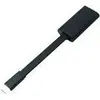
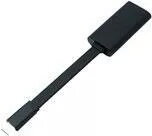
header-product External video adapter Dell USB-C to HDMI (MPN 47KD7) for Latitude 5285/5289/7389, OptiPlex 5250, XPS 12/15
59.99 €

External video adapter Dell USB-C to HDMI (MPN 47KD7) for Latitude 5285/5289/7389, OptiPlex 5250, XPS 12/15

Dell USB-C to HDMI external video adapter 47KD7 Photo 1
Keep track of price changes You keep track of price changes
Watch the price drop

Leave your address - as soon as the price of the product goes down, you'll know about it right away

You keep track of price changes

External video adapter Dell USB-C to HDMI (MPN 47KD7) for Latitude 5285/5289/7389, OptiPlex 5250, XPS 12/15

{{email}}
You keep track of price changes

External video adapter Dell USB-C to HDMI (MPN 47KD7) for Latitude 5285/5289/7389, OptiPlex 5250, XPS 12/15

{{email}}
{{selectedOffer && selectedOffer.price | formatAmount}}

Short description

Dell external video adapter USB-C to HDMI (MPN 47KD7) enables video output from compatible Dell laptops including Latitude 5285, 5289, 7389, OptiPlex 5250 and XPS 12/15. It converts a USB-C port to an HDMI connection for connecting external displays, projectors or TVs for presentations, extended desktop or mirroring. Compact and portable for travel and office use.
Available at price 59.99 €: 7 pcs.
Total available for order: 21 pcs.
Warranty: 2 Years
SKU: 8567952
delivery
to the Customer Service Center at Kengaraga 2b, Riga
22.06.2026 {{selectedOffer.officeDeliveryString}}
free
Customer service center
2b. Kengaraga str., Riga, Latvia, LV-1063
22.06.2026 {{selectedOffer.officeDeliveryString}}
free
Courier Delivery Please note that in case of a large parcel additional delivery costs may apply!
29.06.2026 {{selectedOffer.courierDeliveryString}}
From 4.99 € (Weight: 0.30 kg)
Parcel couriers
Latvijas Pasts pakomāts / Unisend / DPD Paku skapis / Omniva / Venipak Pickup / Venipak Locker / Latvijas Pasts nodaļa
29.06.2026 {{selectedOffer.parcelStationDeliveryString}}
From 1.99 €
payment
Payment Methods:
Cash payment, Bank transfer, Bank cards on-line, Apple Pay, Google Pay
Available for private customers at price 73.49 €: 7 pcs.
Together cheaper
{{product.price | formatAmount}}
{{product.title}}
{{productBundle.reference.specialPrice | formatAmount}}
{{productBundle.title}}
{{productBundlePreviousPrice | formatAmount}}
{{productBundleSpecialPrice | formatAmount}}

You saving {{productBundleYouSave | formatAmount}}

Product information

Description

The Dell external video adapter USB-C to HDMI provides a reliable method to output video from compatible Dell laptops to HDMI-equipped displays. Designed for use with models such as Latitude 5285, 5289, 7389, OptiPlex 5250 and XPS 12/15, the adapter converts a USB-C port to a standard HDMI connection so you can connect monitors, projectors or TVs for presentations, extended desktop workspaces or screen mirroring. The compact, lightweight construction makes it easy to carry between meetings, classrooms and travel locations while maintaining a straightforward plug-and-play experience on supported systems.

Advantages

The adapter offers a simple single-cable solution for video output without requiring additional software on most supported Dell systems. Its HDMI output enables connection to a wide range of external displays, supporting common display setups such as mirrored screens or extended desktops. The small form factor and minimal cable length reduce desk clutter and simplify setup when connecting to conference room displays or portable projectors.

Suitable for

  • Connecting a Dell laptop to an external monitor for increased workspace
  • Presentations using projectors or HDMI-equipped TVs
  • Temporary workstation setups in offices, hot desks or hotel rooms
  • Screen mirroring for demonstrations and training

Key specifications

  • Input interface: USB-C (video-capable port required)
  • Output interface: HDMI (standard Type A)
  • Function: converts USB-C video signal to HDMI video output
  • Physical: compact, portable adapter with short integrated cable
  • Compatibility: designed for use with specified Dell laptop models that support video over USB-C

How to use

Connect the USB-C end of the adapter to a compatible USB-C video-capable port on the laptop, then connect an HDMI cable from the adapter to the external display, projector or TV. Power on the external display and select the appropriate HDMI input. Configure display settings on the laptop to choose mirroring or extended desktop, and adjust resolution and scaling as needed in the operating system’s display settings. No separate drivers are usually required when used with supported Dell systems; consult the laptop’s documentation if additional configuration is needed.

Usage recommendations

Use an HDMI cable that supports the required resolution and refresh rate for your display. When traveling, store the adapter in a protective compartment to prevent cable strain. If no video output is detected, verify that the laptop’s USB-C port supports DisplayPort Alt Mode or video output and check display input selection and cable connections.

Description

Machine translation. Load original

{{highlightedFeature.featureTitle}}:

{{product.title}}
{{product.price}}

{{getProductFeatureValueById(product, highlightedFeature.featureId)}}

Might be useful
{{product.manufacturerName}}
{{product.categoryName}}
{{product.title}}
{{product.specialPrice}}
{{product.price}}
Stock data
Warehouse Stock Delivery to the store Store Price
WH354 7 01.07.2026 73.49 €
Available only for legal entities
Warehouse Stock Delivery to the store Store Price
EU6 7 22.06.2026 Best delivery 59.99 € Best price
WH109 7 08.07.2026 102.49 €
73.49 €
Stock: 7
Delivery Date: 01.07.2026
Warehouse: WH354
Available only for legal entities
59.99 €
Stock: 7
Delivery Date: 22.06.2026 Best delivery
Warehouse: EU6
102.49 €
Stock: 7
Delivery Date: 08.07.2026
Warehouse: WH109

Customer reviews

Customer questions

FAQ

How much does the Dell USB-C to HDMI external video adapter 47KD7 cost, and is it available for purchase?

The price is 59.99 € (valid at the time of publication and already includes all taxes). The item is available for order — 21 pcs. are in stock, and you can place your purchase right now with delivery across Latvia and Europe or choose pickup at the Riga collection point. We offer favorable purchase terms, including the option to split the payment into convenient monthly installments. Availability and price are updated in real time, so we recommend placing your order in advance.

If I order this product today, when will I receive my order?

If you place your order today, delivery will be as fast and convenient as possible. You will be able to pick up your order on 22.06.2026 at the Riga pickup point or choose delivery across Latvia and Europe. We carefully inspect every purchase and pack it securely for safe transportation.

What payment options are available?

AiO.lv offers several payment methods: Cash payment, Bank transfer, Bank cards on-line, Apple Pay, Google Pay. All transactions are 100% secure and encrypted.

Can this product be purchased for a company (with VAT)?

Yes. AiO.lv works with legal entities in Latvia and across Europe. The product price already includes VAT. For certain product categories, as well as for companies from other EU countries with a valid VAT number, a 0% VAT rate may apply. We issue the invoice immediately after the order is placed, support electronic BIS invoices, and automatically generate all necessary accounting documents. You can complete the purchase for a company online — simply select the company profile and choose bank transfer as the payment method during checkout.

What is the warranty period?

All Dell products come with an official 2 Years warranty. It covers all manufacturing defects and malfunctions that may occur during use. The warranty is valid at all authorized Dell service centers and through AiO.lv

Can the product be returned after purchase?

Yes, you can return the product within 14 days of purchase if you bought it as a consumer (not a legal entity). Returns are possible without giving any reason — the main condition is that the product retains its original appearance and full set of accessories. We will make the process as simple and convenient as possible: just contact our customer support team, and we will help you arrange the return.

Where should I contact for warranty service?

For warranty-related questions you can contact the AiO.lv (SIA VSPRO) customer support team. We will assist with consultation, warranty claim processing, and coordination with certified service centers.

warranty
14-Day Return Policy We are confident in our quality, but if the purchase doesn’t fit — you have 14 days to return the product with peace of mind.
shipping
Fast Delivery Get your orders as quickly as possible — right to your door, parcel lockers, or pickup points across Latvia and the EU.
payment
Secure Payment Pay the way you prefer: cash, VISA, MasterCard, Apple Pay, Google Pay, bank transfer, or 0% installment plan.
warranty
Quality Since 2008 AiO.lv has been on the market for over 18 years and has earned trust — with more than 6000 genuine positive reviews on Google.