


Docking Station Dell H600C
Offer for a legal entity, non-cash payment.
Short description


Cheapest delivery:
Unisend LV
Product information
Description
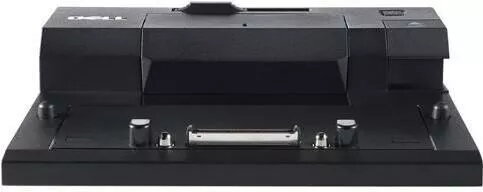
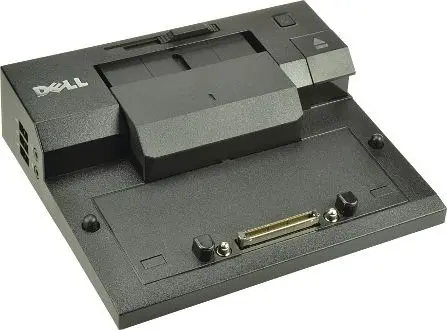
The Dell H600C Docking Station provides expanded connectivity for laptops via a single USB-C connection. It consolidates common ports such as USB-C, HDMI and Ethernet into a compact module that allows connection of external displays, wired networks and peripherals. Designed to support dual displays and fast data transfer, the docking station is intended for users who need a tidy workspace and simplified cable management in both office and remote work settings.
Advantages
The docking station reduces the need to plug and unplug multiple cables by centralizing connections through one hub. Its support for dual displays enables multitasking across two external monitors, while integrated Ethernet and HDMI ports provide reliable wired networking and video output. The compact footprint improves portability and desk organization without introducing unnecessary complexity.
Suitable for
- Office work requiring multiple external monitors and stable network connection
- Remote work and hot-desking where quick docking/undocking is needed
- Presentations or meeting rooms that need easy connection to HDMI displays
- Users who connect several USB peripherals and require faster data transfer
Key specifications
- Connectivity types: USB-C host connection, HDMI video output, Ethernet (wired network), USB ports for peripherals
- Display support: capable of connecting to two external displays via available video outputs
- Data transfer: supports fast data transfer over USB-C and integrated USB ports
- Form factor: compact, portable docking module suitable for desk use and transport
How to use
Connect the Docking Station Dell H600C to a compatible laptop using the built-in USB-C cable or host port, then attach external displays via the HDMI outputs and connect a wired network using the Ethernet port. Plug in USB peripherals such as keyboard, mouse or external storage into the available USB ports. After making connections, the host laptop will recognize attached devices; if necessary, install or update drivers provided by the laptop manufacturer to ensure full functionality.
Usage recommendations
Use a compatible USB-C port on the laptop that supports data and video output for full functionality. Place the docking station on a stable surface and avoid exposing it to excessive heat or moisture. For optimal dual-display performance, verify display resolution and refresh rate settings on the host device and use quality HDMI cables.
Stock data
| Warehouse | Stock | Delivery to the store | Store Price | |
| WH357 | 3 | 08.12.2026 | 105.49 € | Add to cart |
- 105.49 €Stock: 3Delivery Date: 08.12.2026Warehouse: WH357Add to cart
| Warehouse | Stock | Delivery to the store | Store Price | |
| EU6 | 3 | 10.12.2026 | 70.49 € | Add to cart |
| WH109 | 3 | 22.12.2026 | 88.99 € | Add to cart |
- 70.49 €Stock: 3Delivery Date: 10.12.2026Warehouse: EU6Add to cart
- 88.99 €Stock: 3Delivery Date: 22.12.2026Warehouse: WH109Add to cart


