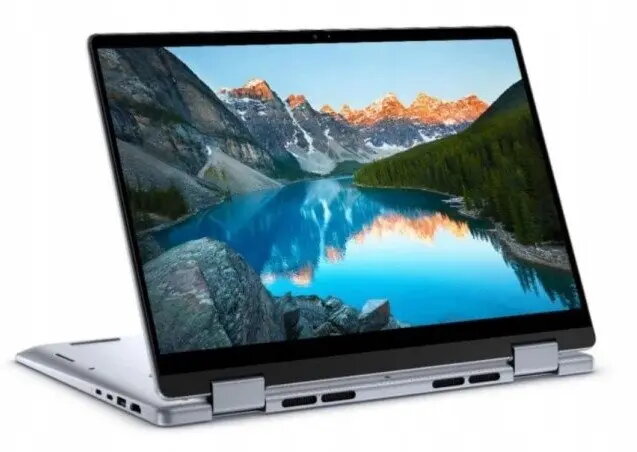
The Dell Inspiron 14 7440 2-in-1 laptop is a versatile computing solution designed for users who require both performance and flexibility. Featuring a 360-degree hinge, this device seamlessly transitions between laptop, tent, stand, and tablet modes, making it suitable for a wide range of environments. It is equipped with an Intel Core 5 120U processor, 16GB of RAM, and a 512GB SSD, ensuring responsive multitasking and ample storage for professional and personal files. The 14-inch WUXGA touchscreen provides a sharp, interactive visual experience, while the Ice Blue finish offers a modern aesthetic.
Advantages
The primary benefit of this 2-in-1 laptop is its exceptional adaptability, allowing users to switch between productivity and entertainment modes instantly. The inclusion of a high-resolution WUXGA touchscreen enhances navigation and creative workflows, while the robust internal hardware configuration ensures smooth operation for demanding applications. Security and convenience are prioritized through the integrated fingerprint reader and a backlit keyboard, which facilitates comfortable typing in low-light conditions. Furthermore, the pre-installed Windows 11 operating system provides a modern, secure, and user-friendly interface right out of the box.
Suitable for
- Office productivity and document management
- Creative tasks such as digital sketching and photo editing
- Multimedia consumption and streaming
- Students requiring a portable and flexible study device
- Remote work and video conferencing
This device may not be suitable for users who require high-end dedicated graphics for professional-grade 3D rendering, complex video editing, or intensive gaming. Additionally, those who prefer a larger screen real estate for multitasking might find the 14-inch form factor limiting compared to desktop-replacement laptops.
Key specifications
- Processor: Intel Core 5 120U
- Display: 14-inch WUXGA Touchscreen (1920x1200)
- Memory: 16GB RAM
- Storage: 512GB SSD
- Operating System: Windows 11
- Features: 360-degree hinge, backlit keyboard, fingerprint reader
How to use
To begin using the Dell Inspiron 14 7440, simply open the lid and press the power button. Follow the on-screen prompts to complete the Windows 11 setup process, including connecting to your Wi-Fi network and signing in with your Microsoft account. To utilize the 2-in-1 functionality, rotate the screen beyond 180 degrees to automatically trigger tablet mode or stand mode. The touchscreen supports multi-touch gestures, allowing you to swipe, pinch, and zoom for intuitive navigation. Use the fingerprint reader for secure and quick access to your desktop without needing to type a password.
What to consider before purchase
- Verify if the 14-inch screen size meets your specific workflow requirements.
- Ensure the port selection aligns with your peripheral connectivity needs.
- Consider whether the integrated graphics are sufficient for your software applications.
- Check if the storage capacity of 512GB is adequate for your data requirements or if external storage will be needed.
Usage recommendations: To maintain optimal performance, keep the laptop's air vents clear of obstructions to ensure proper cooling. Regularly update the operating system and drivers through the Dell support utility to ensure security and stability. When using the device in tablet mode, handle the hinge with care to preserve the longevity of the convertible mechanism.