


AC Adapter Dell YY20N WK890 PA-10 19.5V 4.62A 90W

Offer for a legal entity, non-cash payment.
Short description


Cheapest delivery:
Unisend LV
Product information
Description
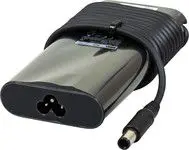
The Dell Replacement AC Adapter YY20N WK890 PA-10 supplies stable power at 19.5V and 4.62A, delivering up to 90W to compatible Dell laptops. Designed as a direct replacement power supply, the adapter includes a detachable power cable and a compact rectangular brick that fits standard laptop charging ports. The unit provides consistent voltage for charging and operating your device, while its compact form factor supports portability for travel and daily commute.
Advantages
This AC adapter offers reliable output with 19.5V and 4.62A ratings to meet the power requirements of many Dell notebooks. The 90W capacity ensures both charging and continued operation under moderate workloads. The adapter is equipped with integrated protection against common electrical issues such as short circuits, overcurrent and overheating, supporting safe and stable performance. Its small size and included power cable make it convenient for immediate use and storage.
Suitable for
- Replacing a lost or damaged Dell laptop charger
- Providing a spare power adapter for travel or office use
- Powering compatible Dell notebooks that require 19.5V/4.62A input
- Maintaining uninterrupted work or charging when the original adapter is unavailable
Key specifications
- Output voltage: 19.5 V
- Output current: 4.62 A
- Maximum power: 90 W
- Input: AC mains (standard country-specific voltage and frequency)
- Connector: Dell-compatible barrel connector (standard size for supported models)
- Design: compact rectangular adapter brick with detachable power cable
- Safety features: overcurrent, short-circuit and thermal protection
How to use
Connect the included power cable to the adapter and plug the cable into an appropriate AC outlet. Insert the adapter's barrel connector into the laptop power jack until it seats firmly. Confirm the laptop indicates charging via its LED or on-screen battery icon. When charging is complete or when disconnecting, remove the connector from the laptop first and then unplug the adapter from the mains. Store the adapter in a dry, cool place when not in use.
Usage recommendations
Use the adapter only with devices that accept 19.5V and up to 4.62A input. Avoid exposing the adapter to excessive moisture, heat sources, or impact. If the adapter becomes unusually hot, emits smoke, or produces a strange odor, disconnect it immediately and replace it. For optimal performance, match the connector type and power rating to your Dell laptop model before use.
Stock data
| Warehouse | Stock | Delivery to the store | Store Price | |
| WH353 | 5 | 07.12.2026 | 57.49 € | Add to cart |
- 57.49 €Stock: 5Delivery Date: 07.12.2026Warehouse: WH353Add to cart
| Warehouse | Stock | Delivery to the store | Store Price | |
| EU6 | 121 | 11.12.2026 | 44.99 € | Add to cart |
| EU13 | 53 | 07.12.2026 | 51.49 € | Add to cart |
| WH109 | 82 | 21.12.2026 | 58.99 € | Add to cart |
- 44.99 €Stock: 121Delivery Date: 11.12.2026Warehouse: EU6Add to cart
- 51.49 €Stock: 53Delivery Date: 07.12.2026Warehouse: EU13Add to cart
- 58.99 €Stock: 82Delivery Date: 21.12.2026Warehouse: WH109Add to cart


