
{{ totalProductsCount }}

In cart {{totalProductsCount}} item(s)

Total:
{{sum | formatAmount}}

Your cart is empty

header-product USB A to USB C cable 1 m, DeLOCK, USB 3.2 Gen 2 (10 Gbit/s), male–male, black

USB A to USB C cable 1 m, DeLOCK, USB 3.2 Gen 2 (10 Gbit/s), male–male, black

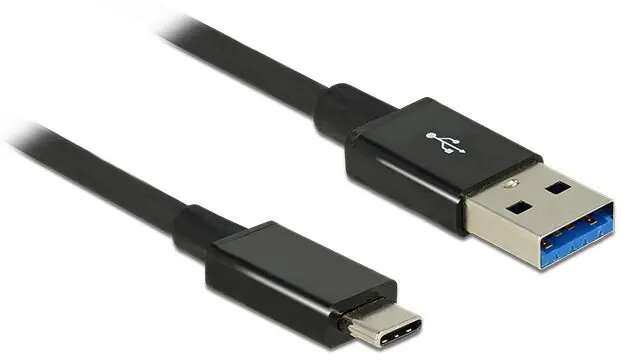
DeLOCK USB A–C cable 1 m USB 3.2 Gen 2 Photo 1
Out of stock.
View similar!

Short description

DeLOCK 1 m USB A to USB C data cable supporting USB 3.2 Gen 2 (3.1 Gen 2) with maximum transfer speeds up to 10 Gbit/s. Male-to-male connectors (USB A and USB C), nickel/gold plated contacts and black jacket. Designed for fast data transfer between computers, external drives, docking stations and peripherals requiring a USB 3.2 Gen 2 connection.
Warranty: 2 Years
SKU: 11860505

delivery
Information regarding the items availability for purchase will be posted on this site
price
Item cost information will be published on this site
Together cheaper
{{product.price | formatAmount}}
{{product.title}}
{{productBundle.reference.specialPrice | formatAmount}}
{{productBundle.title}}
{{productBundlePreviousPrice | formatAmount}}
{{productBundleSpecialPrice | formatAmount}}

You saving {{productBundleYouSave | formatAmount}}

Product information

Description

DeLOCK USB A to USB C cable, 1 m, supports USB 3.2 Gen 2 (also known as USB 3.1 Gen 2) with data transfer speeds up to 10 Gbit/s. The cable has a Type-A male connector on one end and a Type-C male connector on the other, nickel/gold-plated contact surfaces and a black PVC jacket. It is designed to connect devices with USB Type-A ports (for example external hard drives or peripherals) to computers or laptops that provide a USB Type-C host port, enabling high-speed file transfers and interaction between legacy devices and modern hosts.

Advantages

The cable implements SuperSpeed USB signalling for up to 10 Gbit/s throughput and uses coaxial conductors for the high-speed pairs and a twisted pair for USB 2.0 compatibility. Connectors are plated to improve contact reliability and resist corrosion. With a 1 m overall length and a cable diameter of approximately 4 mm the design balances flexibility and signal integrity for typical desktop and mobile workflows.

Suitable for

  • Connecting external HDDs or SSDs with USB Type-A to laptops or PCs with USB Type-C host ports
  • Transferring large files and backups between devices at SuperSpeed USB rates
  • Using USB Type-A peripherals with a computer that only provides USB Type-C ports (data-only)

Key specifications

  • Connector 1: USB Type-A male (SuperSpeed)
  • Connector 2: USB Type-C male (SuperSpeed)
  • USB version: USB 3.2 Gen 2 (SuperSpeed 10 Gbit/s)
  • Cable length: approx. 1 m (including connectors)
  • Cable diameter: approx. 4 mm
  • Conductor construction: 4 x coaxial for SuperSpeed, 1 x twisted pair for USB 2.0
  • Cable gauge: 32 AWG data lines, 26 AWG power line
  • Contact plating: nickel/gold-plated contacts
  • Resistor: 5.1 kΩ on appropriate wire for USB-C identification
  • Colour: black

How to use

Plug the USB Type-C male connector into the host port of your computer or laptop and insert the USB Type-A male connector into the target device such as an external drive or peripheral. Ensure the host recognises the connected device and that drivers are installed if required by the operating system. The cable supports SuperSpeed transfers when both host and device support USB 3.2 Gen 2; if one side only supports USB 2.0 or USB 3.0 the transfer rate will fall back accordingly.

Usage recommendations

Use the cable for data connections only; this cable provides standard power conductors but is primarily intended for USB data transfer between a Type-C host and a Type-A device. Avoid bending the cable sharply at the connectors and keep it away from strong electromagnetic sources to maintain signal integrity. For full 10 Gbit/s performance, connect devices that both support USB 3.2 Gen 2 and use short cable runs such as this 1 m length.

Specifications

Cable length: How long the cable is.
1 m
Connector 2 gender: The gender of the second connector of the product. Each half of a pair of mating connectors is assigned the designation male or female, the indented one or the one fitting around the other being called female.
Male
Connector 1 gender: The gender of the first connector of the product. Each half of a pair of mating connectors is assigned the designation male or female, the part bearing one or which fits into another being called male.
Male
Connector 2: This is the second connector in the device.
USB C
Connector 1: This is the first connector in the device.
USB A
USB version: Universal Serial Bus (USB) is an industry standard developed in the mid-1990s that defines the interface used for connection, communication and power supply between computers and electronic devices. Every new version - for example 1.1, 2.0, 3.0 - is much faster than the previous one.
USB 3.2 Gen 2 (3.1 Gen 2)
Product colour: The colour e.g. red, blue, green, black, white.
Black
All features

Logistics data

Harmonized System (HS) code:
84733080

Packaging data

Package type: The type of product package e.g. box.
Polybag

Weight & dimensions

Cable diameter: The distance from one side of the cable to the other, with a straight line going through the middle of the cable.
4 mm
Cable length: How long the cable is.
1 m

Features

Product colour: The colour e.g. red, blue, green, black, white.
Black
Cable colour: Colour of the cable e.g. white, gray.
Black
Maximum data transfer rate: The maximum speed with which data can be transmitted from one device to another.
10000 Mbit/s
Maximum data transfer rate:
10 Gbit/s
Connector contacts plating: What the connector contacts are covered with (layer on top).
Nickel/Gold
AWG wire size:
26/32
Connector 2 form factor:
Straight
Connector 1 form factor:
Straight
Connector 2 gender: The gender of the second connector of the product. Each half of a pair of mating connectors is assigned the designation male or female, the indented one or the one fitting around the other being called female.
Male
Connector 1 gender: The gender of the first connector of the product. Each half of a pair of mating connectors is assigned the designation male or female, the part bearing one or which fits into another being called male.
Male
Connector 2: This is the second connector in the device.
USB C
Connector 1: This is the first connector in the device.
USB A
USB version: Universal Serial Bus (USB) is an industry standard developed in the mid-1990s that defines the interface used for connection, communication and power supply between computers and electronic devices. Every new version - for example 1.1, 2.0, 3.0 - is much faster than the previous one.
USB 3.2 Gen 2 (3.1 Gen 2)

Description

Machine translation. Load original

Similar products

{{product.title}}
Show details Hide details

{{highlightedFeature.featureTitle}}:

{{getProductFeatureValueById(product, highlightedFeature.featureId)}}

{{product.price | formatAmount}}
Might be useful
{{product.manufacturerName}}
{{product.categoryName}}
{{product.title}}
{{product.specialPrice}}
{{product.price}}

Customer reviews

Customer questions

FAQ

What payment options are available?

AiO.lv offers several payment methods: Bank transfer. All transactions are 100% secure and encrypted.

Can this product be purchased for a company (with VAT)?

Yes. AiO.lv works with legal entities in Latvia and across Europe. The product price already includes VAT. For certain product categories, as well as for companies from other EU countries with a valid VAT number, a 0% VAT rate may apply. We issue the invoice immediately after the order is placed, support electronic BIS invoices, and automatically generate all necessary accounting documents. You can complete the purchase for a company online — simply select the company profile and choose bank transfer as the payment method during checkout.

What is the warranty period?

All DIGITUS products come with an official 2 Years warranty. It covers all manufacturing defects and malfunctions that may occur during use. The warranty is valid at all authorized DIGITUS service centers and through AiO.lv

Can the product be returned after purchase?

Yes, you can return the product within 14 days of purchase if you bought it as a consumer (not a legal entity). Returns are possible without giving any reason — the main condition is that the product retains its original appearance and full set of accessories. We will make the process as simple and convenient as possible: just contact our customer support team, and we will help you arrange the return.

Where should I contact for warranty service?

For warranty-related questions you can contact the AiO.lv (SIA VSPRO) customer support team. We will assist with consultation, warranty claim processing, and coordination with certified service centers.

How can I tell if this product suits my needs?

When making a choice, we recommend paying attention to the key features: cable length, connector 2 gender, connector 1 gender, connector 2, connector 1, usb version, product colour, compatibility with your devices or usage conditions, material quality, functionality, and warranty terms. These characteristics will help you determine how well the model meets your needs.

Where can I download the instructions for DeLOCK USB A–C cable 1 m USB 3.2 Gen 2?

You can download the instructions in PDF format from the “Instructions” section on the product description page. The file contains complete information about installation, setup, and usage.
warranty
14-Day Return Policy We are confident in our quality, but if the purchase doesn’t fit — you have 14 days to return the product with peace of mind.
shipping
Fast Delivery Get your orders as quickly as possible — right to your door, parcel lockers, or pickup points across Latvia and the EU.
payment
Secure Payment Pay the way you prefer: cash, VISA, MasterCard, Apple Pay, Google Pay, bank transfer, or 0% installment plan.
warranty
Quality Since 2008 AiO.lv has been on the market for over 18 years and has earned trust — with more than 6000 genuine positive reviews on Google.