
Leave your address - as soon as the price of the product goes down, you'll know about it right away
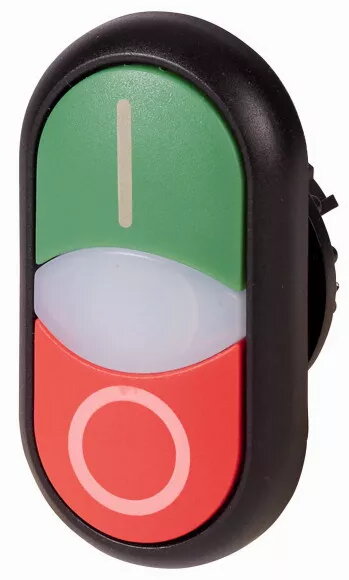
Eaton M22S-DDL-GR-X1/X0 Double Pushbutton, Green/Red, I/O Marking
In cart {{totalProductsCount}} item(s)
Your cart is empty
Eaton M22S-DDL-GR-X1/X0 Double Pushbutton, Green/Red, I/O Marking
Leave your address - as soon as the price of the product goes down, you'll know about it right away
Eaton M22S-DDL-GR-X1/X0 Double Pushbutton, Green/Red, I/O Marking
The Eaton M22S-DDL-GR-X1/X0 is a high-quality double pushbutton actuator engineered for demanding industrial control environments. As part of the robust RMQ-Titan series, this unit combines a green and a red button in a single, space-saving housing, featuring clear I/O markings to ensure intuitive and error-free operation. Its durable construction makes it a reliable choice for integration into complex automation systems and machinery control panels where space efficiency and functional clarity are essential.
This double pushbutton offers significant space savings by consolidating two control functions into a single mounting hole, which is ideal for compact control panels. The ergonomic design ensures comfortable tactile feedback, while the high-contrast I/O markings provide immediate visual confirmation of the button status. Built with industrial-grade materials, the actuator is designed to withstand frequent use and harsh operating conditions, ensuring long-term reliability and consistent performance in various electrical switching applications.
This unit may not be suitable for environments requiring specific explosion-proof ratings or for applications where the control interface must be operated while wearing heavy protective gloves that could accidentally trigger both buttons simultaneously. It is also not intended for outdoor use without an additional protective enclosure to prevent environmental damage.
To install the Eaton M22S-DDL-GR-X1/X0, insert the actuator into a standard 22.5 mm mounting hole on your control panel and secure it using the provided locking mechanism. Ensure that the contact blocks are properly attached to the rear of the actuator to complete the electrical circuit. Once installed, verify that the buttons move freely and that the I/O markings are oriented correctly for the operator.
For optimal performance and longevity, ensure that the actuator is kept free of excessive dust, oil, and debris. Regularly inspect the button surfaces and the mounting nut to ensure the unit remains securely fastened and responsive during daily operation.
{{highlightedFeature.featureTitle}}:
{{getProductFeatureValueById(product, highlightedFeature.featureId)}}