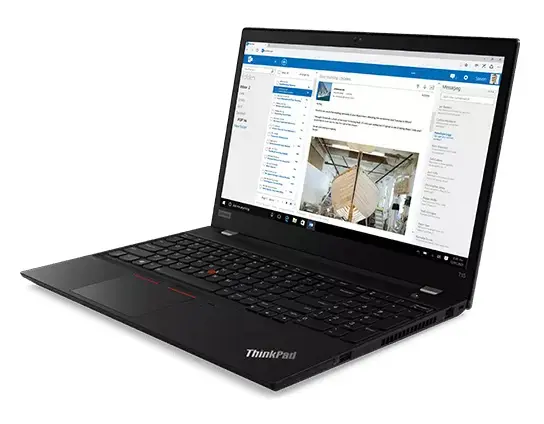
The Lenovo ThinkPad T15 Gen2 is a robust, professional-grade laptop engineered to meet the demands of modern business environments. Equipped with an Intel Core i7-1185G7 processor, 16GB of RAM, and a high-speed 512GB SSD, this device delivers reliable performance for complex multitasking and data-intensive applications. The 15.6-inch Full HD display offers crisp, clear visuals, while the pre-installed Windows 11 Pro operating system provides advanced security and management tools essential for enterprise workflows.
Advantages
This laptop excels in productivity thanks to its powerful internal hardware that ensures smooth operation across multiple professional applications. The inclusion of a spacious 15.6-inch screen allows for comfortable viewing during long work sessions, reducing eye strain and improving focus. Furthermore, the ThinkPad series is renowned for its durable build quality and ergonomic keyboard, which facilitates efficient typing. With Windows 11 Pro, users benefit from enhanced encryption and remote management capabilities, making it a secure choice for corporate and remote work environments.
Suitable for
- Corporate office work and administrative tasks
- Multitasking with multiple professional software applications
- Mobile computing for business professionals on the go
- Secure data management and enterprise-level operations
When it may not be suitable
This laptop is not optimized for high-end gaming or professional-grade video editing that requires a dedicated graphics card. Users looking for a lightweight, ultra-portable device for casual media consumption may find the 15.6-inch form factor larger and heavier than specialized ultrabooks.
Key specifications
- Processor: Intel Core i7-1185G7
- Memory: 16GB RAM
- Storage: 512GB SSD
- Display: 15.6-inch Full HD
- Operating System: Windows 11 Pro
How to use
To begin using the Lenovo ThinkPad T15 Gen2, connect the power adapter to the charging port and press the power button to initiate the initial Windows setup. Follow the on-screen instructions to configure your language, network settings, and user account. Once the setup is complete, you can install your preferred productivity software and connect external peripherals via the available ports. Ensure the device is placed on a flat, stable surface to allow for proper ventilation during operation.
What to consider before purchase
- Check if the 15.6-inch size meets your portability requirements
- Verify that the port selection matches your peripheral needs
- Consider if the storage capacity is sufficient for your data requirements
Usage recommendations: To maintain optimal performance, keep the laptop firmware and Windows 11 Pro updated regularly. Avoid blocking the ventilation vents on the sides and bottom of the chassis to prevent overheating during intensive tasks.