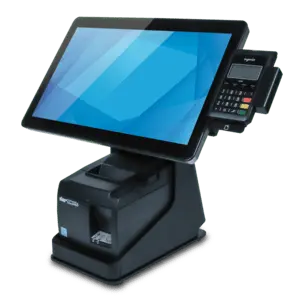
The Elo mPOS Flip Stand Black VESA 75/100 mm for I-Series and Touch Monitors is a dedicated point of sale accessory engineered to securely hold compatible touchscreens and integrated systems. Finished in a professional black color, this robust stand provides a stable and ergonomic platform for retail and hospitality checkout counters. It features built-in cable management through an integrated USB connection cable and includes a dedicated storage space beneath the display to house a receipt printer. By combining the monitor and printer into a single, cohesive footprint, this flip stand helps optimize counter space while maintaining a clean appearance in high-traffic commercial environments.
Advantages
This flip stand offers a reliable and sturdy construction with a weight of 3.27 kg, ensuring that mounted touch monitors remain stable during frequent daily interactions. The integrated design accommodates both the screen and a peripheral receipt printer, reducing cable clutter and simplifying the overall setup on the counter. VESA mounting compatibility allows for straightforward installation, while the included USB connection cable facilitates fast integration with existing systems. Its dedicated printer compartment protects the hardware and keeps the transaction area organized.
Suitable for
- Retail checkout counters
- Hospitality point of sale stations
- Self-service environments
- Interactive customer kiosks
When it may not be suitable
This flip stand is specifically designed for compatible Elo I-Series and select touch monitors, meaning it may not accommodate displays from other manufacturers or those with different mounting patterns. It is also unsuitable for receipt printers that exceed the maximum specified dimensions of 205x140x132 mm.
Key specifications
- VESA mounting compatibility: 75x75 mm and 100x100 mm
- Maximum printer dimensions (D x W x H): 205 x 140 x 132 mm
- Weight: 3.27 kg
- Colour: Black
- Included accessories: USB connection cable
- Compatibility: Elo I-Series (10 inch and 15 inch), 1002L, 1004L, 1304L, 1504L, 1502L
How to use
To set up the stand, attach your compatible Elo touch monitor or I-Series device to the VESA 75/100 mm mounting plate using the appropriate screws. Route the integrated USB connection cable securely through the stand to connect the display to your terminal or host system. Place a compatible receipt printer into the designated compartment beneath the stand, ensuring its dimensions do not exceed 205x140x132 mm. Organize any remaining cables to prevent tangling and ensure smooth flipping or pivoting actions during operation.
What to consider before purchase
- Verify that your specific touch monitor model matches the compatibility list, including Elo I-Series 10 and 15-inch displays, as well as models 1002L, 1004L, 1304L, 1504L, and 1502L.
- Measure your receipt printer to ensure it fits within the maximum allowable dimensions of 205x140x132 mm.
- Check that your checkout counter has sufficient space and a stable surface to support the 3.27 kg weight of the stand plus the attached hardware.
Usage recommendations
Ensure that the stand is placed on a flat, stable surface to maintain balance during daily POS operations. Periodically check all VESA mounting screws and cable connections to prevent loosening from constant use. Do not force peripherals that exceed the specified printer dimensions into the housing compartment.