Leave your address - as soon as the price of the product goes down, you'll know about it right away
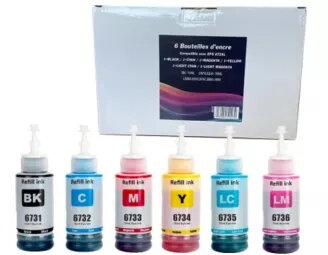
Cartridge GenerInk Epson T673X BK/C/M/Y/LC/LM 6 x 70 ml
In cart {{totalProductsCount}} item(s)
Your cart is empty
Cartridge GenerInk Epson T673X BK/C/M/Y/LC/LM 6 x 70 ml
Leave your address - as soon as the price of the product goes down, you'll know about it right away
Cartridge GenerInk Epson T673X BK/C/M/Y/LC/LM 6 x 70 ml
The GenerInk Epson T673X cartridge pack contains six individual ink cartridges — black, cyan, magenta, yellow, light cyan and light magenta — each filled with 70 ml of ink formulated for use in compatible Epson printers. This set is intended to deliver consistent color balance, clear black text and smooth tonal gradients for photo and document printing. The cartridges are designed for straightforward installation and supply sufficient ink volume for extended print runs in home or small office environments.
This six-cartridge pack offers a balanced color set with dedicated light cyan and light magenta inks to improve photo detail and reduce grain in light tones. High-capacity 70 ml cartridges reduce the frequency of replacements and help lower running costs compared with smaller cartridges. The ink formulation is made to produce sharp text and vibrant color output on common coated and plain papers, while the modular cartridge design makes replacement quick and user-friendly.
Before installation, verify printer compatibility and follow the printer manufacturer’s instructions for replacing cartridges. Remove each cartridge from its protective packaging, avoid touching electrical contacts and nozzles, and insert the cartridge into the corresponding color slot according to the printer’s guidance. After installation, run the printer’s alignment and nozzle check procedures if available to ensure optimal print quality. Store unused cartridges upright in a cool, dry place and install within the recommended time frame to maintain ink performance.
To maintain consistent print quality, perform regular nozzle checks and print head alignments. Use manufacturer-recommended paper settings in the printer driver for photo or plain paper to achieve accurate color reproduction. If prints are not as expected, run a cleaning cycle or leave the printer powered on between print jobs to reduce nozzle drying. Keep cartridges sealed until ready to use and avoid exposure to direct sunlight or extreme temperatures.
{{highlightedFeature.featureTitle}}:
{{getProductFeatureValueById(product, highlightedFeature.featureId)}}