
Dreame vacuums for fast and efficient cleaning!
In cart {{totalProductsCount}} item(s)
Your cart is empty
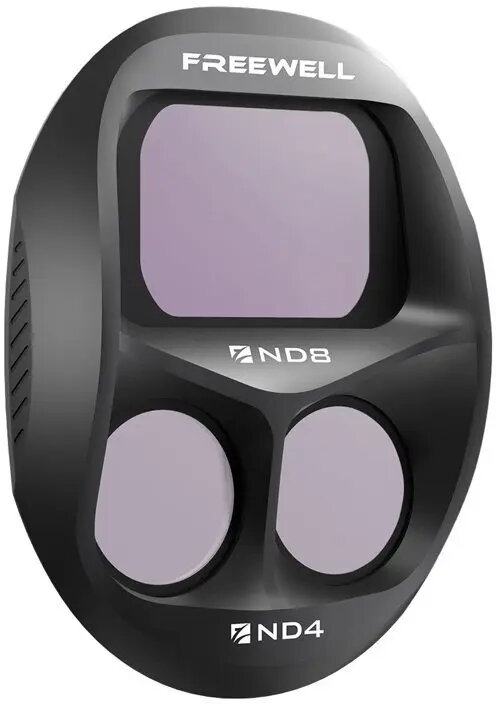
Neutral Density Split Filter Freewell for DJI Mavic 4 Pro — ND8/ND4 Split Neutral Density
The Freewell Neutral Density Split Filter for DJI Mavic 4 Pro combines ND8 and ND4 densities in a single split configuration for aerial photography and videography. Designed to attach to the Mavic 4 Pro camera, this filter reduces light on one portion of the frame while leaving the other portion less affected, enabling balanced exposures across scenes with strong contrast such as coastlines, horizons and landscape compositions captured from the air.
This split neutral density filter allows controlled light reduction across a portion of the image without affecting the entire frame, helping to preserve highlights and maintain detail in bright skies while retaining proper exposure in foreground elements. The two density zones (stronger ND8 and lighter ND4) offer a gradual transition between darkened and clear areas, supporting a natural look in single-shot compositions. The filter is made to fit the optical geometry of the DJI Mavic 4 Pro camera and is intended to be lightweight and secure for aerial use.
Attach the Freewell split neutral density filter to the Mavic 4 Pro camera according to the aircraft’s accessory mounting procedure, ensuring alignment so the split line corresponds to the horizon or other high-contrast boundary in the scene. Compose your shot with the darker ND8 portion covering the brighter sky or highlights while the ND4 portion covers midtones or foreground. Adjust camera exposure settings (shutter speed, ISO, and aperture if available) to account for the reduced light in the filtered area and verify the histogram or highlight warnings to confirm balanced exposure. Remove the filter when uniform light reduction is required or when shooting in low-light conditions.
Use the filter when the scene includes a clear horizontal or vertical boundary between bright and darker areas; align the split so the transition falls along that boundary. Preview results at different altitudes and angles to ensure the split transition appears natural. Clean the optical surfaces with a suitable lens cloth before flight and inspect the mounting interface for secure fitment. Avoid using the split filter in scenes without a clear separation of light levels, as it may create uneven exposure where uniform ND filters would be preferable.
{{highlightedFeature.featureTitle}}:
{{getProductFeatureValueById(product, highlightedFeature.featureId)}}
{{ productComparisonGenerationError }}