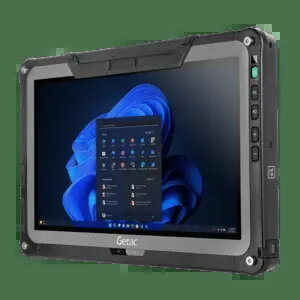
The Getac F110 is a fully rugged tablet designed for high-performance computing in demanding professional environments. It features an 11.6-inch Full HD projected capacitive multi-touch display with a high brightness of 1200 cd/m², ensuring excellent visibility even in challenging lighting conditions. Equipped with an Intel Core i7 processor, 16 GB of RAM, and a 256 GB SSD, this device delivers reliable processing power and efficient data management for complex field operations.
Advantages
This rugged tablet is built to withstand harsh conditions, meeting IP66, MIL-STD 461, and MIL-STD 810H standards for durability against dust, water, and physical impact. Its versatile connectivity suite includes Wi-Fi 6E, Bluetooth, Thunderbolt 4, and 4G LTE, ensuring constant communication and data transfer capabilities. The inclusion of dual removable batteries allows for extended operation times, while the integrated GPS and high-resolution cameras support precise field documentation and navigation tasks.
Suitable for
- Field service and maintenance operations
- Public safety and emergency response
- Industrial and manufacturing data management
- Logistics and transportation tracking
This device may not be suitable for tasks requiring lightweight, consumer-grade portability, as its ruggedized construction and protective features result in a heavier and bulkier form factor compared to standard tablets. It is also not intended for high-end graphical rendering or intensive gaming applications.
Key specifications
- Display: 11.6-inch Full HD (1920x1080) projected capacitive multi-touch
- Processor: Intel Core i7, 2.4 GHz
- Memory: 16 GB RAM
- Storage: 256 GB SSD
- Connectivity: Wi-Fi 6E, Bluetooth, Thunderbolt 4, USB, 4G LTE
- Cameras: 8 MP rear, 5 MP front
- Durability: IP66, MIL-STD 461, MIL-STD 810H
- Operating System: Windows 11 Professional
How to use
To begin using the Getac F110, insert one or both of the provided removable batteries into the designated slots. Connect the device to a power source using the included power supply unit and cable to ensure a full charge. Power on the tablet and follow the Windows 11 Professional setup prompts to configure your network and user settings. Use the included stylus-pen for precise input on the multi-touch screen, especially when wearing gloves or working in outdoor environments.
What to consider before purchase
- Verify that your specific software requirements are compatible with Windows 11 Professional.
- Assess whether the 256 GB storage capacity is sufficient for your data needs or if external storage solutions are required.
- Confirm that your local network provider supports the 4G LTE frequency bands used by this device.
- Consider the weight and dimensions to ensure it meets your ergonomic requirements for field use.
Usage recommendations: To maintain the integrity of the rugged housing, ensure all port covers are securely closed when the device is exposed to dust or moisture. Regularly calibrate the touch screen if using the stylus-pen frequently, and keep the battery contacts clean to ensure optimal power performance.