Leave your address - as soon as the price of the product goes down, you'll know about it right away
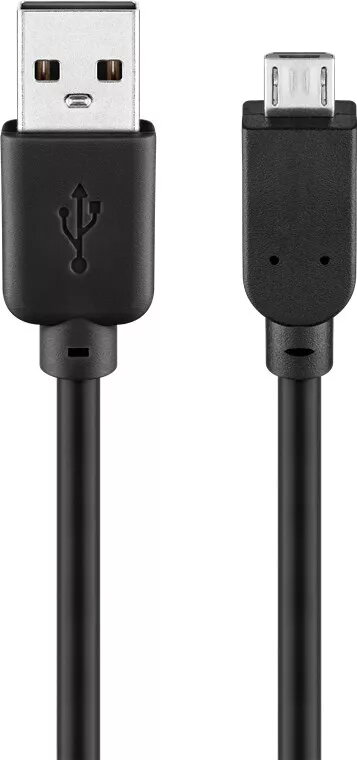
USB 2.0 Hi-Speed cable GOOBAY Micro-USB B to USB A, 5 m, black
In cart {{totalProductsCount}} item(s)
Your cart is empty
USB 2.0 Hi-Speed cable GOOBAY Micro-USB B to USB A, 5 m, black
Leave your address - as soon as the price of the product goes down, you'll know about it right away
USB 2.0 Hi-Speed cable GOOBAY Micro-USB B to USB A, 5 m, black
GOOBAY USB 2.0 Hi-Speed cable Micro-USB B to USB A, 5 m, black provides a flexible, extended connection between USB‑A host ports and devices with a Micro‑USB B socket. Designed for USB 2.0 Hi‑Speed data rates up to 0.48 Gbit/s, the cable supports data transfer and charging of smartphones, tablets, cameras and other peripherals. The 5‑metre length and black jacket make it suitable for setups where devices are located away from the computer or charger.
The cable supports USB 2.0 Hi‑Speed data transfer up to 0.48 Gbit/s while maintaining compatibility with standard USB‑A ports and Micro‑USB B devices. Its 5 m length offers greater reach than typical short cables, enabling flexible placement of devices without additional adapters. The black outer jacket provides a neutral, low‑visibility appearance and the cable construction is intended for regular data and charging tasks.
Insert the USB A plug into the host device (PC, laptop, charger or power bank) and the Micro‑USB B plug into the target device. For data transfer, ensure the target device is powered on and set to the appropriate connection mode (e.g., file transfer or MTP) if required by the operating system. For charging, connect to a suitable USB‑A power source; charging speed depends on the power source and the connected device's charging circuitry.
To maintain signal quality over the 5 m length, avoid sharp bends and prolonged stress on connectors. Use the cable with USB 2.0‑capable devices for optimal performance; when connecting to USB 3.x hosts or devices, functionality will be limited to USB 2.0 speeds. Store the cable coiled loosely to prevent kinks and disconnect gently by gripping the connector housings rather than pulling the cable.
{{highlightedFeature.featureTitle}}:
{{getProductFeatureValueById(product, highlightedFeature.featureId)}}