
Leave your address - as soon as the price of the product goes down, you'll know about it right away
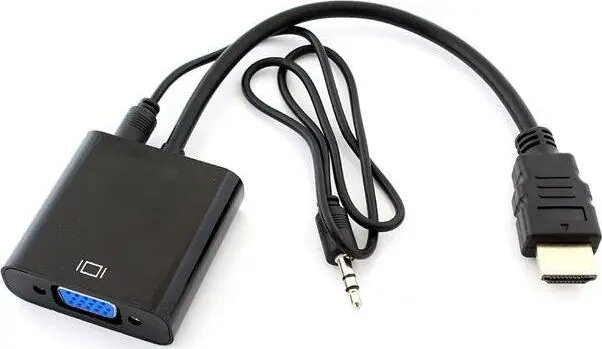
HERTZ adapter HDMI to D-Sub (VGA) with 3.5mm audio jack, black
In cart {{totalProductsCount}} item(s)
Your cart is empty
HERTZ adapter HDMI to D-Sub (VGA) with 3.5mm audio jack, black
Leave your address - as soon as the price of the product goes down, you'll know about it right away
HERTZ adapter HDMI to D-Sub (VGA) with 3.5mm audio jack, black
The HERTZ adapter HDMI to D-Sub (VGA) with 3.5mm audio jack, black converts a digital HDMI signal into an analog VGA video output and provides a separate 3.5mm analog audio output. It enables connection of HDMI sources such as laptops, media players or set-top boxes to older VGA monitors, projectors or displays that do not accept HDMI audio. The compact inline adapter is designed for simple signal conversion where only video is carried over the VGA connector and audio is routed via the 3.5mm jack.
This adapter separates digital video and audio into a compatible analog VGA signal and a standard 3.5mm audio output, allowing use with legacy displays and AV equipment. Its plug-and-play design requires no external power or drivers for typical setups, and the compact housing in black fits easily into desktop or presentation environments. The adapter supports common HDMI video formats at resolutions typically handled by VGA displays and avoids the need to replace existing monitors or projectors.
Connect the HDMI end of the adapter to the HDMI output of your source device. Attach a VGA cable from the adapter’s D-Sub output to the monitor or projector’s VGA input. Plug a standard 3.5mm audio cable from the adapter’s audio jack to external speakers, a soundbar, or an amplifier if audio is required. Configure the source device’s display settings to use the external display; set audio output to the built-in analog jack or to the connected audio device as needed. No driver installation is usually required for standard video and audio routing.
Use high-quality VGA and 3.5mm audio cables to maintain signal integrity. Verify the target display’s maximum supported resolution and set the source device to a compatible output resolution to ensure stable video. If no audio is heard, check the source device’s audio output settings and cable seating; some HDMI sources may require manual switching of audio output to the analog jack.
{{highlightedFeature.featureTitle}}:
{{getProductFeatureValueById(product, highlightedFeature.featureId)}}