{{ totalProductsCount }}

In cart {{totalProductsCount}} item(s)

Total:
{{sum | formatAmount}}

Your cart is empty

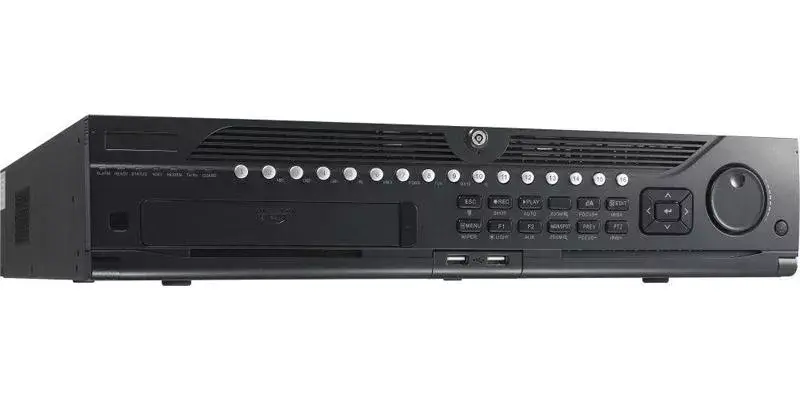
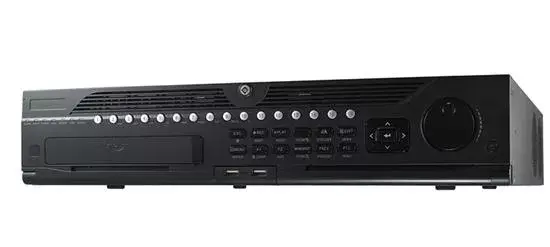
header-product Hikvision DS-9632NI-I8 network video recorder 2U Black

Hikvision DS-9632NI-I8 network video recorder 2U Black

Hikvision DS-9632NI-I8 network video recorder DS-9632NI-I8 Photo 1
Hikvision DS-9632NI-I8 network video recorder DS-9632NI-I8 Photo 2
Hikvision DS-9632NI-I8 network video recorder DS-9632NI-I8 Photo 1
Hikvision DS-9632NI-I8 network video recorder DS-9632NI-I8 Photo 2
Out of stock.
View similar!

Short description

Hikvision DS-9632NI-I8. Video input channels: 32 channels, Maximum resolution: 3840 x 2160 pixels, Resolution at capture speed: 1280x720@60fps, 1920x1080@60fps, 3840x2160@30fps. Maximum storage capacity: 48 TB, HDD interface: Serial ATA, RAID levels: 0, 1, 5, 6, 10. Ethernet LAN data rates: 10,100,1000 Mbit/s. Rack capacity: 2U, Product colour: Black. Power consumption (max): 30 W, AC input voltage: 100 - 240 V, AC input frequency: 50 - 60 Hz
Warranty: 2 Years
SKU: 196411
delivery
Information regarding the items availability for purchase will be posted on this site
price
Item cost information will be published on this site
Together cheaper
{{product.price | formatAmount}}
{{product.title}}
{{productBundle.reference.specialPrice | formatAmount}}
{{productBundle.title}}
{{productBundlePreviousPrice | formatAmount}}
{{productBundleSpecialPrice | formatAmount}}

You saving {{productBundleYouSave | formatAmount}}

Product information

Description

Hikvision DS-9632NI-I8 network video recorder is a 2U rack-mount NVR designed for multi-channel IP surveillance. It supports up to 32 video input channels with maximum output resolution up to 3840 × 2160 and full-channel recording at high resolutions. The recorder offers flexible storage and RAID options, dual-OS design for improved system reliability, and multiple video outputs for local monitoring.

Advantages

The device uses a dual-OS architecture and ANR technology to maintain recording continuity when network conditions change. It supports HDD hot-swap and configurable RAID modes (RAID 0, 1, 5, 6, 10) as well as normal or hot-spare working modes to create an N+1 hot spare setup. H.264+ compression reduces storage needs while allowing full-channel recording at up to 12MP, and dual HDMI/VGA outputs (with one HDMI output up to 4K) provide flexible display options.

Suitable for

  • Medium to large IP surveillance systems requiring up to 32 camera inputs
  • Environments needing high-resolution recording and local 4K monitoring
  • Installations where RAID redundancy and hot-swap HDDs are required for reliability

Key specifications

  • Maximum camera inputs: 32 channels
  • Maximum output resolution: 3840 × 2160 (4K)
  • Supported capture frame rates: up to 1280×720@60fps, 1920×1080@60fps, 3840×2160@30fps
  • Compression: H.264+
  • Recording: full-channel recording at up to 12 MP
  • Storage interfaces: up to 8 SATA interfaces and 1 eSATA interface; maximum supported capacity up to 48 TB
  • RAID levels supported: 0, 1, 5, 6, 10; configurable normal or hot spare (N+1)
  • Video outputs: HDMI1 (up to 4K)/VGA1 and HDMI2/VGA2
  • Network: 2 × RJ-45 Ethernet ports, 10/100/1000 Mbit/s
  • USB: 1 × USB 3.2 Gen 1 Type-A, 2 × USB 2.0
  • Rack size: 2U
  • Power input: 100–240 V AC, 50–60 Hz; max power consumption ~30 W
  • Weight: 10 kg

How to use

Install the Hikvision DS-9632NI-I8 in a standard 19-inch rack (2U) and connect network cameras to the NVR via Ethernet switches. Install HDDs into the SATA bays according to required RAID configuration and power on the unit. Configure network settings, camera channels, recording schedules and storage management from the NVR’s web interface or management software. Use the HDMI/VGA outputs for local monitoring and the smart search functions for efficient playback across multiple channels.

Usage recommendations

For reliable long-term operation, use enterprise-grade surveillance HDDs, configure RAID level according to required redundancy, enable ANR for camera-side buffering, and perform regular backups using the eSATA or network backup options. Ensure adequate cooling and stable AC power to maintain system stability.

Specifications

USB 3.2 Gen 1 (3.1 Gen 1) Type-A ports quantity:
1
USB 2.0 ports quantity:
2
Ethernet LAN (RJ-45) ports:
2
Weight:
10 kg
HDD interface:
Serial ATA
Product colour:
Black
All features

Hard drive

HDD interface:
Serial ATA
RAID levels:
10, 6, 5, 1
Number of HDDs supported:
8
RAID support:
Yes

Storage

Maximum storage capacity:
48 TB

Ports & interfaces

USB 2.0 ports quantity:
2
Power over Ethernet (PoE):
Yes
eSATA:
Yes
RS-232 interface:
Yes
RS-485 ports:
1
VGA (D-Sub) output ports:
1
HDMI output:
Yes
Video input channels:
32 channels
Alarm input channels:
16
Alarm output channels:
4
USB 3.2 Gen 1 (3.1 Gen 1) Type-A ports quantity:
1

Network

Ethernet LAN (RJ-45) ports:
2
Wi-Fi:
No
Ethernet LAN data rates:
1000, 100, 10

Performance

Still image resolution(s):
3840 x 2160, 2560 x 1440, 1920 x 1080, 1600 x 1200, 1280 x 1024, 1280 x 720, 1024 x 768
Maximum resolution:
3840 x 2160
Product colour:
Black
Resolution at capture speed:
3840x2160@30fps, 1920x1080@60fps, 1280x720@60fps
Rack capacity:
2U
Video formats supported:
MPEG4, H.265, H.264
Maximum frame rate:
60 fps
Display modes:
Live view
Input bandwidth:
320 Mbit/s
Output bandwidth:
256 Mbit/s

Power

AC input frequency:
50 - 60
AC input voltage:
100 - 240
Power consumption (max):
30 W

Weight & dimensions

Weight:
10 kg
Rack mounting:
Yes
Height:
90 mm
Width:
470 mm
Depth:
445 mm

Operational conditions

Operating relative humidity (H-H):
10 - 90
Operating temperature (T-T):
-10 - 55

Packaging content

Quick installation guide:
Yes

Description

Machine translation. Load original

Reasons to buy

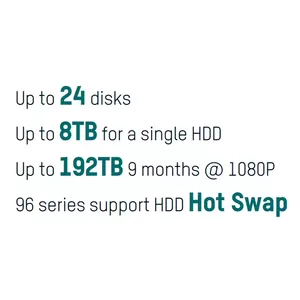
Hard Drive Storage
The Hard Drive Health Detection function here enables users to clearly see how many storage units are operating normally.
Hard Drive Storage
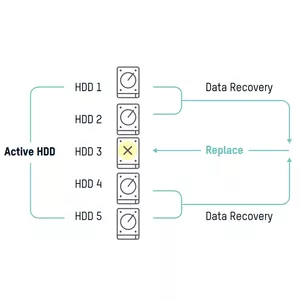
RAID
The RAID function ensures that data stored on functioning hard drives can still be played back. Hikvision NVRs
support RAID 0, 1, 5, 6, 10.
RAID
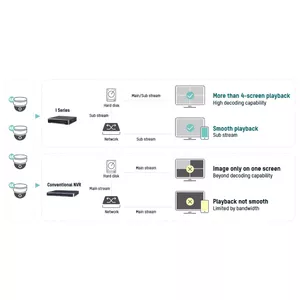
Dual Stream Recording
Dual-stream recording ensures high-quality streaming for local playback and lower-quality streaming for remote playback to allow for different network conditions.
Dual Stream Recording
Channel Zero
With the channel-zero function, users can view up to 16 cameras connected to an NVR but only use one channel’s worth of bandwidth. This function helps to ensure fluid video for remote users.
Channel Zero
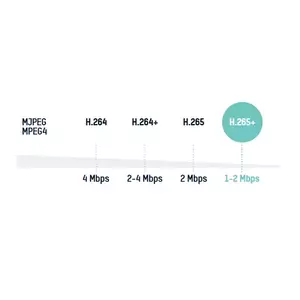
Multiple Stream Types
Hikvision NVRs automatically adapt to multiple code streams types, making them compatible with several kinds of cameras. Taking 1080p cameras for example, as below.
Multiple Stream Types
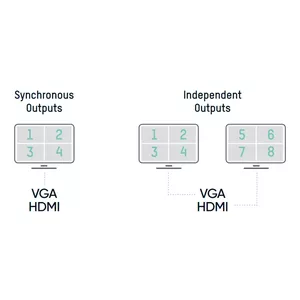
Multi-Video Output
Synchronous Outputs: The same channel displays at multiple locations simultaneously Independent Outputs: Multiple outputs can display various channels independently, enabling users to view multiple channels at the same time and save their time.
Multi-Video Output
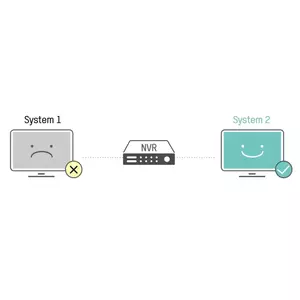
Dual Systems
Our NVRs have two copies of the OS system in the flash memory, so if one of them fails, the redundant firmware will operate in its place.
Dual Systems
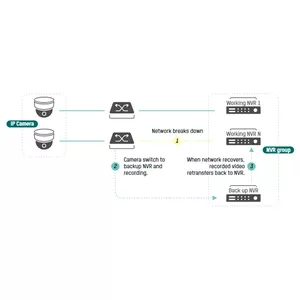
N+1 Hot Spare
When NVR X breaks down, the standby NVR will take over for it to keep the system operating continuously. When the network recovers, recorded video transfers back to NVR X (the standby NVR can only take over one offline device at a time) .*n≤16
N+1 Hot Spare
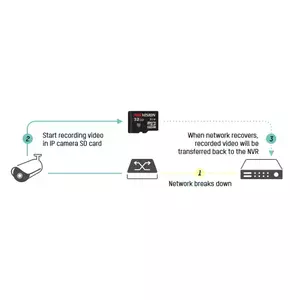
Automatic Network Replenishment
If the network goes down, video recording will move to the on-board SD card in the IP camera. Upon network recovery, recorded video will return back to the NVR.
Automatic Network  Replenishment
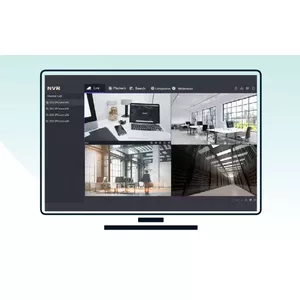
New GUI
The newly released GUI features a more concise design.
There are 5 modules for quick access
There are 2 modes for more efficient operation.
The easy mode shows frequently used configurations
The expert mode displays all configurations provided to professional users.
New GUI
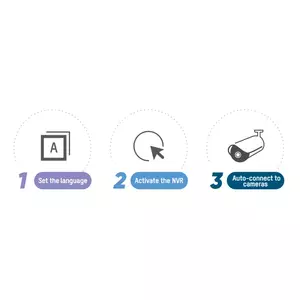
Auto Connection
Three steps get users up and running with live view with no need to configure your IP.
*Available for non-PoE models
Auto Connection
Easy Playback
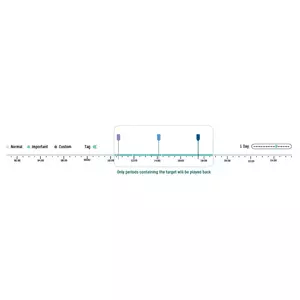
Hikvision NVRs support several smart playback modes:
- Smart Mode: Skip static images and play back periods containing the target event.
- Sub-Period Mode: Cut an extended time period into several short periods. Play back any short time period in
several different channels at the same time.
Easy Playback
No Web Plugin Required
- No web plugin required for live viewing or configuration
- Up to 8 MP IP camera access for 2 MP live view or playback
No Web Plugin Required
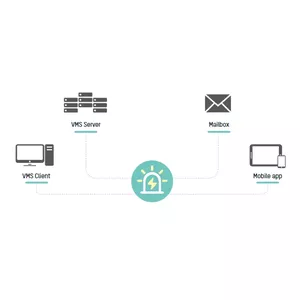
Multi-Device Access
Users can manage an NVR through various channels and the alarm information will be pushed to each one.
Multi-Device Access
Multilevel Permissions
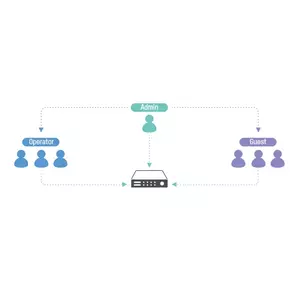
Each user can be assigned any access level. Management of multiple users can be employed to ensure device and information security. The default user “Admin” is the administrator. This user has the highest privilege set and can decide the other two levels
of user authorization.
Multilevel Permissions
Double Verification Permission for Non-Admin Users
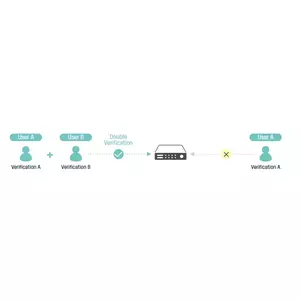
After double verification is enabled in the channel, a non-admin user must be verified by an authorized user to be granted permission. Only admin has the authorization to set double verification.
Double Verification Permission  for Non-Admin Users
Human and Vehicle Classification
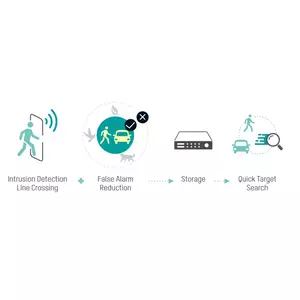
Based on a deep learning algorithm, the DeepinMind Series & AcuSense Series support video analysis for human and vehicle recognition to reduce false alarms.
- Intrusion detection and line crossing for perimeter protection
- Efficient alarms of humans and vehicles
- Quick target search
Human and Vehicle Classification
Facial Recognition
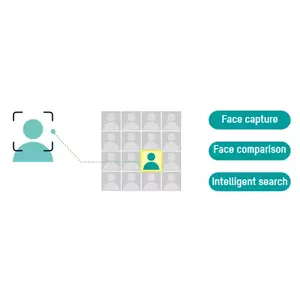
Based on a deep learning algorithm, the DeepinMind NVR/NVS supports powerful face capture, modeling and comparison.

Facial Recognition

Similar products

{{product.title}} Show details Hide details

{{highlightedFeature.featureTitle}}:

{{getProductFeatureValueById(product, highlightedFeature.featureId)}}

{{product.price | formatAmount}}
Might be useful
{{product.manufacturerName}}
{{product.categoryName}}
{{product.title}}
{{product.specialPrice}}
{{product.price}}

Customer reviews

Customer questions

FAQ

What payment options are available?

AiO.lv offers several payment methods: Bank transfer, Leasing for legal entities. All transactions are 100% secure and encrypted.

Can this product be purchased for a company (with VAT)?

Yes. AiO.lv works with legal entities in Latvia and across Europe. The product price already includes VAT. For certain product categories, as well as for companies from other EU countries with a valid VAT number, a 0% VAT rate may apply. We issue the invoice immediately after the order is placed, support electronic BIS invoices, and automatically generate all necessary accounting documents. You can complete the purchase for a company online — simply select the company profile and choose bank transfer as the payment method during checkout.

What is the warranty period?

All Hikvision products come with an official 2 Years warranty. It covers all manufacturing defects and malfunctions that may occur during use. The warranty is valid at all authorized Hikvision service centers and through AiO.lv

Can the product be returned after purchase?

Yes, you can return the product within 14 days of purchase if you bought it as a consumer (not a legal entity). Returns are possible without giving any reason — the main condition is that the product retains its original appearance and full set of accessories. We will make the process as simple and convenient as possible: just contact our customer support team, and we will help you arrange the return.

Where should I contact for warranty service?

For warranty-related questions you can contact the AiO.lv (SIA VSPRO) customer support team. We will assist with consultation, warranty claim processing, and coordination with certified service centers.

How can I tell if this product suits my needs?

When making a choice, we recommend paying attention to the key features: usb 3.2 gen 1 (3.1 gen 1) type-a ports quantity, usb 2.0 ports quantity, ethernet lan (rj-45) ports, weight, hdd interface, product colour, compatibility with your devices or usage conditions, material quality, functionality, and warranty terms. These characteristics will help you determine how well the model meets your needs.

Where can I download the instructions for Hikvision DS-9632NI-I8 network video recorder DS-9632NI-I8?

You can download the instructions in PDF format from the “Instructions” section on the product description page. The file contains complete information about installation, setup, and usage.
warranty
14-Day Return Policy We are confident in our quality, but if the purchase doesn’t fit — you have 14 days to return the product with peace of mind.
shipping
Fast Delivery Get your orders as quickly as possible — right to your door, parcel lockers, or pickup points across Latvia and the EU.
payment
Secure Payment Pay the way you prefer: cash, VISA, MasterCard, Apple Pay, Google Pay, bank transfer, or 0% installment plan.
warranty
Quality Since 2008 AiO.lv has been on the market for over 18 years and has earned trust — with more than 6000 genuine positive reviews on Google.