Hurry and order now – up to 50% off!
In cart {{totalProductsCount}} item(s)
Your cart is empty
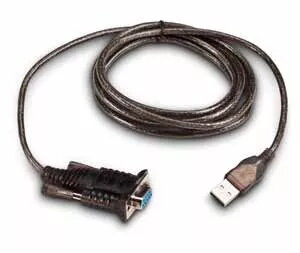
USB to Serial Adapter Honeywell Intermec 203-182-100
The USB to RS-232 adapter connects to a printer USB host (Type A) port and provides a female DB-9 RS-232 serial interface. The cable is 1.8 m long and the adapter supports serial flow control using XON/XOFF and RTS/CTS. Model: Honeywell Intermec 203-182-100, black cable with USB Type-A to DB-9 connectors for connecting serial devices to USB ports.
This adapter offers straightforward USB-to-serial conversion without requiring separate power, with a standard DB-9 female connector for compatibility with RS-232 devices. The 1.8 m cable length provides flexibility in device placement, and support for XON/XOFF and RTS/CTS flow control ensures reliable serial communication.
Plug the USB Type-A connector into the host USB port (for example, a printer USB host port) and connect the DB-9 female connector to the RS-232 male port of the target device. Install any required drivers on the host system if prompted by the operating system. Verify serial settings (baud rate, parity, data bits, stop bits) and enable the appropriate flow control (XON/XOFF or RTS/CTS) to match the connected device.
Use the adapter with devices that support RS-232 communication and match serial parameter settings on both ends. Avoid sharp bends near connector ends and keep cable length close to required distance to reduce signal issues. If communication problems occur, check driver installation and confirm flow control settings.
{{highlightedFeature.featureTitle}}:
{{getProductFeatureValueById(product, highlightedFeature.featureId)}}
{{ productComparisonGenerationError }}