
Dreame vacuums for fast and efficient cleaning!
In cart {{totalProductsCount}} item(s)
Your cart is empty
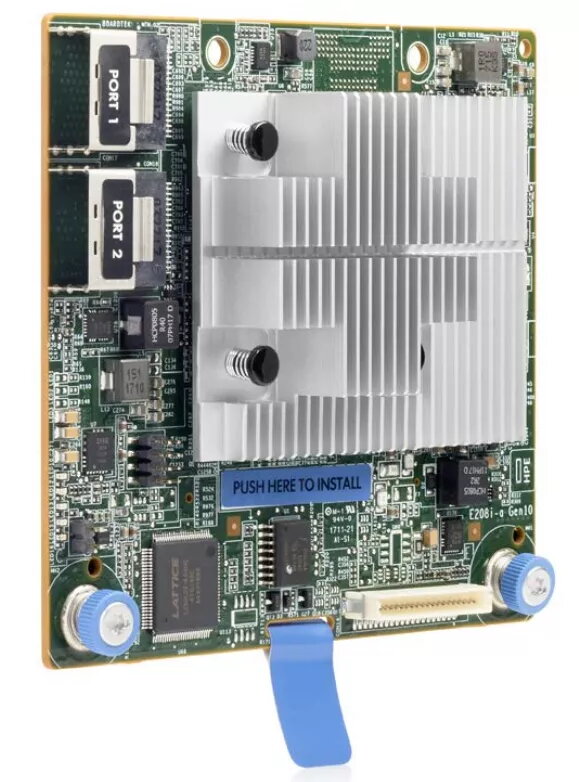
RAID controller HP SmartArray E208i-a SR Gen10 — SAS, RAID 0/1/5/10, 12 Gbit/s
HP SmartArray E208i-a SR Gen10 is an onboard RAID controller designed for HPE ProLiant Gen10 servers, providing hardware RAID levels 0, 1, 5 and 10 for internally attached SAS and SATA drives. The controller delivers up to 12 Gbit/s per SAS link and supports centralized array management and fault-tolerant storage suitable for RAID-protected boot volumes, database servers and file servers. This type-a modular controller fits a dedicated internal storage slot without occupying a PCIe expansion slot and supports mixed mode operation of RAID and HBA simultaneously.
The controller provides enterprise-class reliability and a cost-effective path to software-defined storage by enabling standard RAID levels and 12 Gbit/s SAS connectivity for internal drives. It supports centralized management through HPE Smart Storage Administrator and UEFI storage configuration tools, which simplify creation and scripting of arrays. Additional capabilities include support for data-at-rest encryption (with applicable license) and monitoring features that help preserve data integrity on attached drives.
Install the SmartArray E208i-a SR Gen10 into the server's dedicated storage slot according to the server installation instructions. Connect internal SAS or SATA drives to the controller’s internal lanes. Use the UEFI storage configuration tool during system boot for initial volume creation and quick configuration or use HPE Smart Storage Administrator (SSA) from the OS or remote management environment to create and manage RAID volumes and controller features. Apply any required encryption license and configure monitoring features as needed to enable drive health alerts.
For resilience, configure arrays according to workload needs: use RAID 1 for mirrored boot volumes, RAID 5 for capacity-efficient fault-tolerant storage, and RAID 10 for high I/O and redundancy. Keep controller firmware and management tools up to date and verify compatibility with server firmware and drive models. If using encryption, retain and protect keys according to your organization’s security policy.
{{highlightedFeature.featureTitle}}:
{{getProductFeatureValueById(product, highlightedFeature.featureId)}}
{{ productComparisonGenerationError }}
