
Save time and money with our discounts!
In cart {{totalProductsCount}} item(s)
Your cart is empty
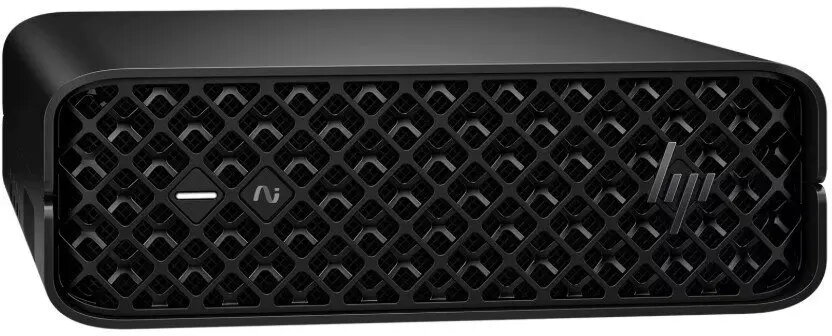
Desktop workstation HP Z2 Mini G1i U7-265 with 32GB RAM, 1TB SSD, NVIDIA RTX A1000, Windows 11 Pro
The HP Z2 Mini G1i U7-265 is a compact desktop workstation configured with 32GB of RAM, a 1TB solid-state drive and an NVIDIA RTX A1000 professional GPU. Preinstalled with Windows 11 Pro, this small-footprint workstation is engineered to deliver sustained compute and graphics performance for professional workflows while fitting into space-constrained offices and studios. Its combination of fast NVMe storage, substantial memory and workstation-class GPU enables responsive multitasking, large model handling and accelerated visualization.
This HP Z2 Mini workstation offers workstation-grade GPU acceleration in a compact chassis, reducing the physical footprint without sacrificing performance. The 32GB memory configuration supports demanding applications and multitasking, while the 1TB SSD provides fast system responsiveness and quick project load times. The NVIDIA RTX A1000 GPU delivers certified drivers and optimized performance for CAD, 3D rendering and visualization applications. Windows 11 Pro ensures business features and security for professional deployments.
Set the workstation on a stable surface or mount it according to available mounting options, connect power and peripherals, then complete the Windows 11 Pro initial setup. Install or activate any required professional applications and drivers; for optimal performance with GPU-accelerated applications, install the latest certified NVIDIA drivers from official sources. Use the workstation for interactive CAD sessions, render jobs, or as a workstation for editing and visualization tasks, leveraging the SSD for project storage and the 32GB RAM for smooth multitasking.
For sustained rendering or simulation workloads, ensure adequate ventilation around the mini chassis and consider using external storage for long-term archival of large project files. Keep system and GPU drivers up to date and configure power settings in Windows 11 Pro for performance mode when running intensive tasks.
{{highlightedFeature.featureTitle}}:
{{getProductFeatureValueById(product, highlightedFeature.featureId)}}
{{ productComparisonGenerationError }}
