

A curated selection of maximum value offers!
In cart {{totalProductsCount}} item(s)
Your cart is empty
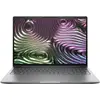
Laptop HP ZBook X G1i 16" Intel Core Ultra 7 255H 32GB 1TB SSD NVIDIA RTX PRO 1000 8GB W11P
The HP ZBook X G1i 16" Intel Core Ultra 7 255H 32GB 1TB SSD NVIDIA RTX PRO 1000 8GB W11P is a professional mobile workstation built for demanding workflows. It combines a 16-inch display with an Intel Core Ultra 7 processor, 32 GB of system memory and a 1 TB solid-state drive to provide responsive multitasking and fast file access. The dedicated NVIDIA RTX PRO 1000 graphics with 8 GB of video memory supports visualization, rendering and GPU-accelerated applications. Windows 11 Pro is preinstalled to provide business-oriented features and security controls suitable for corporate environments.
This laptop delivers a balance of CPU performance and dedicated GPU capability for graphics-intensive tasks while maintaining the portability expected from a 16-inch mobile workstation. High-capacity RAM and a large NVMe SSD reduce loading times and enable fluid operation with multiple professional applications open simultaneously. The workstation-grade NVIDIA RTX PRO 1000 provides certified drivers and optimized performance for many design and engineering software packages. Windows 11 Pro offers enterprise management features and security options for professional use.
Power on the HP ZBook X G1i and complete the initial Windows 11 Pro setup, including user account and security preferences. Install required professional applications and, if needed, vendor-certified drivers for the NVIDIA RTX PRO 1000 to ensure compatibility with CAD, rendering or content-creation software. Store large project files on the internal 1 TB SSD for fast access, and use the 32 GB of RAM to run multiple applications concurrently without significant slowdowns. Connect external monitors, storage, or input devices through available ports as required for extended workstation setups.
For optimal performance in graphics and simulation workloads, keep device drivers and Windows updates current, monitor storage capacity to maintain free SSD space for virtual memory and temporary files, and use active cooling or a well-ventilated workspace during prolonged heavy use.
{{highlightedFeature.featureTitle}}:
{{getProductFeatureValueById(product, highlightedFeature.featureId)}}
{{ productComparisonGenerationError }}
