
Filters you can trust. Pure water every day.
In cart {{totalProductsCount}} item(s)
Your cart is empty
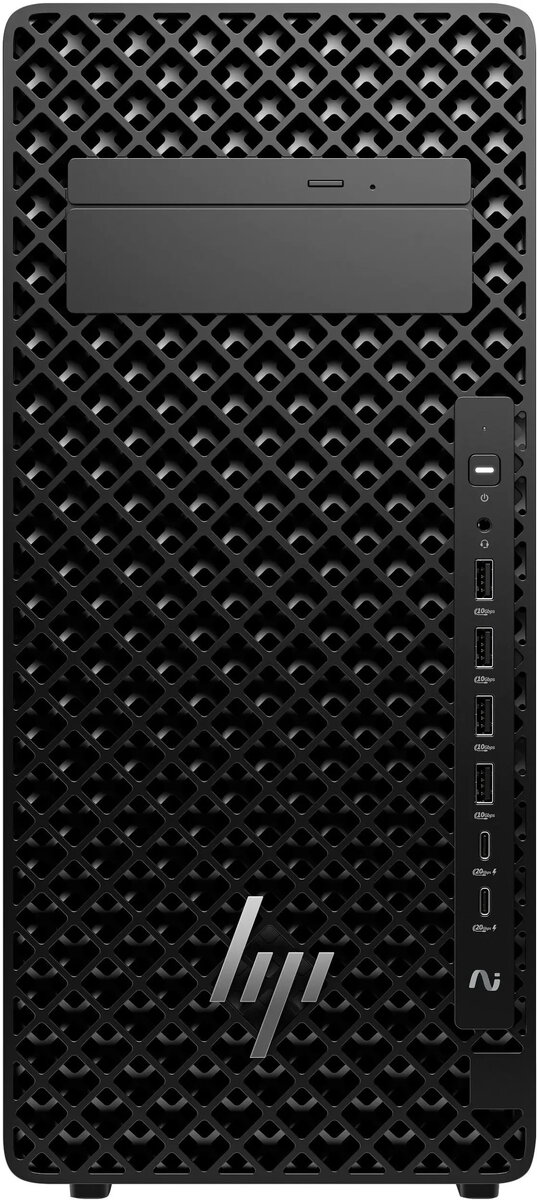
HP Z2 Tower G1i Workstation, Intel Core Ultra 9 285K, 64GB RAM, 1TB SSD, Windows 11 Pro
The HP Z2 Tower G1i Workstation is a high-performance desktop computer engineered to meet the rigorous demands of professional environments. Powered by the Intel Core Ultra 9 285K processor and supported by 64GB of RAM, this workstation delivers exceptional processing speed and multitasking capabilities. With a 1TB SSD, it provides fast data access and ample storage for complex projects, all housed within a reliable tower chassis running Windows 11 Pro.
This workstation excels in providing consistent power for resource-heavy software, ensuring that complex calculations and rendering tasks are completed efficiently. The combination of high-speed memory and a fast solid-state drive minimizes latency, allowing for a seamless workflow even when running multiple professional applications simultaneously. Its robust build quality and professional-grade components offer the stability required for long-term business operations and intensive creative work.
This workstation may not be the ideal choice for users seeking a portable computing solution or those requiring a compact form factor for limited desk space. Additionally, it is likely overpowered for basic office tasks such as word processing, web browsing, or light media consumption, where a standard consumer-grade desktop would be more cost-effective.
To begin using the HP Z2 Tower G1i, connect the necessary peripherals such as a monitor, keyboard, and mouse to the designated ports on the rear or front panels. Connect the power cable to a grounded electrical outlet and press the power button to initiate the system. Follow the on-screen prompts provided by the Windows 11 Pro setup wizard to configure your user account, network settings, and security preferences before installing your professional software suite.
For optimal performance and longevity, ensure the workstation is placed on a stable, flat surface with adequate clearance for airflow. Regularly update your drivers and operating system through the official support channels to maintain system security and compatibility with the latest professional software updates.
{{highlightedFeature.featureTitle}}:
{{getProductFeatureValueById(product, highlightedFeature.featureId)}}
{{ productComparisonGenerationError }}
