{{ totalProductsCount }}

In cart {{totalProductsCount}} item(s)

Total:
{{sum | formatAmount}}

Your cart is empty

header-product Wireless Access Point HP Enterprise Aruba AP-555 (RW) — dual-band 2.4/5 GHz, 5950 Mbps, 4 antennas, 2x RJ-45, PoE, white

Wireless Access Point HP Enterprise Aruba AP-555 (RW) — dual-band 2.4/5 GHz, 5950 Mbps, 4 antennas, 2x RJ-45, PoE, white

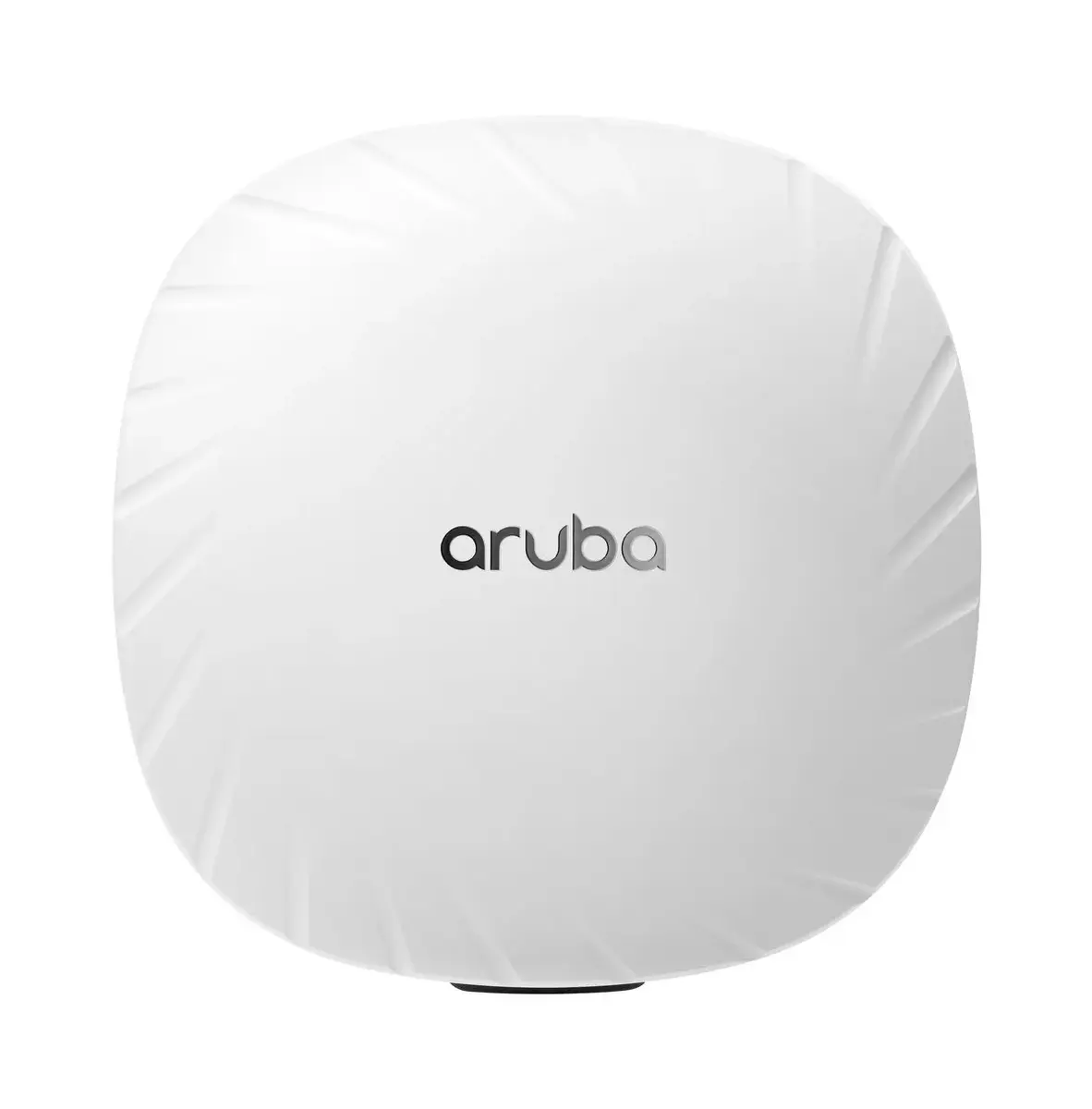
HP Enterprise Aruba AP-555 (RW) access point Photo 1
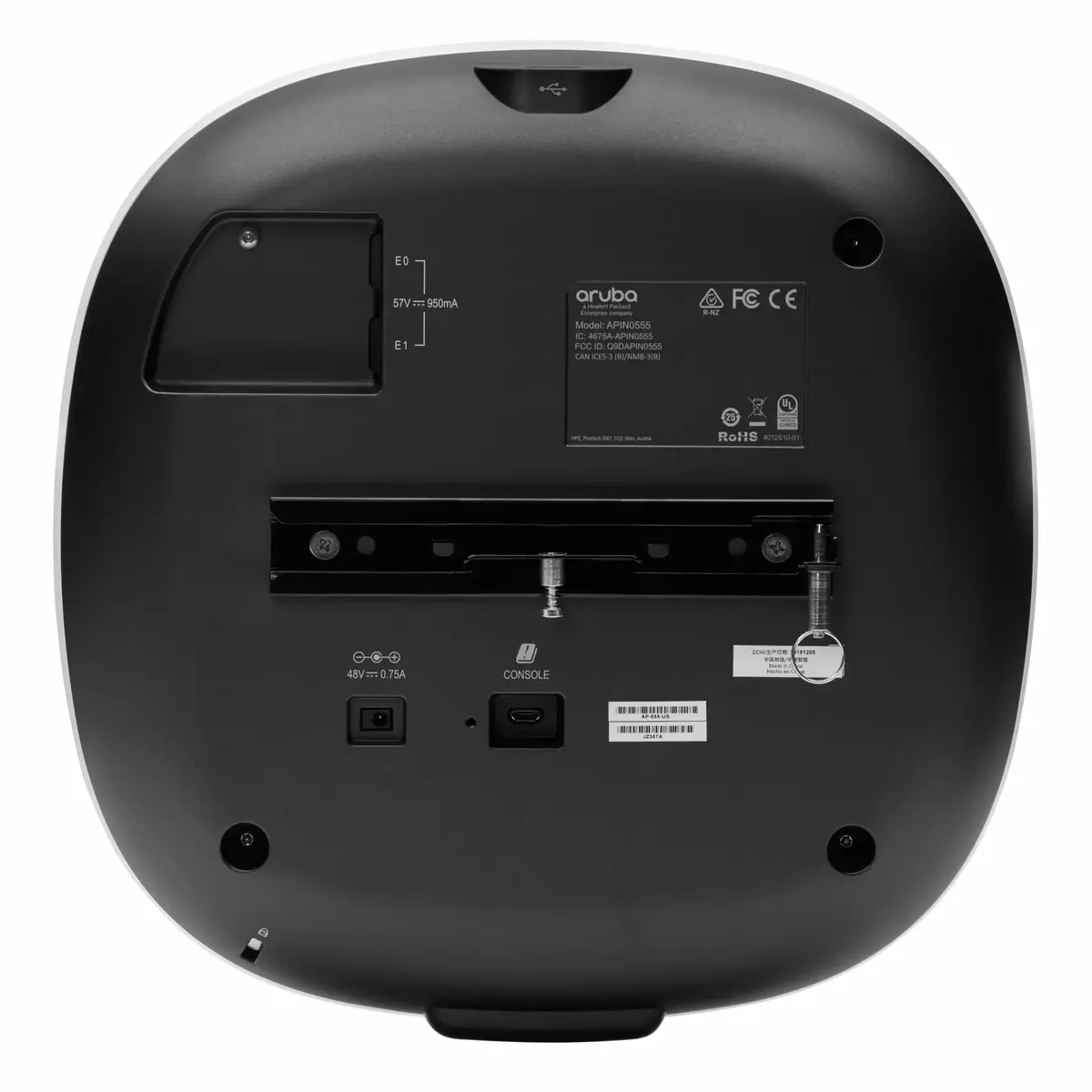
HP Enterprise Aruba AP-555 (RW) access point Photo 2
HP Enterprise Aruba AP-555 (RW) access point Photo 1
HP Enterprise Aruba AP-555 (RW) access point Photo 2
Out of stock.
View similar!

Short description

HP Enterprise Aruba AP-555 (RW) is a dual-band wireless access point supporting 2.4 GHz and 5 GHz with a maximum throughput of 5950 Mbps. It features four antennas, two Ethernet RJ-45 ports with multi-gig rates (100/1000/2500/5000 Mbps), PoE support and hardware security with WMM/WPA/WPA2. Designed for high-density enterprise and campus environments, it delivers higher capacity and flexible deployment options. Power consumption up to 38.2 W; colour white.
Warranty: 2 Years
SKU: 10736280
Manufacturer: HP Enterprise
delivery
Information regarding the items availability for purchase will be posted on this site
price
Item cost information will be published on this site
Together cheaper
{{product.price | formatAmount}}
{{product.title}}
{{productBundle.reference.specialPrice | formatAmount}}
{{productBundle.title}}
{{productBundlePreviousPrice | formatAmount}}
{{productBundleSpecialPrice | formatAmount}}

You saving {{productBundleYouSave | formatAmount}}

Product information

Description

The HP Enterprise Aruba AP-555 (RW) is a dual-band wireless access point supporting 2.4 GHz and 5 GHz with Wi‑Fi 6 (IEEE 802.11ax) and a maximum aggregated throughput of 5950 Mbps. Designed for high-density enterprise and campus deployments, it includes four antennas, two multi‑gigabit RJ‑45 ports, PoE support, hardware security (WMM/WPA/WPA2) and features that integrate wired and wireless policy management.

Advantages

The AP-555 offers enhanced capacity and performance for environments with many simultaneous clients by using dual radios (8x8 + 4x4 MIMO) and optional tri‑radio mode to increase overall network throughput versus 802.11ac APs. Aruba features such as ClientMatch optimise client distribution across APs, AI‑driven RF optimisation improves Wi‑Fi performance, and Green AP mode reduces energy consumption. The device supports WPA3 security and Dynamic Segmentation for unified wired and wireless policy enforcement.

Suitable for

  • High‑density offices and enterprise campuses
  • Educational institutions and lecture halls
  • Retail environments and public venues
  • Deployments requiring integrated IoT and location services (Bluetooth, Zigbee)

Key specifications

  • Wireless standards: IEEE 802.11ax (Wi‑Fi 6), 802.11ac, 802.11n, 802.11a/b/g
  • Maximum data rate: 5950 Mbps
  • Frequency bands: 2.4 GHz and 5 GHz (dual‑band)
  • Antennas: 4
  • Ethernet ports: 2 × RJ‑45 multi‑gig (100/1000/2500/5000 Mbps)
  • Power: PoE support; maximum power consumption up to 38.2 W
  • Security: WMM, WPA, WPA2, WPA3 certified capabilities
  • Colour: White
  • MPN: JZ356AR

How to use

Mount the AP-555 in the desired location and connect it to your network switch using a compatible Ethernet cable. If available, use PoE from a supported switch to power the device; otherwise provide appropriate power according to your infrastructure. Configure the AP through Aruba management (on‑prem or cloud) to define SSIDs, security policies (WPA3/WPA2), VLANs and Dynamic Segmentation. Enable ClientMatch and RF optimisation features to improve client distribution and wireless performance in high‑density areas.

Usage recommendations

For best results in high‑density deployments, place APs to provide overlapping coverage while minimising co‑channel interference, enable AI RF optimisation and ClientMatch, and ensure your switch provides sufficient PoE budget or use IEEE 802.3at/802.3bt capable ports for reliable operation.

Specifications

Ethernet LAN (RJ-45) ports:
2
Antennas quantity:
4
Weight:
1.57 kg
Maximum data transfer rate:
5950 Mbit/s
Networking standards:
IEEE 802.3at, IEEE 802.3az, IEEE 802.3bt, IEEE 802.3bz, IEEE 802.3af, IEEE 802.11a, IEEE 802.11ac, IEEE 802.11ax, IEEE 802.11b, IEEE 802.11g, IEEE 802.11n
Product colour:
White
All features

Antenna

Antenna type:
Internal
Antenna gain level (max):
5.5 dBi
Antennas quantity:
4
Antenna features:
Integrated antenna
Antenna direction type:
Omni-directional

Operational conditions

Operating relative humidity (H-H):
5 - 93
Storage temperature (T-T):
-40 - 70
Operating temperature (T-T):
0 - 50
Storage relative humidity (H-H):
5 - 93

Logistics data

Harmonized System (HS) code:
85176990

Features

Maximum data transfer rate:
5950 Mbit/s
Modulation:
16PSK, 64-QAM, 256-QAM, 1024-QAM, BPSK, CCK, QPSK
Spread spectrum method:
DSSS, OFDM
Networking standards:
IEEE 802.3at, IEEE 802.3az, IEEE 802.3bt, IEEE 802.3bz, IEEE 802.3af, IEEE 802.11a, IEEE 802.11ac, IEEE 802.11ax, IEEE 802.11b, IEEE 802.11g, IEEE 802.11n
Ethernet LAN data rates:
100, 1000, 2500, 5000
Auto MDI/MDI-X:
Yes
2.4 GHz:
Yes
5 GHz:
Yes
MIMO:
Yes
Maximum data transfer rate (2.4 GHz):
1150 Mbit/s
Maximum data transfer rate (5 GHz):
4800 Mbit/s

Ports & interfaces

USB connector type:
USB Type-A
USB 2.0 ports quantity:
1
Ethernet LAN (RJ-45) ports:
2

Power

Power over Ethernet (PoE):
Yes
Power consumption (max):
38.2 W

Weight & dimensions

Weight:
1.57 kg
Height:
58 mm
Width:
260 mm
Depth:
260 mm

Design

Cable lock slot:
Yes
Product colour:
White
Placement:
Ceiling
Cable lock slot type:
Kensington

Security

Security algorithms:
WPA, WMM, WPA2

Similar products

{{product.title}} Show details Hide details

{{highlightedFeature.featureTitle}}:

{{getProductFeatureValueById(product, highlightedFeature.featureId)}}

{{product.price | formatAmount}}
Might be useful
{{product.manufacturerName}}
{{product.categoryName}}
{{product.title}}
{{product.specialPrice}}
{{product.price}}

Customer reviews

Customer questions

FAQ

What payment options are available?

AiO.lv offers several payment methods: Bank transfer. All transactions are 100% secure and encrypted.

Can this product be purchased for a company (with VAT)?

Yes. AiO.lv works with legal entities in Latvia and across Europe. The product price already includes VAT. For certain product categories, as well as for companies from other EU countries with a valid VAT number, a 0% VAT rate may apply. We issue the invoice immediately after the order is placed, support electronic BIS invoices, and automatically generate all necessary accounting documents. You can complete the purchase for a company online — simply select the company profile and choose bank transfer as the payment method during checkout.

What is the warranty period?

All HP Enterprise products come with an official 2 Years warranty. It covers all manufacturing defects and malfunctions that may occur during use. The warranty is valid at all authorized HP Enterprise service centers and through AiO.lv

Can the product be returned after purchase?

Yes, you can return the product within 14 days of purchase if you bought it as a consumer (not a legal entity). Returns are possible without giving any reason — the main condition is that the product retains its original appearance and full set of accessories. We will make the process as simple and convenient as possible: just contact our customer support team, and we will help you arrange the return.

Where should I contact for warranty service?

For warranty-related questions you can contact the AiO.lv (SIA VSPRO) customer support team. We will assist with consultation, warranty claim processing, and coordination with certified service centers.

How can I tell if this product suits my needs?

When making a choice, we recommend paying attention to the key features: ethernet lan (rj-45) ports, antennas quantity, weight, maximum data transfer rate, networking standards, product colour, compatibility with your devices or usage conditions, material quality, functionality, and warranty terms. These characteristics will help you determine how well the model meets your needs.

Where can I download the instructions for HP Enterprise Aruba AP-555 (RW) access point?

You can download the instructions in PDF format from the “Instructions” section on the product description page. The file contains complete information about installation, setup, and usage.

warranty
14-Day Return Policy We are confident in our quality, but if the purchase doesn’t fit — you have 14 days to return the product with peace of mind.
shipping
Fast Delivery Get your orders as quickly as possible — right to your door, parcel lockers, or pickup points across Latvia and the EU.
payment
Secure Payment Pay the way you prefer: cash, VISA, MasterCard, Apple Pay, Google Pay, bank transfer, or 0% installment plan.
warranty
Quality Since 2008 AiO.lv has been on the market for over 18 years and has earned trust — with more than 6000 genuine positive reviews on Google.