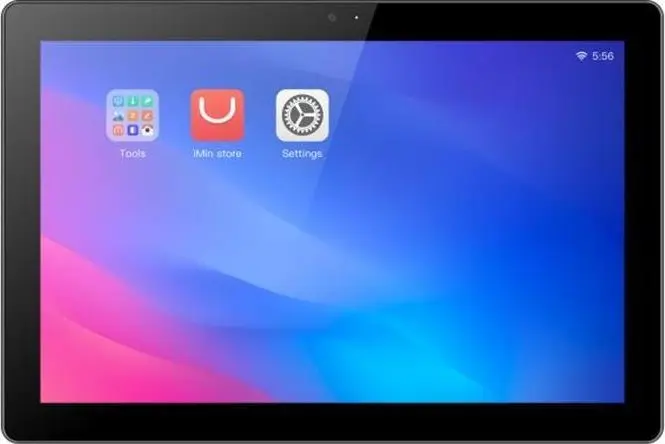
The Desktop POS IMIN I22D01S terminal is compared with several alternative devices for retail and service environments, including IMIN and SUNMI POS terminals, a specialized stand, and a customer display. All these solutions are designed for transaction automation and customer interaction at checkout zones; however, they differ significantly in their form factor, functionality, and component setup, separating into full-fledged payment terminals, auxiliary accessories, and peripheral screens.
⚙️ Characteristics such as device type, screen size, construction features, and connectivity options have been selected for comparison to clearly demonstrate the practical differences between the terminals, the stand, and the additional display.
| Parameter | Desktop POS IMIN I22D01S | POS terminal IMIN Model 1/1 07 1S 015 | IMIN Mobile POS Stand 1 07 1S 019 | POS terminal IMIN SWAN 2/DS2-13 | POS terminal SUNMI D2 Mini | Customer Display IMIN SWAN1 | Practical significance |
|---|
| Device type | Desktop POS terminal | Compact POS terminal | Adjustable terminal stand | High-performance desktop POS terminal | Compact POS terminal with 4G and NFC | Customer display with NFC | Determines the role of the device: independent checkout hub, auxiliary screen, stand, or mobile sales solution. |
| Display and interface | 10.1-inch touch display | Standard POS interface | None (accessory) | 13-inch display, 4GB RAM, 64GB storage | 10.1-inch screen with NFC and 4G | Customer screen with NFC | The larger screen and memory capacity of SWAN 2 are more convenient for complex applications, whereas I22D01S is optimal for basic checkouts. |
| Purpose | Front-counter checkout service | Payment and sales processing | Cashier workspace organization | Sales management and local data storage | Mobile and remote sales without fixed LAN | Customer information and contactless payments | Allows matching equipment to specific retail tasks, whether it is a primary transaction hub or an auxiliary station. |
◎ The table below evaluates the suitability of different devices for specific usage scenarios and business needs to help select the right equipment for a retail location.
| Use case | Recommended product | Why |
|---|
| Setting up a basic counter checkout station | Desktop POS IMIN I22D01S | Ideal thanks to its compact 10.1-inch screen and reliable construction for standard retail transactions. |
| Installing an adjustable ergonomic stand | IMIN Mobile POS Stand 1 07 1S 019 | Specifically designed for securing and conveniently positioning terminals and touchscreens on a crowded counter. |
| Working with a larger screen and higher storage capacity | POS terminal IMIN SWAN 2/DS2-13 | Offers an expanded 13-inch display and increased hardware resources for demanding applications. |
| Sales with mobile internet and contactless payments | POS terminal SUNMI D2 Mini | Equipped with a 4G module and NFC support, enabling transactions outside of a fixed local network area. |
| Customer-facing information and fast contactless checkout | Customer Display IMIN SWAN1 I22D01NFC | A specialized second screen improves transaction transparency and speeds up customer interaction. |
The main difference between the Desktop POS IMIN I22D01S and the presented alternatives is its balance between full desktop terminal functionality and the compactness of a 10.1-inch screen for standard points of sale. This unit is most convenient for retail stores and service providers that require a reliable checkout hub without redundant features. You should choose it if you need a classic desktop terminal for a stationary counter, whereas specialized modifications from the lineup are better suited for advanced tasks, mobile connectivity, or customer-facing information.