Save time and money with our discounts!
In cart {{totalProductsCount}} item(s)
Your cart is empty
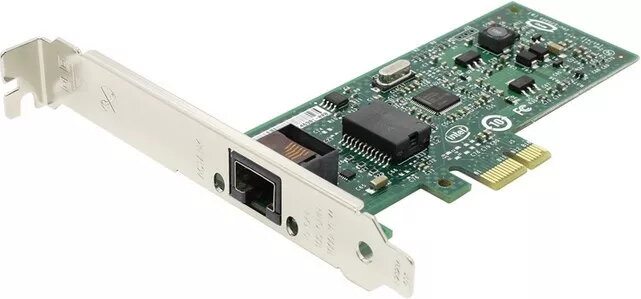
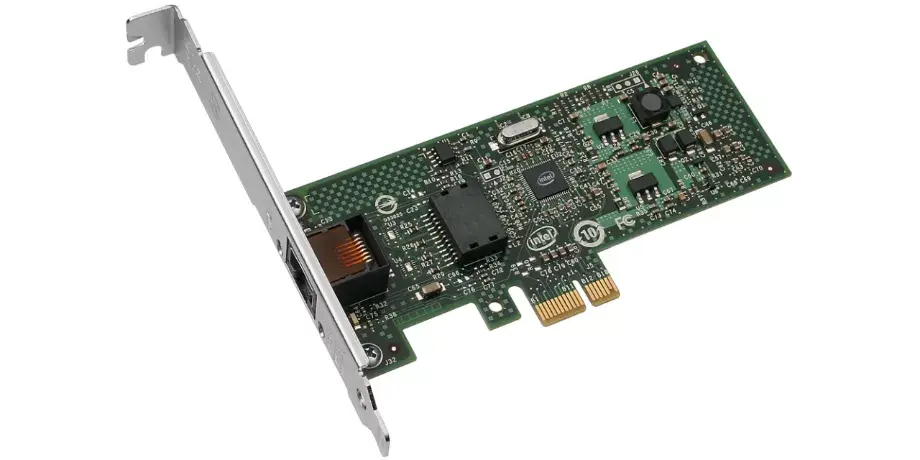
Network Interface Card INTEL EXPI9301CTBLK — PCI Express x1, 1 Gbps, Intel 82574L, RJ-45
Intel EXPI9301CTBLK is an internal PCI Express x1 network interface card designed to provide reliable wired Gigabit Ethernet connectivity for desktop systems. Equipped with the Intel 82574L controller and a single RJ-45 port, the card supports 10/100/1000 Mbit/s speeds over Category‑5 copper cabling up to 100 m. The adapter uses a PCIe v1.1 (2.5 GT/s) x1 interface, comes with a compact low-profile/full-height bracket and has a typical power consumption of 1.9 W. Operating temperature range is 0–55 °C, making it suitable for standard office and home desktop environments.
The card delivers stable Gigabit performance with an Intel 82574L controller known for compatibility and driver support across many operating systems. Its single RJ-45 port and wired connectivity provide predictable latency and throughput for networked applications. The low-profile/full-height bracket allows installation in various desktop chassis, while the low power draw reduces impact on system power budgets. PCIe x1 interface enables installation in systems with limited expansion slots without occupying larger lanes.
Power down the desktop and unplug it from the mains before installation. Open the chassis, locate an available PCIe x1 slot and remove the corresponding expansion slot cover. Insert the Intel EXPI9301CTBLK firmly into the PCIe x1 slot and secure the bracket with the screw. Reassemble the chassis, connect an RJ-45 Ethernet cable to the port and to your network switch or router, then power on the system. Install the appropriate drivers for your operating system if they are not installed automatically; driver packages are available from Intel and common OS update services. Verify link status and speed through the operating system network settings or system LEDs.
Use Category‑5 or better copper cabling and keep runs within 100 m to ensure full Gigabit performance. For best results, ensure the system BIOS and operating system have the latest updates and install the recommended Intel drivers. When installing in small-form-factor cases, confirm bracket orientation and clearance for proper seating. Avoid operating the card outside the specified 0–55 °C range and provide adequate airflow to maintain stable operation.
{{highlightedFeature.featureTitle}}:
{{getProductFeatureValueById(product, highlightedFeature.featureId)}}