Save time and money with our discounts!
In cart {{totalProductsCount}} item(s)
Your cart is empty
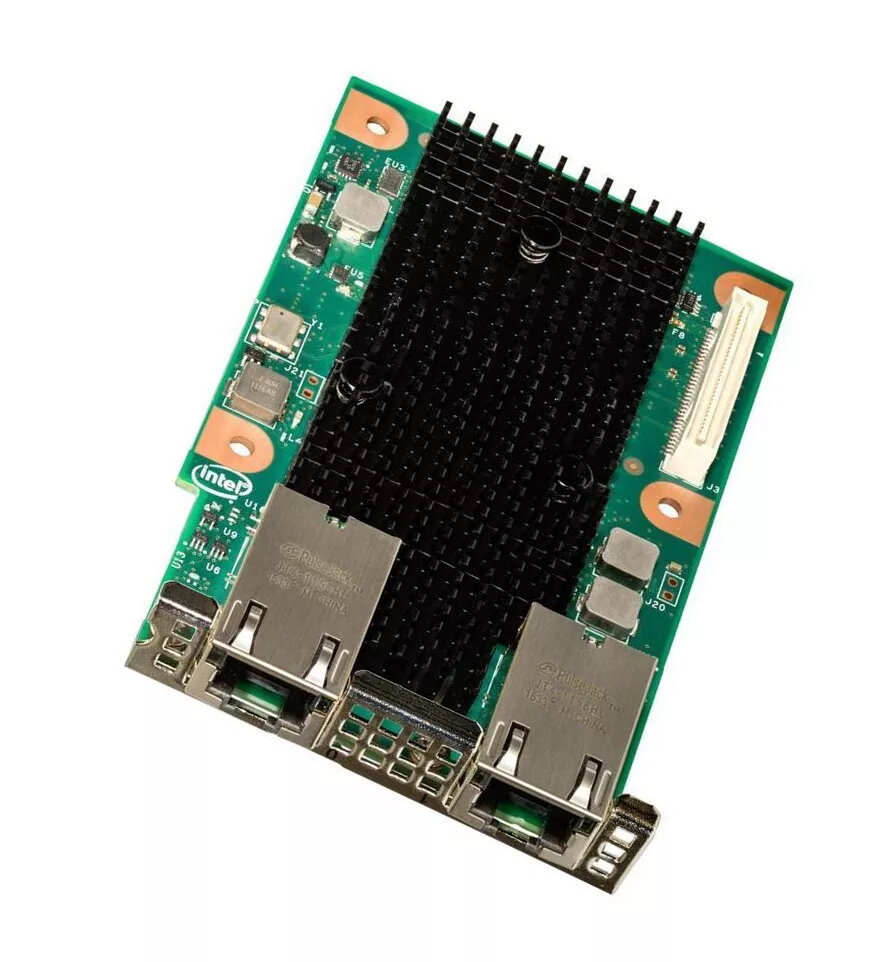
Internal SFP+ Interface Card INTEL X527DA2OCPG1P5, Passive Cooling, for Servers, Black/Green/Grey
Intel X527DA2OCPG1P5 is an internal SFP+ interface card engineered for server environments and data centers. The module provides two SFP+ uplinks and supports OCP PHY Mezzanine Type 1 and Type 2 AIC form factors with two KR host connections via the OCP PHY Mezzanine connector. The card uses passive cooling and is finished with black, green and grey visual accents. It is intended for integration into compatible server platforms to add high-speed 10 Gigabit links over optical modules or direct-attach copper (DAC).
This internal SFP+ interface card delivers dual 10 Gb/s SFP+ connectivity with low-latency operation and a compact OCP mezzanine form factor for space-constrained server designs. Passive cooling reduces moving parts and maintenance requirements while keeping acoustic noise minimal. Compatibility with OCP PHY Mezzanine Type 1 and Type 2 AIC ensures flexible deployment across a range of servers that provide the corresponding connector. The neutral black, green and grey finish integrates unobtrusively into rack-mounted equipment.
Install the card into a server equipped with a compatible OCP PHY Mezzanine slot (Type 1 or Type 2 AIC) and secure it according to the server vendor’s installation procedure. Populate the SFP+ cages with appropriate optical transceivers or DAC modules rated for 10 Gb/s, then connect the uplinks to switches, transceivers, or other network devices. Configure the server operating system and network stack to recognize the new interfaces, install any required drivers or firmware provided by the platform or network controller vendor, and verify link status and speed through standard system utilities.
Use vendor-verified SFP+ transceivers or DAC cables and keep firmware and drivers up to date. Ensure the server chassis provides adequate airflow for passive-cooled mezzanine modules and observe ESD precautions during installation. For high-availability deployments, plan redundant uplinks and monitor link statistics to detect and resolve issues promptly.
{{highlightedFeature.featureTitle}}:
{{getProductFeatureValueById(product, highlightedFeature.featureId)}}
{{ productComparisonGenerationError }}