Dreame vacuums for fast and efficient cleaning!
In cart {{totalProductsCount}} item(s)
Your cart is empty
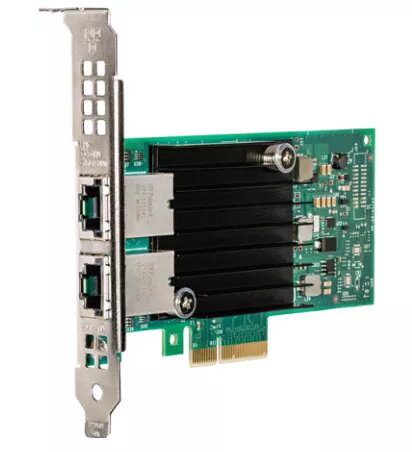
Network Card Intel X550T2 Internal Ethernet 10000 Mbit/s
iWARP/RDMA provides converged, low-latency fabric services for data centers by enabling Remote Direct Memory Access (RDMA) over Ethernet. Key mechanisms that reduce latency include Kernel Bypass, Direct Data Placement, and Transport Acceleration. Intel® Data Direct I/O Technology (DDIO) improves I/O data processing by allowing adapters and controllers to access processor cache directly instead of traversing system memory, which reduces latency, increases I/O bandwidth, and lowers power use. The product is PCI-SIG SR-IOV capable, enabling native sharing of a single I/O resource among multiple virtual machines, and supports Flexible Port Partitioning (FPP) to divide a physical Ethernet device into multiple virtual devices and enforce fair bandwidth allocation. Virtual Machine Device Queues (VMDq) offload VMM switching tasks to networking hardware to reduce overhead and improve throughput and overall system performance.
Low-latency RDMA over Ethernet through iWARP reduces CPU involvement in data transfers, improving application responsiveness. Intel DDIO lowers I/O latency and increases effective system bandwidth by permitting direct I/O access to processor cache. SR-IOV and FPP enable efficient hardware-level virtualization and predictable Quality of Service by presenting virtual functions that share a single physical port. VMDq decreases virtual machine I/O overhead by shifting switching work to specialized network hardware, improving throughput and system efficiency.
Deploy the adapter or controller in a server PCIe slot and enable iWARP/RDMA functionality in the host network stack and firmware to allow RDMA over Ethernet. Ensure Intel DDIO is supported and enabled on the platform to benefit from direct cache access for I/O. Configure SR-IOV in the system BIOS/firmware and the hypervisor to create Virtual Functions, then use Flexible Port Partitioning to allocate virtual devices and bandwidth shares. Enable VMDq support in the driver and hypervisor to offload VM switching and optimize throughput.
Verify compatibility of motherboard, CPU, firmware, and hypervisor with iWARP/RDMA, Intel DDIO, SR-IOV, FPP and VMDq features before deployment. Use firmware and driver versions recommended by the hardware vendor and monitor performance to tune Virtual Function allocations and bandwidth partitions according to workload requirements.
{{highlightedFeature.featureTitle}}:
{{getProductFeatureValueById(product, highlightedFeature.featureId)}}
{{ productComparisonGenerationError }}