JBL speakers and headphones for pure and deep sound!
In cart {{totalProductsCount}} item(s)
Your cart is empty
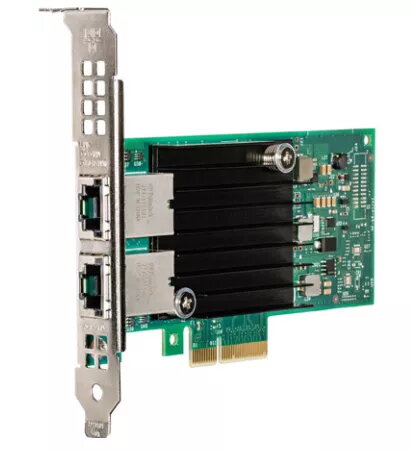
Network Card Intel X550T2 Internal Ethernet 10000 Mbit/s
The Intel X550T2 is an internal wired Ethernet network card with a PCI Express host interface and a maximum data transfer rate of 10000 Mbit/s. Designed for data center and enterprise use, the adapter supports advanced offload and virtualization features—iWARP/RDMA for low-latency fabric services, Intel® Data Direct I/O Technology for more efficient processor cache access, and PCI-SIG SR-IOV for direct sharing of a single I/O resource among multiple virtual machines. The card complies with common Ethernet networking standards and is available in a robust silver and green design.
The card delivers low-latency data transfers using iWARP/RDMA components such as Kernel Bypass, Direct Data Placement and Transport Acceleration. Intel® Data Direct I/O Technology (DDIO) reduces memory detours by allowing adapters and controllers to communicate directly with processor cache, improving I/O bandwidth and lowering latency and power usage. Virtualization capabilities—SR-IOV, Flexible Port Partitioning (FPP) and Virtual Machine Device Queues (VMDq)—enable efficient sharing of the physical port across virtual machines and reduce host CPU overhead for I/O switching.
Install the Intel X550T2 into an available PCI Express slot on a compatible server or workstation following the host system manufacturer’s instructions. Connect the network cable to the Ethernet port and configure the operating system network settings or hypervisor to recognize the adapter. For virtualization, enable SR-IOV and configure virtual functions or FPP in the host firmware/BIOS and in the hypervisor settings. Install the appropriate Intel drivers and firmware to enable RDMA/iWARP, DDIO optimizations and VMDq functionality.
Use the adapter in systems with up-to-date drivers and firmware and in environments that support PCI Express and the listed Ethernet standards. For best latency and throughput, enable RDMA/iWARP where supported, activate DDIO in compatible platforms, and configure SR-IOV or FPP with appropriate resource allocation to ensure fair bandwidth distribution among virtual functions.
{{highlightedFeature.featureTitle}}:
{{getProductFeatureValueById(product, highlightedFeature.featureId)}}
{{ productComparisonGenerationError }}