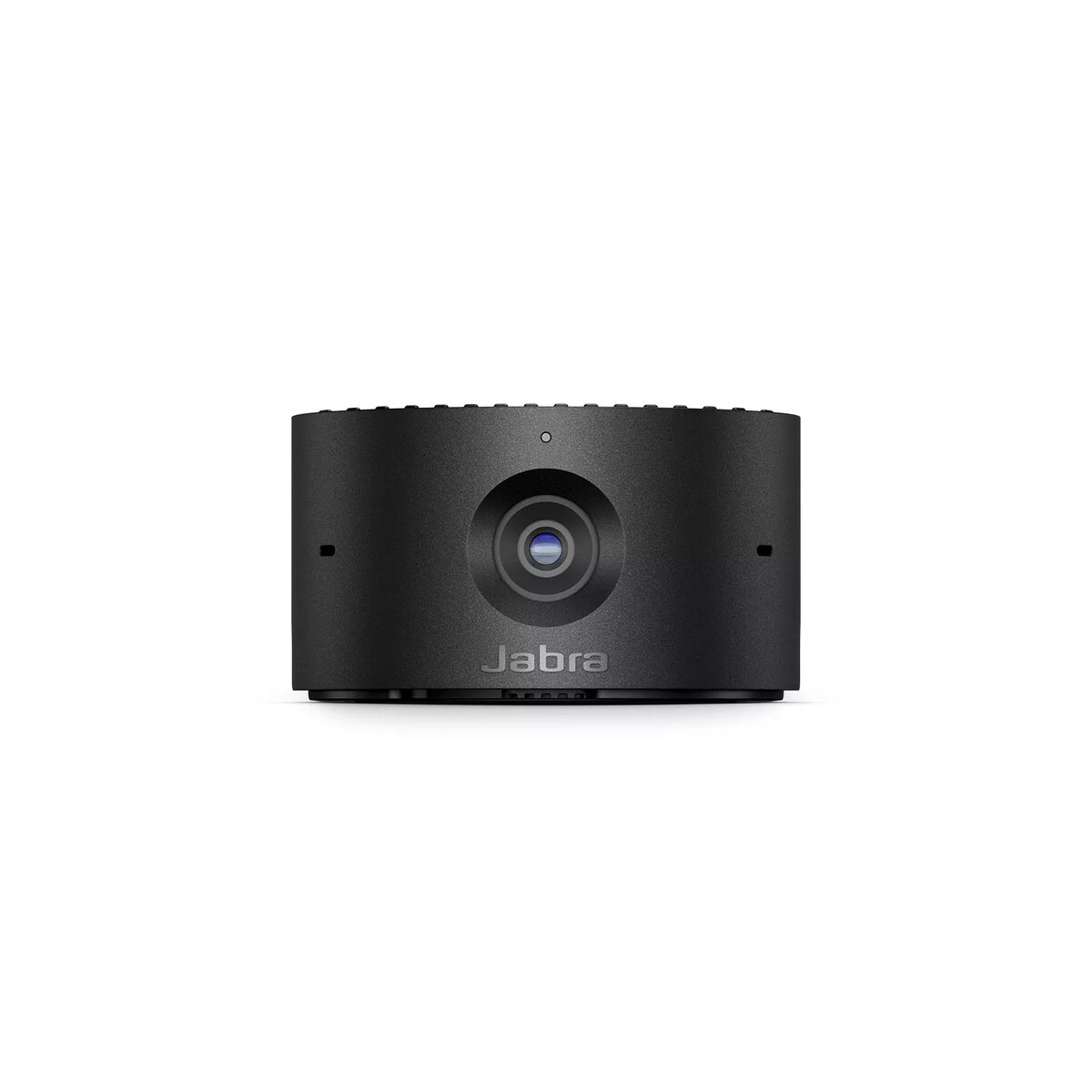
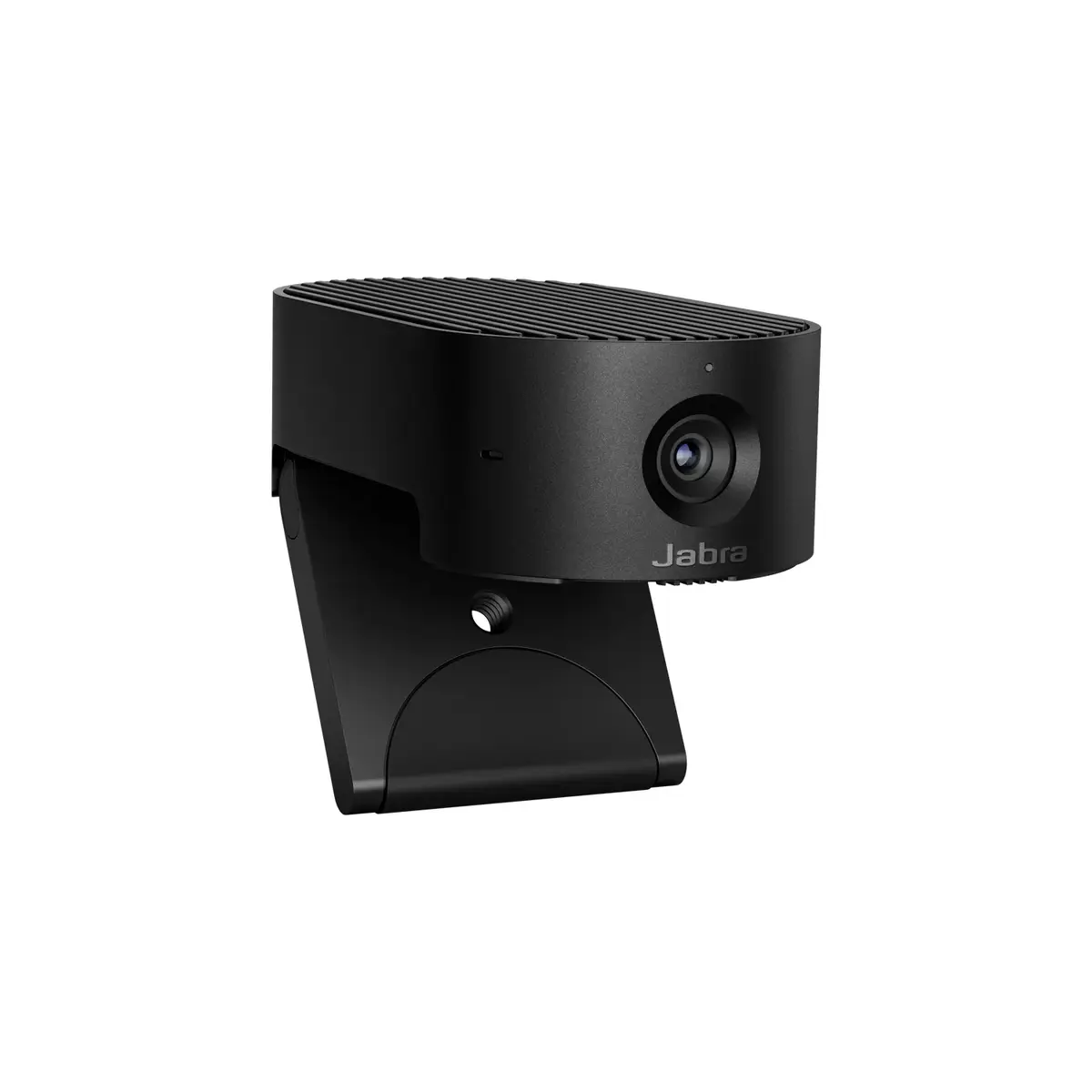
The Jabra PanaCast 20 is a 13 MP camera offering 4K Ultra HD video resolution at 3840 x 2160 pixels and a 117° field of view. It features a digital zoom of 3x and operates at a maximum frame rate of 30 fps. Ideal for high-quality video conferencing and streaming, it provides clear and detailed visuals for professional use.
You saving {{productBundleYouSave | formatAmount}}
Product information
Description
The Jabra PanaCast 20 13 MP 4K Ultra HD 117° FOV is a compact conference camera designed for professional video calls and streaming. It delivers up to 3840 x 2160 pixel resolution with a maximum frame rate of 30 fps and a wide 117° field of view to capture participants and meeting room details. The camera supports 3x digital zoom, lightweight construction and a black finish suitable for desktop mounting and portable setups.
Advantages
The camera provides high-resolution 4K Ultra HD imaging that preserves fine detail in presentations and face-to-face interactions. The 117° field of view captures a wide scene without fisheye distortion at typical meeting distances, and the 3x digital zoom enables closer framing when needed. With a maximum frame rate of 30 fps the device offers smooth motion for typical conferencing and streaming scenarios. Its lightweight design and neutral black colour allow easy placement on laptops, monitors or small tripods.
Suitable for
Video conferencing in small to medium meeting rooms
Live streaming and content creation requiring detailed 4K video
Home office and remote work video calls
Online teaching and webinars where wide field of view is beneficial
Key specifications
Image sensor resolution: 13 MP
Maximum video resolution: 3840 x 2160 (4K Ultra HD)
Field of view: 117°
Digital zoom: 3x
Maximum frame rate: 30 fps
Colour: Black
Weight: 0.136 kg
How to use
Position the Jabra PanaCast 20 on top of a monitor, laptop screen or on a small tripod at roughly eye level for natural framing. Connect the camera to a compatible host device following the manufacturer software or operating system plug-and-play instructions to enable video output at preferred resolution and frame rate. Use the digital zoom to adjust framing during a call or recording; if available, adjust exposure and white balance through conferencing application settings or the camera management software.
Usage recommendations
For best results, place the camera at a distance that balances the wide 117° field of view with subject size—typically 0.8–2.5 meters for small meeting groups. Ensure even front lighting to maximize facial detail and avoid strong backlighting. When streaming or recording at 4K, confirm the host system and network can handle the higher data throughput to maintain stable frame rates.
All features
Aspect ratio:
The aspect ratio is the ratio of the width of a shape to its height. For example, 4:3 is common for standard displays and 16:9 is the ratio for Widescreen TV.
16:9
Digital zoom:
Indicates the digital zoom capacity, the number of times that the picture is enlarged thanks to digital technology.
3 x
Megapixel (approx.):
The number (in millions) of light-sensitive picture elements known as pixels actually used by the camera's image sensor (CCD) to record light, and which are reflected to the final number of recorded pixels stored on the memory card.
13 MP
Resolution at capture speed:
3840x2160@30fps, 1920x1080@30fps, 1280x720@30fps
Picture-in-Picture:
Picture-in-picture (PiP) is a feature of some television receivers and similar devices. One program (channel) is displayed on the full TV screen at the same time as one or more other programs are displayed in inset windows. Sound is usually from the main program only.
Yes
Supported graphics resolutions:
The graphic resolutions that can be displayed by the device. The graphic resolution describes the width and height dimensions of a display, such as a computer monitor, measured in pixels.
3840 x 2160, 1920 x 1080 (HD 1080), 1280 x 720 (HD 720)
Mounting type:
Type of mounting e.g. wall mounting.
Stand
Maximum video resolution:
This is the maximum resolution of video images. Resolution is a measure of the degree of detail visible.
3840 x 2160
Maximum frame rate:
This is the maximum frame rate, also known as frame frequency and frames per second (FPS). It is the frequency (rate) at which an imaging device produces unique consecutive images called frames. The term applies equally well to film and video cameras, computer graphics, and motion capture systems. Frame rate is most often expressed in frames per second (FPS) and is also expressed in progressive scan monitors as hertz (Hz).
30 fps
PTZ control:
Yes
Camera type:
There are a number of common types of digital cameras: compact cameras, bridge cameras, mirrorless interchangeable-lens cameras (MILC) and single lens reflex (SLR) cameras. Bridge cameras 'bridge the gap' between the low-end compact and high-end professional (SLR) cameras. Also MILCs populate this mid-segment by combining the larger sensors and interchangeable lenses of DSLRs with the live-preview viewing system of compact cameras.
Single camera
USB cable length:
1.5 m
Field of view (FOV) angle:
117 °
Horizontal field of view:
90 °
Vertical field of view:
75 °
HD type:
Type of supported High Definition (e.g. Full HD, 4K Ultra HD).
4K Ultra HD
USB 3.2 Gen 1 (3.1 Gen 1) Type-C ports quantity:
Number of USB 3.0 (3.1 Gen 1) ports with Type-C connector. USB 3.0 (3.1 Gen 1) is USB interface version which supports transfer rate up to 5 Gbit/s (SuperSpeed). USB Type-C connector has symmetrical design architecture and compatible with Thunderbolt 3 interface.
1
Microphone frequency response:
100 - 8000
High Dynamic Range (HDR) supported:
Yes
Logistics data
Harmonized System (HS) code:
85258900
Technical details
Built-in microphone:
Microphone that is found inside the product.
Yes
Packaging content
Cables included:
USB
Weight & dimensions
Weight:
Weight of the product without packaging (net weight). If possible, the net weight is given including standard accessories and supplies. Please note that sometimes the manufacturer leaves out the weight of accessories and/or supplies.
0.136 kg
Height:
The measurement of the product from head to foot or from base to top.
25 mm
Package depth:
The distance from the front to the back of the packaging.
130 mm
Package height:
The distance from the top to the bottom of the packaging.
50 mm
Package width:
The distance from one side of the packaging to the other.
160 mm
Depth:
The distance from the front to the back of something.
90 mm
Width:
The measurement or extent of something from side to side.
44 mm
Microphone
Microphone sensitivity:
-37 dB
Number of microphones:
3
Features
Mac operating systems supported:
Mac operating systems e.g. OS X can be used with the device.
Mac OS X 10.9 Mavericks, Mac OS X 11.0 Big Sur
Windows operating systems supported:
Windows vesions wich can be used with the device.
Windows 11
Product colour:
The colour e.g. red, blue, green, black, white.
Personal video conferencing, but not as you know it
As we all navigate the realities of trying to stay connected and productive, video conferencing is more important than ever. It’s time to experience the next generation of intelligent, secure, portable video collaboration with Jabra PanaCast 20.
Harnessing advanced on-board AI to deliver an intelligent feature set that takes your video experience to the next level, PanaCast 20 is a personal camera that knows exactly what you need, when you need it.
Let your camera do the thinking.
Picture perfect. Wherever you work.
Video calls are now part of everyday life, but poor picture quality impacts the whole experience. PanaCast 20 uses advanced processors, powerful on-board AI and a 13-megapixel camera to deliver an impressive real-time 4K Ultra-HD image that’s crystal-clear, with virtually no latency. So you can deliver that big presentation knowing you’ll look your best.
Give your personal video conferencing a complete makeover.
Are you ready for your close-up?
When you’re on an important video call, being seen clearly makes all the difference. Our Intelligent Zoom feature uses powerful AI to continuously scan and adjust your picture in real-time, ensuring you’re always in the centre of the frame. Now you can experience more immersive, natural video collaboration without having to stay rooted to the spot. PanaCast 20 delivers a meeting experience that’s not just better, it’s completely reinvented.
With Intelligent Zoom, you’re always centre-stage.
Any light is good light
Today’s professionals need to take video calls from everywhere. With PanaCast 20, AI-based Intelligent Lighting Optimization analyses your environment and automatically adjusts your image in real-time to enhance the video quality.
Your next meeting calls for next-generation technology.
Two streams are better than one
Get ready for more engaging presentations with PanaCast 20. Our unique Picture-in-Picture mode enables you to share a close-up as your main image while continuing to present in a smaller window, thanks to on-board Edge processing that combines two real-time video streams into one. What's more Picture-in-Picture mode works with any UC platform, even if they don't support dual-stream devices.
Because showing is so much more powerful than telling.
Collaborate in confidence
PanaCast 20 is engineered for data security. An advanced on-board Edge AI chipset drives all of the intelligent features, as well as processing your video on the device itself to reduce the risk of data breaches. So you can get on with whatever you’re doing, without worrying.
Secure personal video conferencing that gives you the Edge.
Share what’s good. Hide what’s not.
You can’t be camera-ready all the time. That’s why PanaCast 20 comes with an integrated privacy cover, to give you total control. Simply slide the privacy cover across your camera lens when you need privacy and slide it back again when you’re ready to turn your video on.
Because video calls are great. But sometimes you just need a minute.
Here. There. Anywhere.
When you work flexibly, you can be joining meetings from anywhere. This clever little camera is perfectly portable, with a compact design that easily slots over the top of any screen, an integrated, foldable mounting clip and a protective carry case. So you’re only ever seconds away from seamless, intelligent, high-quality video collaboration.
From the café to the kitchen table. Enjoy great video meetings anywhere.
…and, action.
You’re used to hitting the ground running, so why settle for tech that holds you back? PanaCast 20 is plug-and-play, for instant connection from the very first time you use it. Simply connect the USB-C cable to your computer and you’re ready to collaborate from anywhere.
Get right to it with PanaCast 20.
Superheroes need sidekicks.
OK, so you’ve got the video part all figured out, but what about the sound? From the world-leading Evolve Series, to the crystal-clear audio of the Speak Series – here at Jabra we've got the perfect audio partner for your PanaCast 20, however you like to work.
Because intelligent video and world-leading audio is a powerful combination.
Out of sight. Peace of mind.
X-rays. Financial records. Trade agreements. Even the secret bunker VIP list. Whatever sensitive information you want to keep hidden during video calls, On-device Background Effects have - quite literally - got you covered.
They blur your background or replace it with a solid colour, using the powerful Edge AI on PanaCast 20 to process image alterations directly on the device, unlike similar features on UC platforms. This reduces the risk of cyber attack when you’re hybrid working since the real background data isn’t seen, sent or stored on the cloud. Ensuring any data you need to conceal stays strictly “for your eyes only”. How very 007.
Make video calls less I-spy and more stealth mode.
It’s all UC, you see
PanaCast 20 is certified for Microsoft Teams, Zoom, Google Meet and Works With Chromebook and works with all leading UC platforms for a seamless experience. So you’re free to focus on your meetings – not your tech.
More, More, More
PanaCast 20 will receive regular software updates throughout the product’s lifespan to enhance the experience and update the feature set.
Get more from your UC investment. Today and tomorrow.
How much does the Camera Jabra PanaCast 20 cost, and is it available for purchase?
The price is 169.99 € (valid at the time of publication and already includes all taxes). The item is available for order — 1099 pcs. are in stock, and you can place your purchase right now with delivery across Latvia and Europe or choose pickup at the Riga collection point. We offer favorable purchase terms, including the option to split the payment into convenient monthly installments. Availability and price are updated in real time, so we recommend placing your order in advance.
If I order this product today, when will I receive my order?
If you place your order today, delivery will be as fast and convenient as possible. You will be able to pick up your order on 18.09.2026 at the Riga pickup point or choose delivery across Latvia and Europe. We carefully inspect every purchase and pack it securely for safe transportation.
What payment options are available?
AiO.lv offers several payment methods: Bank transfer, Bank cards on-line, Apple Pay, Google Pay, Installment. All transactions are 100% secure and encrypted.
Can Camera Jabra PanaCast 20 be purchased with a lease?
Yes, the purchase is available both on credit and with an interest-free installment plan.
We work with leading banks and leasing companies in Latvia, allowing you to make your purchase on convenient terms — with a minimal down payment and a repayment period from 3 to 36 months.
You can apply for credit or installments for the Camera Jabra PanaCast 20 online, and the application process is as simple as possible:
Select the product on the website and add it to your cart;
When placing your order, choose the payment method “Installments”;
Fill in the required details for the lending partner;
Receive a decision within a few minutes.
For more information about available payment options, interest-free installment terms, and credit conditions in Latvia, please visit the Payment page.
Can this product be purchased for a company (with VAT)?
Yes. AiO.lv works with legal entities in Latvia and across Europe. The product price already includes VAT. For certain product categories, as well as for companies from other EU countries with a valid VAT number, a 0% VAT rate may apply. We issue the invoice immediately after the order is placed, support electronic BIS invoices, and automatically generate all necessary accounting documents. You can complete the purchase for a company online — simply select the company profile and choose bank transfer as the payment method during checkout.
What is the warranty period?
All Jabra products come with an official 2 Years warranty. It covers all manufacturing defects and malfunctions that may occur during use. The warranty is valid at all authorized Jabra service centers and through AiO.lv
Can the product be returned after purchase?
Yes, you can return the product within 14 days of purchase if you bought it as a consumer (not a legal entity). Returns are possible without giving any reason — the main condition is that the product retains its original appearance and full set of accessories. We will make the process as simple and convenient as possible: just contact our customer support team, and we will help you arrange the return.
Where should I contact for warranty service?
For warranty-related questions you can contact the AiO.lv (SIA VSPRO) customer support team. We will assist with consultation, warranty claim processing, and coordination with certified service centers.
Where can I download the instructions for Camera Jabra PanaCast 20?
You can download the instructions in PDF format from the “Instructions” section on the product description page. The file contains complete information about installation, setup, and usage.
We use cookies to ensure the full operation of our store.
The information associated with cookies is not used to personally identify you, and the files themselves are stored on your device, under your control.
Cookies are not used for purposes other than those stated in our Privacy policy.
By continuing to use our site, you agree to the use of essential cookies. If you do not agree, please, leave this site.
We use cookies to ensure the full operation of our store.
The information associated with cookies is not used to personally identify you, and the files themselves are stored on your device, under your control.
Cookies are not used for purposes other than those stated in our Privacy policy.
By continuing to use our site, you agree to the use of essential cookies. If you do not agree, please, leave this site.
Which cookie files we use?
The necessary technical cookies allow you to use the basic functions of the store, such as page navigation, ordering, access to secure sites and more. The site cannot function properly without these files.
Preferences cookies are used to save information that changes how the site works and looks.
Static cookies are used in order to help the sites owner understand how the users are interacting with the site.
Marketing cookies are used in order to track a users movements throughout the site in order to show interesting and relevant ads to the specific user.