Save time and money with our discounts!
In cart {{totalProductsCount}} item(s)
Your cart is empty
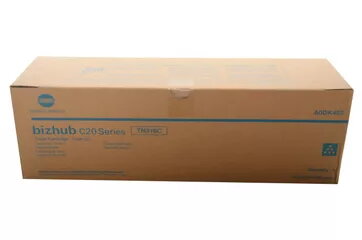
Konica Minolta TN318C Original Cyan Toner Cartridge for Bizhub C20, C20P, C20PX, C20X Printers, 8000 Pages Yield
The Konica Minolta TN318C Original Cyan Toner Cartridge is a reliable printing supply engineered specifically for compatible laser printers. Designed to integrate seamlessly with your printing hardware, this cyan toner cartridge ensures consistent performance and professional output for everyday business documents and marketing materials. With a page yield of up to 8000 pages, it supports medium-volume printing environments while minimizing the frequency of cartridge replacements. Utilizing genuine Konica Minolta supplies helps maintain the operational longevity of your printer and ensures dependable color accuracy from the first page to the last.
Using the original Konica Minolta TN318C cyan toner cartridge guarantees optimal compatibility and reduces the risk of print defects or hardware issues often associated with non-genuine alternatives. The formulation of the cyan toner allows for sharp text definition and smooth color transitions, which is essential for professional presentations, reports, and graphics. Furthermore, the reliable page yield of up to 8000 pages helps businesses manage their printing costs effectively by providing predictable, long-lasting performance. Installation is straightforward, allowing users to replace the cartridge quickly and resume printing tasks with minimal downtime.
This toner cartridge is not suitable for high-volume industrial printing operations that exceed its rated capacity, as it is designed for standard office workloads. Additionally, it will not function properly in printer models outside of the specified compatibility list.
To install the toner cartridge, first open the front door of your compatible Konica Minolta printer. Carefully remove the used cyan toner cartridge from its slot. Take the new Konica Minolta TN318C cartridge out of its packaging and gently rock it a few times from side to side to distribute the toner evenly inside. Remove any protective tapes or covers as indicated in the printer manual. Insert the cartridge firmly into the correct cyan slot until it clicks securely into place. Finally, close the printer door and wait for the device to initialize and confirm that the toner is recognized.
For the best print quality and to protect your printer hardware, always store unused toner cartridges in a cool, dry place away from direct sunlight and install them promptly after opening the protective packaging.
{{highlightedFeature.featureTitle}}:
{{getProductFeatureValueById(product, highlightedFeature.featureId)}}
{{ productComparisonGenerationError }}