
JBL speakers and headphones for pure and deep sound!
In cart {{totalProductsCount}} item(s)
Your cart is empty
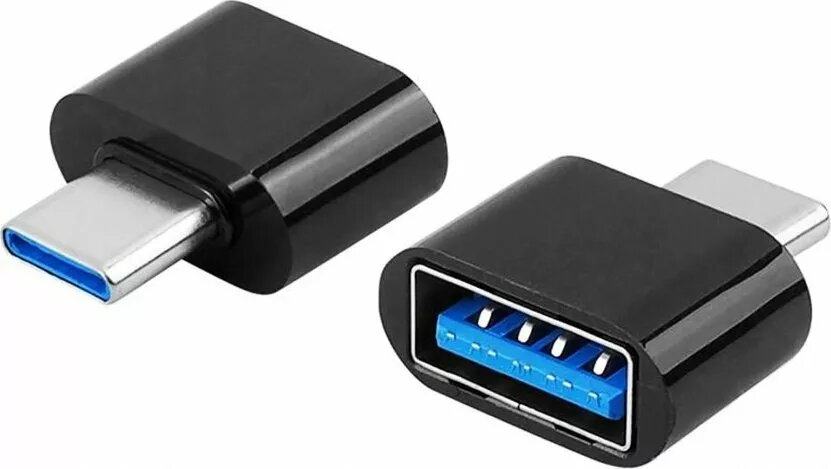
Adapter Lamex OTG USB-C to USB-A for phone and mouse, model LXOTG18
The Lamex LXOTG18 OTG adapter converts a USB-C port into a USB-A female connector, enabling direct connection of standard USB peripherals to compatible phones and tablets. Compact and plug-and-play, this adapter lets you connect mice, keyboards, flash drives and other USB-A devices to mobile devices that support USB On-The-Go functionality without the need for drivers or additional software.
The adapter provides a reliable wired connection between a USB-C host device and USB-A peripherals, with a compact metal-and-plastic housing designed for portability. It supports immediate device recognition on compatible smartphones and tablets, eliminates the need for additional cables or hubs for common accessories, and is useful when wireless options are unavailable or impractical.
Insert the USB-C male end of the adapter into the compatible phone or tablet's USB-C port. Connect the USB-A peripheral, such as a flash drive, mouse or keyboard, to the female USB-A socket on the adapter. The host device should detect the connected peripheral automatically if it supports OTG; open the file manager or the relevant app to access storage devices, or use the connected input device immediately for control and text entry. Remove devices by unmounting storage in the host operating system before disconnecting when required.
Verify that your phone or tablet supports USB OTG and that connected peripherals do not exceed the power capabilities of the mobile host. For external drives with higher power needs, use a powered hub or a drive with independent power. Avoid applying excessive force to the connectors and store the adapter in a protective case to prolong service life.
{{highlightedFeature.featureTitle}}:
{{getProductFeatureValueById(product, highlightedFeature.featureId)}}
{{ productComparisonGenerationError }}