
Hurry and order now – up to 50% off!
In cart {{totalProductsCount}} item(s)
Your cart is empty
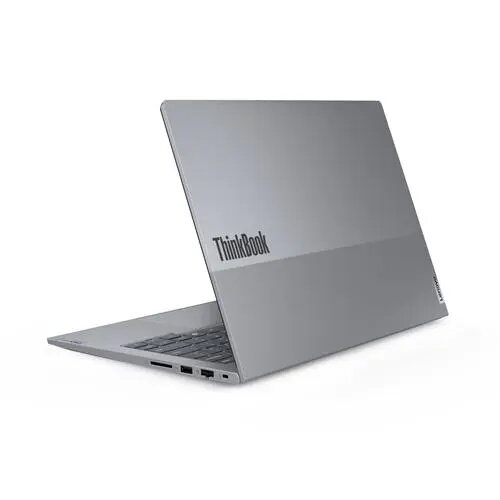
Lenovo ThinkBook 14 G7 ARP Laptop, 14" WUXGA, AMD Ryzen 3 7335U, 8GB RAM, 256GB SSD, Windows 11 Pro
The Lenovo ThinkBook 14 G7 ARP is a professional-grade 14-inch laptop engineered to provide a balance of performance and portability for modern business environments. Powered by the AMD Ryzen 3 7335U processor, this device delivers reliable computing power for daily office applications and multitasking. The 14-inch WUXGA display offers clear visuals, while the compact design ensures it remains easy to carry for professionals on the move. With Windows 11 Pro pre-installed, it provides advanced security and management features suitable for corporate and small business settings.
This laptop excels in providing a secure and efficient workspace through its integrated infrared camera, which facilitates fast and reliable biometric authentication. The inclusion of a high-speed M.2 SSD ensures quick system boot times and responsive application loading, significantly improving overall productivity. Its durable construction is designed to withstand the rigors of daily use, while the efficient AMD processor helps maintain a balance between performance and energy consumption, allowing for extended periods of mobile operation.
This device is not intended for high-end gaming, professional video editing, or complex 3D rendering tasks that require dedicated graphics hardware and higher processing power. Users requiring extensive local storage for large media libraries may find the 256GB SSD capacity limiting without external storage solutions.
To begin using the Lenovo ThinkBook 14 G7 ARP, connect the power adapter to charge the battery fully before the initial startup. Press the power button to initiate the Windows 11 Pro setup process, following the on-screen instructions to configure your user account and network settings. Utilize the infrared camera to set up Windows Hello for secure, password-free access. Keep the device updated through the system settings to ensure optimal performance and security patches are applied regularly.
Usage recommendations: To maintain the longevity of the laptop, keep the air vents clear of obstructions to ensure proper cooling. It is recommended to use a protective sleeve when transporting the device to prevent surface damage. Regularly back up important data to an external drive or cloud service to ensure information security.
{{highlightedFeature.featureTitle}}:
{{getProductFeatureValueById(product, highlightedFeature.featureId)}}
{{ productComparisonGenerationError }}
