
Powerful EcoFlow stations for energy anywhere!
In cart {{totalProductsCount}} item(s)
Your cart is empty
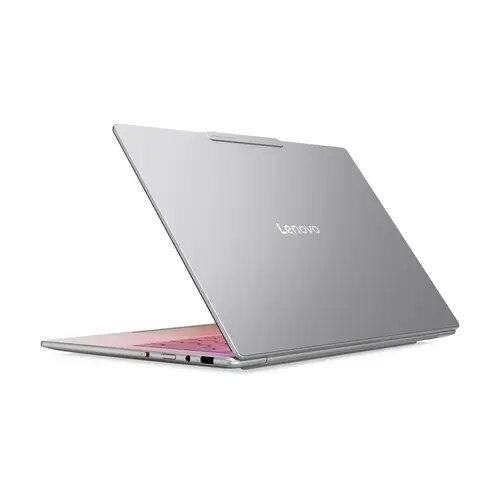
Lenovo Yoga Slim 7 14ILL10 Laptop, 14" WUXGA Touch, Intel Core Ultra 7 258V, 32GB RAM, 1TB SSD, Windows 11
The Lenovo Yoga Slim 7 14ILL10 is a premium, high-performance laptop engineered for professionals and students who require a balance of power and portability. Featuring a vibrant 14-inch WUXGA touchscreen display, this device offers crisp visuals and intuitive navigation. Under the hood, it is equipped with the advanced Intel Core Ultra 7 258V processor, paired with 32GB of RAM and a spacious 1TB SSD, ensuring seamless multitasking and rapid data access. Pre-installed with Windows 11, this laptop provides a modern, secure, and efficient computing environment for demanding daily tasks.
This laptop stands out due to its exceptional processing capabilities provided by the latest Intel Core Ultra architecture, which handles intensive applications with ease. The generous 32GB of memory allows for smooth operation even when running multiple complex programs simultaneously. Its lightweight and slim design makes it highly portable for users on the move, while the high-resolution touchscreen enhances productivity by allowing for direct interaction with content. The inclusion of a large 1TB solid-state drive ensures that users have ample space for files, media, and software without compromising on system speed.
This device may not be the optimal choice for users primarily focused on high-end professional gaming or heavy 3D rendering tasks that require a dedicated graphics card. Additionally, users who prefer a larger screen size for specialized design work might find the 14-inch display limiting for their specific workflow.
To begin using the Lenovo Yoga Slim 7, simply open the lid to power on the device. Follow the on-screen prompts provided by the Windows 11 setup assistant to configure your user account, network settings, and security preferences. The touchscreen can be used alongside the keyboard and touchpad to navigate the interface. For optimal performance, ensure the device is connected to power during initial updates and software installations.
Usage recommendations: To maintain the longevity of the device, keep the ventilation areas clear of obstructions during operation. Regularly update the operating system and drivers through the manufacturer's support software to ensure peak performance and security.
{{highlightedFeature.featureTitle}}:
{{getProductFeatureValueById(product, highlightedFeature.featureId)}}
{{ productComparisonGenerationError }}
