
Powerful EcoFlow stations for energy anywhere!
In cart {{totalProductsCount}} item(s)
Your cart is empty
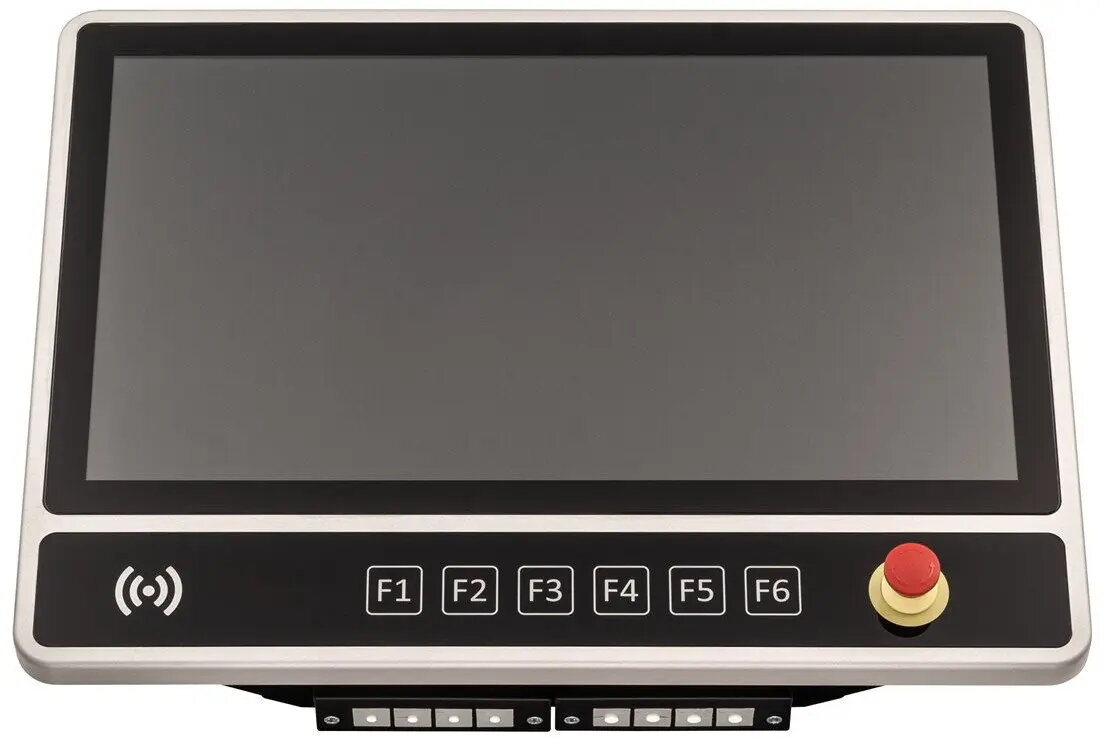
Lenovo GETT InduSmart BlackLine 21.5-inch Industrial Panel PC, Intel Core i5, 8GB RAM, 128GB SSD, Touchscreen, NFC, VESA, Ethernet, Emergency Stop
The Lenovo GETT InduSmart BlackLine is a high-performance 21.5-inch industrial panel PC engineered for reliability in challenging operational environments. Combining a powerful Intel Core i5 processor with 8GB of RAM and a 128GB SSD, this workstation delivers consistent computing power for demanding industrial applications. The unit features a durable touchscreen interface, integrated NFC technology for secure access, and essential Ethernet connectivity for seamless network integration. Designed with safety in mind, it includes a dedicated emergency stop button, making it a robust solution for factory floors and control centers.
This industrial panel PC stands out due to its ruggedized construction, which is specifically built to withstand the rigors of industrial settings. The inclusion of a responsive touchscreen enhances user interaction, allowing for precise control in fast-paced environments. With integrated NFC capabilities, the device supports secure authentication and data exchange, while the VESA mount compatibility ensures that the unit can be easily installed in various configurations, from wall mounts to specialized machine arms. The presence of an emergency stop button provides an immediate safety mechanism, ensuring that operators can halt processes instantly when necessary.
This device may not be suitable for high-end graphical rendering or intensive gaming, as it is optimized for stability and industrial tasks rather than multimedia performance. Additionally, it is not intended for consumer-grade office environments where a standard desktop form factor would be more cost-effective and appropriate.
To use the Lenovo GETT InduSmart BlackLine, mount the unit securely using a compatible VESA bracket in your desired location. Connect the device to your local network via the Ethernet port and attach necessary peripherals. Once powered on, configure the operating system and software according to your specific industrial requirements. Ensure the emergency stop button is accessible to operators at all times to maintain workplace safety protocols.
For optimal performance and longevity, ensure the device is installed in an environment with adequate ventilation and protected from extreme moisture or dust ingress. Regularly clean the touchscreen with non-abrasive materials to maintain responsiveness.
{{highlightedFeature.featureTitle}}:
{{getProductFeatureValueById(product, highlightedFeature.featureId)}}
{{ productComparisonGenerationError }}
