Leave your address - as soon as the price of the product goes down, you'll know about it right away
Video cable adapter Lindy 41196 — DVI‑I to VGA (D‑Sub), 2 m, black
In cart {{totalProductsCount}} item(s)
Your cart is empty
Video cable adapter Lindy 41196 — DVI‑I to VGA (D‑Sub), 2 m, black
Leave your address - as soon as the price of the product goes down, you'll know about it right away
Video cable adapter Lindy 41196 — DVI‑I to VGA (D‑Sub), 2 m, black
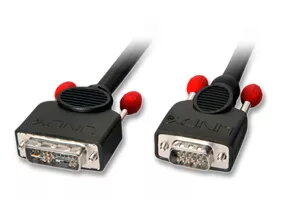
Lindy 41196 is a 2 m video cable adapter that converts a DVI‑I output to a VGA (D‑Sub, HD15) input for analogue video signals. The cable features a DVI‑I male connector on one end and a VGA (15‑pin HD) male connector on the other, in a black jacket. It provides a direct wired connection between devices with DVI‑I and VGA ports without electronic signal conversion, allowing use of the analogue pins embedded in a DVI‑I socket to feed a VGA display.
This adapter offers a simple plug‑and‑play solution for connecting legacy VGA displays to systems with DVI‑I outputs. With a 2 metre length it gives flexibility in desktop or presentation setups while maintaining a tidy cable run. The cable supports analogue video transmission without additional adapters or power, and its standard connectors are compatible with most PCs, monitors and projectors that accept VGA input.
Ensure the source device outputs an analogue signal through its DVI‑I connector; plug the DVI‑I male connector into the source and the VGA male connector into the display's VGA input. Secure connector screws where present to ensure a stable connection. No drivers or external power are required. Do not attempt to use this cable to convert digital DVI‑D signals to VGA, as it only carries analogue signals provided by the DVI‑I interface.
Use this cable for systems where the DVI‑I port exposes analogue pins; if a device only provides digital DVI‑D output, use an active digital‑to‑analogue converter instead. Keep cable runs under recommended lengths for VGA to avoid signal degradation and tighten connector screws for reliable contact.
{{highlightedFeature.featureTitle}}:
{{getProductFeatureValueById(product, highlightedFeature.featureId)}}