Dreame vacuums for fast and efficient cleaning!
In cart {{totalProductsCount}} item(s)
Your cart is empty
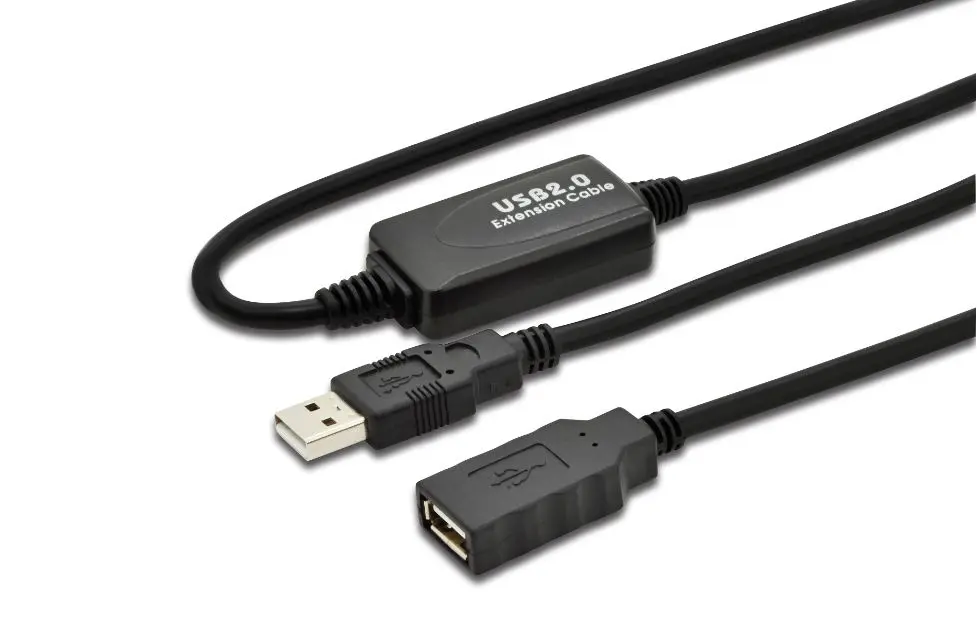
MicroConnect USB Cable USB 2.0 Type-A Male to Female 5 m Black WBEE0
The MicroConnect USB Cable USB 2.0 Type-A Male to Female 5 m Black WBEE0 is an active extension cable designed to bridge the distance between your computer and various USB peripherals. Featuring a generous length of 5 meters, this cable allows you to flexibly position devices such as printers, scanners, and external storage drives without worrying about restrictive placement. Equipped with an integrated signal booster, it ensures reliable data transmission up to 480 Mbit/s without signal degradation over the extended distance. The black color design blends seamlessly into office and home environments, while the durable construction with nickel-plated contacts provides dependable daily performance.
The main advantage of this MicroConnect USB extension cable is its active design with an integrated booster, which prevents signal loss commonly experienced in standard passive cables of similar length. This ensures stable and fast data transfer speeds up to 480 Mbit/s, making it fully compliant with USB 2.0 specifications while remaining backward compatible with USB 1.1 devices. The Plug and Play functionality allows for immediate setup without the need for additional drivers or external power adapters, saving time and simplifying installation across different operating systems including Windows and macOS.
This cable may not be suitable for high-bandwidth applications that require USB 3.0 or USB 3.1 SuperSpeed transfer rates, as its maximum speed is limited to USB 2.0 standards. Additionally, it is primarily intended for data transmission and standard peripheral connections rather than high-power device charging.
To use the MicroConnect USB 2.0 extension cable, simply connect the USB Type-A male connector into an available USB port on your host computer or laptop. Then, plug the USB Type-A female connector into the cable or device you wish to extend. The system will automatically recognize the connection via Plug and Play functionality, allowing you to begin using your peripheral immediately without configuring additional settings.
Usage recommendations: To ensure optimal signal integrity and longevity, avoid tightly coiling the cable or placing heavy objects on it during regular operation. Store the cable in a dry environment away from direct heat sources when not in use.
{{highlightedFeature.featureTitle}}:
{{getProductFeatureValueById(product, highlightedFeature.featureId)}}
{{ productComparisonGenerationError }}