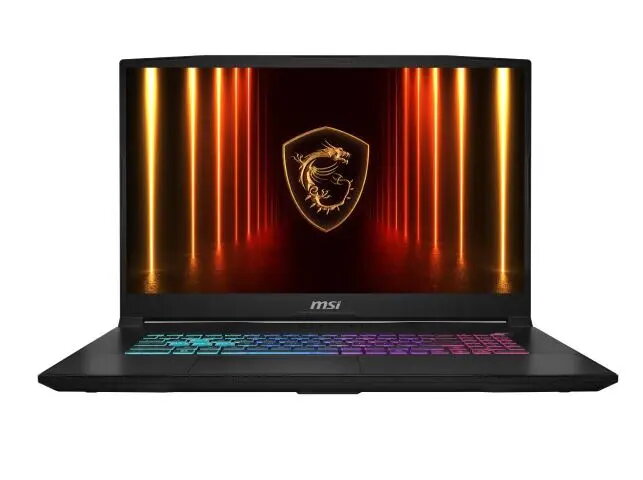
The MSI Katana 17 HX B14WGK-405 is a high-performance gaming laptop engineered to provide a competitive edge in modern gaming and demanding professional workflows. Featuring a large 17.3-inch QHD display with a rapid 240Hz refresh rate, this device ensures fluid visuals and precise motion clarity. At its core, the laptop utilizes the powerful Intel Core i7-14650HX processor paired with the advanced NVIDIA GeForce RTX 5070 graphics card, delivering robust processing power and realistic ray-tracing capabilities. With 16GB of high-speed DDR5 memory and a spacious 1TB SSD, the system offers quick boot times, fast data access, and seamless multitasking for intensive applications.
Advantages
The primary strength of this laptop lies in its combination of high-end hardware and a high-refresh-rate display, which together minimize input lag and motion blur during fast-paced gaming sessions. The inclusion of the latest generation Intel processor and NVIDIA RTX graphics ensures compatibility with modern gaming titles and demanding creative software. Furthermore, the 17.3-inch screen provides an expansive workspace that is beneficial for both gaming immersion and productivity tasks. The DDR5 memory architecture significantly improves data transfer speeds compared to previous generations, contributing to a more responsive overall user experience.
Suitable for
- Competitive gaming and eSports titles
- AAA gaming with high graphical settings
- Video editing and content creation
- Multitasking with resource-intensive professional software
When it may not be suitable
This laptop may not be the ideal choice for users who prioritize extreme portability, as the 17.3-inch form factor and high-performance cooling system result in a larger and heavier chassis. Additionally, users who primarily perform basic office tasks or web browsing may find the high-end hardware specifications exceed their requirements, making more compact or budget-oriented devices a more practical alternative.
Key specifications
- Display: 17.3-inch QHD, 240Hz refresh rate
- Processor: Intel Core i7-14650HX
- Graphics: NVIDIA GeForce RTX 5070
- Memory: 16GB DDR5 RAM
- Storage: 1TB SSD
- Keyboard Layout: QWERTZ
How to use
To begin using the laptop, connect the provided power adapter to ensure the system operates at full performance, as gaming laptops require consistent power delivery for the GPU and CPU. Upon initial startup, follow the on-screen instructions to configure the operating system and connect to a wireless network. It is recommended to install the latest drivers from the manufacturer's website to ensure optimal hardware compatibility and performance. Users can customize performance profiles and lighting settings through the pre-installed control software provided by the manufacturer.
What to consider before purchase
- Verify that the QWERTZ keyboard layout meets your regional or personal typing requirements.
- Ensure you have adequate desk space for a 17.3-inch laptop.
- Consider if the current 16GB RAM capacity is sufficient for your specific professional workflows or if future upgrades may be required.
Usage recommendations: To maintain peak performance and longevity, keep the air vents clear of obstructions to allow for efficient cooling. Regularly update the system firmware and graphics drivers to benefit from the latest performance optimizations and security patches.