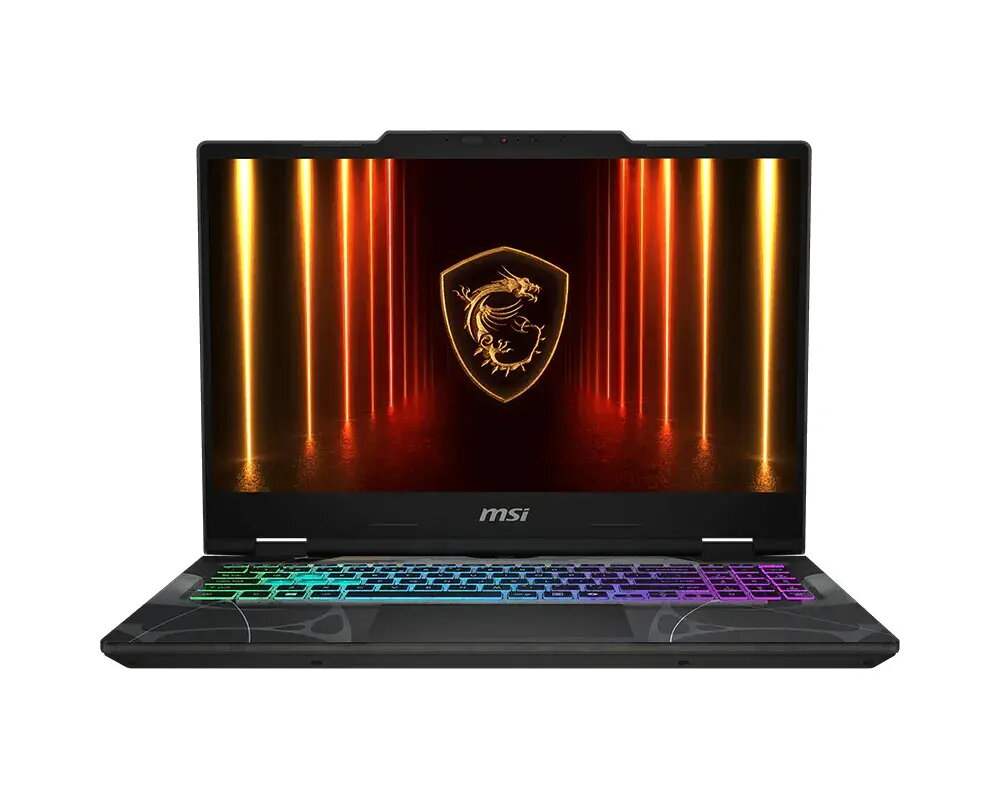
The MSI Cyborg 15 B13WFKG is a high-performance gaming laptop engineered to deliver a balanced experience for modern gamers and power users. Equipped with an Intel Core i7-13620H processor and the NVIDIA GeForce RTX 4060 graphics card, this machine provides the necessary computational power to handle demanding software and contemporary gaming titles with ease. The device features a 15.6-inch FHD display with a 144Hz refresh rate, ensuring smooth visuals during fast-paced action. Housed in a durable, translucent black chassis, it combines aesthetic appeal with functional design, supported by a 1TB SSD for rapid data access and 16GB of DDR5 memory for efficient multitasking.
Advantages
This laptop stands out due to its advanced thermal management and high-speed connectivity options, including Wi-Fi 6E and Bluetooth 5.3. The inclusion of a dedicated NVIDIA GPU with AI-powered capabilities allows for enhanced graphical performance and realistic lighting effects. Users benefit from the versatility of the USB Type-C port, which supports DisplayPort and Power Delivery, making it easy to connect to external monitors or peripherals. The ergonomic keyboard includes a numeric keypad, which is beneficial for both gaming macros and productivity tasks. Furthermore, the system is designed with future-proofing in mind, offering an additional M.2 SSD slot for storage expansion and memory slots that support up to 96GB of RAM.
Suitable for
- Playing modern AAA video games at high settings.
- Content creation, including video editing and graphic design.
- Multitasking between demanding professional applications.
- Streaming and media consumption with high-fidelity audio support.
This laptop may not be the ideal choice for users who require a lightweight device for extreme portability, as its gaming-focused hardware and cooling system result in a weight of 2.1 kg. Additionally, it may not be suitable for professional color-grading work that requires 100% DCI-P3 color accuracy, as the display is optimized primarily for gaming performance.
Key specifications
- Processor: Intel Core i7-13620H
- Graphics: NVIDIA GeForce RTX 4060
- Display: 15.6-inch FHD (1920x1080), 144Hz, IPS-Level
- Memory: 16GB DDR5-5600 (expandable up to 96GB)
- Storage: 1TB NVMe PCIe Gen4 SSD (expandable)
- Connectivity: Wi-Fi 6E, Bluetooth 5.3, Gigabit Ethernet
- Ports: 1x USB Type-C (DP/PD), 2x USB Type-A, 1x HDMI 2.1, 1x Audio Combo
- Weight: 2.1 kg
To begin using the MSI Cyborg 15, connect the provided 120W power adapter to the device and complete the initial Windows 11 Home setup process. Ensure that the laptop is placed on a flat, stable surface to allow for proper airflow through the cooling vents. You can customize your performance settings and monitor system health through the pre-installed MSI software suite. For optimal gaming performance, ensure that your graphics drivers are updated regularly via the NVIDIA GeForce Experience application.
What to consider before purchase
- Check if the available ports meet your specific peripheral requirements.
- Consider if you need additional storage space, as an extra M.2 slot is available for future upgrades.
- Verify that the 15.6-inch form factor fits your preferred balance of screen size and portability.
For the best experience, keep the laptop firmware and drivers updated, and ensure the cooling vents remain unobstructed during intensive tasks to maintain peak performance and hardware longevity.