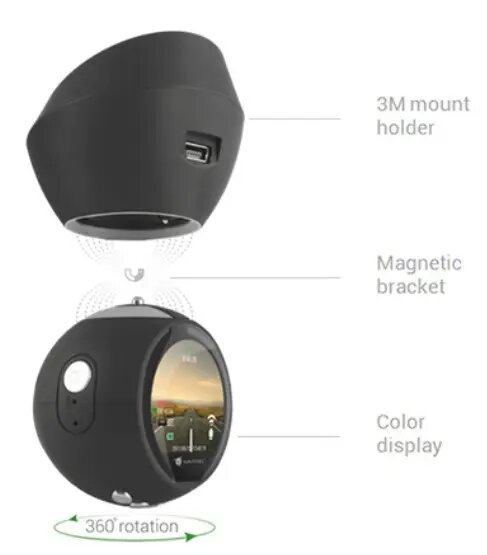
The Navitel R10 compact is a high-performance dash camera engineered for reliable in-car video recording. Its discreet, minimalist design allows it to be mounted unobtrusively on the windshield, ensuring it does not obstruct the driver's field of vision while providing continuous monitoring of the road ahead. This device is built to capture high-quality footage, making it an essential tool for documenting daily commutes, long-distance journeys, and unexpected traffic incidents.
Advantages
The primary benefit of the Navitel R10 compact is its compact form factor, which integrates seamlessly into any vehicle interior without drawing unnecessary attention. The device is designed for automated operation, initiating recording as soon as the vehicle engine starts. Its robust construction ensures consistent performance under various driving conditions, providing peace of mind by maintaining a reliable record of events that can serve as objective evidence in the event of a dispute or insurance claim.
Suitable for
- Daily commuting and urban driving
- Long-distance road trips and travel
- Documenting traffic incidents for insurance purposes
- Monitoring road conditions and driver safety
When it may not be suitable
This device may not be suitable for users requiring multi-channel recording, such as simultaneous interior cabin or rear-facing coverage, as it is designed primarily for forward-facing documentation. Additionally, it may not be the ideal choice for those seeking advanced cloud-based connectivity or integrated GPS tracking features.
Key specifications
- Compact, unobtrusive design
- Continuous loop recording functionality
- Automatic start-up with vehicle ignition
- High-definition video capture
- Secure windshield mounting system
How to use
To use the Navitel R10 compact, securely attach the device to the windshield using the provided mount, ensuring the lens has a clear view of the road. Connect the power cable to the vehicle's cigarette lighter socket or an appropriate power source. Once the vehicle is started, the camera will automatically begin recording. Files are saved onto a memory card, which can be removed to transfer footage to a computer for review or storage.
What to consider before purchase
- Compatibility with your vehicle's power outlet
- Memory card capacity requirements for long-term storage
- Legal regulations regarding dash camera usage in your region
- Placement to ensure it does not interfere with driver visibility
Usage recommendations
For optimal performance, ensure the windshield is clean before mounting the camera and regularly format the memory card to maintain recording stability. Always check the device settings to ensure the date and time are correctly configured for accurate incident documentation.