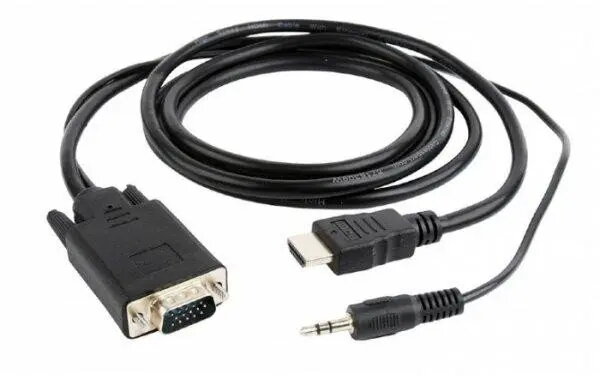
The HDMI to VGA and 3.5mm Audio Cable is a versatile connectivity solution designed to bridge the gap between modern digital devices and legacy analog displays. Measuring 1.8 meters in length, this cable features a male HDMI connector on one end and a male VGA connector paired with a 3.5mm audio jack on the other. It facilitates the seamless transmission of high-definition video signals to VGA-compatible monitors, projectors, and televisions, while simultaneously routing audio through the integrated auxiliary cable to external speakers or sound systems.
Advantages
This cable provides a streamlined, all-in-one solution that eliminates the need for bulky adapters or multiple separate cables. By combining video and audio transmission into a single, durable cord, it simplifies cable management and reduces clutter in your workspace or entertainment area. The 1.8-meter length offers sufficient reach for most standard desktop or presentation setups, ensuring flexibility in device placement without sacrificing signal integrity.
Suitable for
- Connecting laptops to older VGA projectors for professional presentations.
- Linking media players or game consoles to legacy monitors.
- Setting up dual-monitor workstations where the secondary display utilizes a VGA input.
- Home entertainment systems requiring audio output from an HDMI source to external speakers.
When it may not be suitable
This cable is a unidirectional converter designed specifically for HDMI source devices to VGA displays. It will not function if you attempt to connect a VGA source device to an HDMI display. Furthermore, it does not support HDCP-protected content, which may prevent the playback of certain copyrighted media from streaming services.
Key specifications
- Cable length: 1.8 meters
- Input: HDMI male
- Output: VGA male and 3.5mm stereo audio jack
- Signal direction: HDMI to VGA (unidirectional)
- Compatibility: Supports standard analog video resolutions
How to use
To use the cable, insert the HDMI connector into the output port of your source device, such as a laptop or media player. Connect the VGA plug into the input port of your monitor or projector. Finally, insert the 3.5mm audio jack into the headphone or audio-out port of your source device to enable sound. Ensure that your source device is configured to output audio through the headphone jack if necessary.
What to consider before purchase
- Verify that your source device has an HDMI output port.
- Confirm that your display device supports a VGA input.
- Check if your source device requires an external power source for HDMI-to-VGA conversion.
- Ensure the 1.8-meter length is sufficient for your specific setup requirements.
Usage recommendations
For the best performance, ensure all connectors are fully seated in their respective ports. If the image appears distorted, adjust the resolution settings on your source device to match the native resolution of your VGA display.