Filters you can trust. Pure water every day.
In cart {{totalProductsCount}} item(s)
Your cart is empty
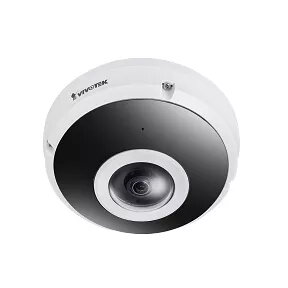
VIVOTEK FE9380-HV Fisheye IP Security Camera, 5MP, 180° Panoramic View, Indoor & Outdoor, Wired, Ceiling/Wall Mount
The VIVOTEK FE9380-HV is a high-performance 5MP fisheye IP security camera engineered for comprehensive surveillance in diverse environments. Featuring a 180-degree horizontal and vertical field of view, this dome camera provides expansive coverage, effectively eliminating blind spots in large areas. Designed for both indoor and outdoor use, it is housed in a durable, weather-proof, and vandal-resistant casing, ensuring reliable operation in challenging conditions. With advanced imaging technologies like WDR Pro and Supreme Night Visibility, the camera delivers clear, high-resolution footage regardless of lighting conditions.
This camera offers significant benefits through its 360-degree panoramic monitoring capabilities, which allow a single unit to replace multiple standard cameras. The integration of H.265 compression technology combined with Smart Stream III significantly optimizes bandwidth and storage efficiency without compromising image quality. The inclusion of built-in IR illuminators provides effective night vision up to 10 meters, while the robust IP66 and IK10 ratings guarantee protection against environmental elements and physical tampering. Furthermore, the camera supports local dewarping and on-board storage via a microSD card slot, providing a flexible and cost-effective security solution.
This camera may not be suitable for applications requiring long-range identification, such as license plate recognition at high speeds or monitoring distant objects, due to the nature of the fisheye lens which prioritizes wide-area coverage over optical zoom capabilities. Additionally, it is not intended for environments where specialized thermal imaging or explosion-proof certifications are required.
To use the VIVOTEK FE9380-HV, mount the device securely to a ceiling or wall using the provided hardware. Connect the camera to your network infrastructure via a wired Ethernet cable, ensuring the network supports the necessary power requirements. Once physically installed, access the camera's web interface through a browser to configure network settings, motion detection zones, and recording preferences. The system supports local dewarping, allowing you to adjust the panoramic view for optimal monitoring of your specific area.
For optimal performance, ensure the camera lens is kept clean from dust and debris, and regularly update the firmware to benefit from the latest security enhancements and feature improvements provided by the manufacturer.
{{highlightedFeature.featureTitle}}:
{{getProductFeatureValueById(product, highlightedFeature.featureId)}}