
JBL speakers and headphones for pure and deep sound!
In cart {{totalProductsCount}} item(s)
Your cart is empty
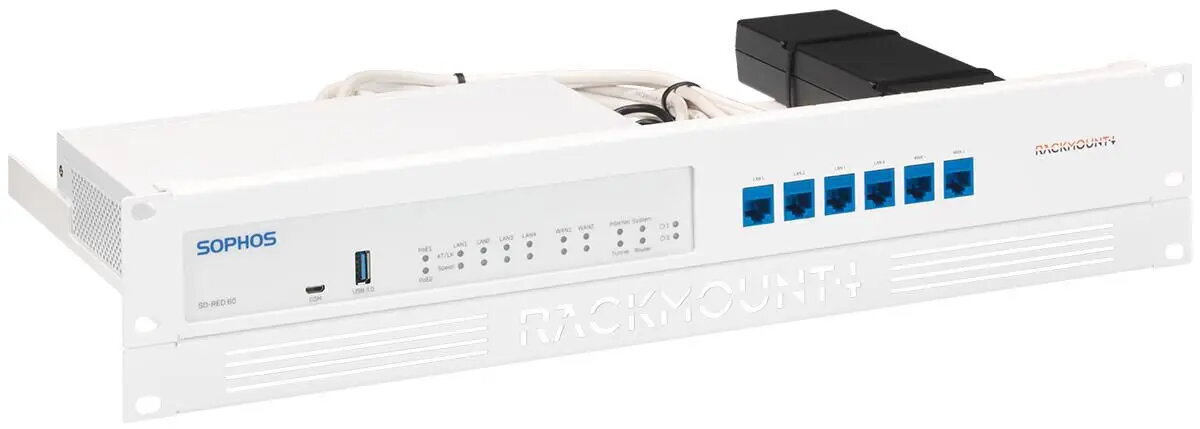
Rackmount.IT RM-SR-T10 Rack Mount Kit for Sophos RED 20 and RED 60
The Rackmount.IT RM-SR-T10 is a professional-grade rack mount kit specifically engineered to integrate Sophos RED 20 and RED 60 network appliances into standard 19-inch server racks. This mounting solution provides a stable and secure platform for your hardware, ensuring that desktop-sized network devices can be organized efficiently within a professional IT infrastructure. By utilizing this kit, you can maintain a clean server environment while ensuring your equipment remains protected and accessible.
This rack mount kit offers a precise fit for the specified Sophos models, ensuring that the device is held firmly in place. A significant benefit of this design is that all network connections are relocated to the front panel, which simplifies maintenance and troubleshooting tasks by eliminating the need to access the rear of the rack. Furthermore, the kit includes a dedicated mechanism to secure the power supply, preventing accidental disconnections that could lead to unexpected downtime. The installation process is straightforward and designed to be completed in approximately five minutes, allowing for rapid deployment in busy network environments.
This kit is exclusively designed for the Sophos RED 20 and RED 60 models and will not fit other hardware devices. It is intended for use in standard 19-inch rack enclosures and is not suitable for wall-mounting or desktop placement without a rack frame.
To install the device, slide your Sophos appliance into the designated slot within the rack mount kit. Once positioned, attach the provided retainers to ensure the unit is locked securely. Connect the supplied cables to the integrated keystones on the front panel for easy access. Finally, secure the power supply unit to the rack frame using the included mounting points to prevent cable strain or accidental power loss.
For optimal performance and longevity, ensure that the rack environment provides adequate airflow around the mounted device to prevent overheating. Regularly inspect the front-facing cable connections to ensure they remain secure and free from dust.
{{highlightedFeature.featureTitle}}:
{{getProductFeatureValueById(product, highlightedFeature.featureId)}}