


Save time and money with our discounts!
In cart {{totalProductsCount}} item(s)
Your cart is empty
Oppo Find X9 Pro Smartphone, 6.78-inch, 16GB RAM, 512GB Storage, 5G, Dual SIM, Android 16.0, Charcoal
The Oppo Find X9 Pro is a high-performance smartphone designed for users who demand power, professional-grade photography, and long-lasting battery life. Featuring a stunning 6.78-inch display with a resolution of 2772 x 1272, this device offers a vivid and immersive visual experience. Powered by the advanced MediaTek Dimensity 9500 processor and paired with 16GB of LPDDR5X RAM, it handles multitasking, gaming, and intensive applications with ease. With 512GB of internal storage, you have ample space for all your media, apps, and documents. The device runs on Android 16.0, providing a modern, secure, and intuitive user interface.
The Oppo Find X9 Pro stands out due to its robust quad-camera system, which includes a 50MP main sensor and a 50MP front camera, ensuring exceptional detail in both photos and videos. The inclusion of a massive 7500 mAh battery ensures that the device can easily last through a full day of heavy usage, while the IP68 rating provides peace of mind against water and dust exposure. Its 5G connectivity and Dual SIM functionality make it an excellent choice for professionals and travelers who need reliable, high-speed internet access anywhere. The combination of high-end hardware and optimized software ensures a smooth, responsive experience for every user.
This device may not be the ideal choice for users who prefer compact, lightweight smartphones, as its large battery and screen size contribute to a more substantial physical footprint. Additionally, users who are strictly looking for a budget-friendly entry-level device may find the premium feature set and price point of the Find X9 Pro to be more than what they require for basic daily tasks.
To begin using your Oppo Find X9 Pro, insert your SIM cards into the tray located on the side of the device. Power on the phone by holding the side button and follow the on-screen setup instructions to connect to Wi-Fi and sign in to your accounts. Once configured, you can navigate the interface using intuitive gestures or standard navigation buttons. To maximize the camera performance, open the camera app and explore the various modes, such as portrait or pro mode, to adjust settings for your specific environment. Keep your software updated through the settings menu to ensure you have the latest security patches and features.
For optimal battery longevity, utilize the included fast-charging capabilities and avoid exposing the device to extreme temperatures. Regularly clear background apps to maintain peak performance, and ensure the device is kept clean to maintain the effectiveness of the IP68 water and dust resistance seals.
{{highlightedFeature.featureTitle}}:
{{getProductFeatureValueById(product, highlightedFeature.featureId)}}
{{ productComparisonGenerationError }}
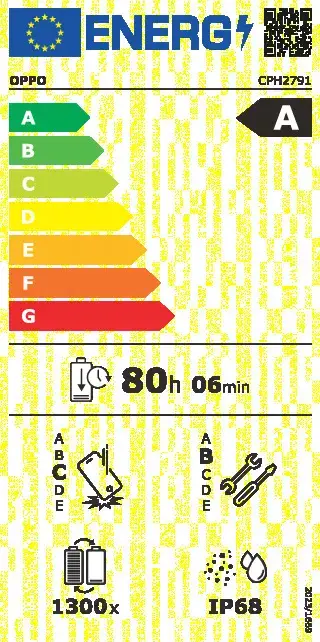
Device manufacturer code
Device manufacturer
Device protection rating against dust and water according to the international IP standard.
Rating of how easy it is to disassemble and repair the device, including parts and manual availability.
Assessment of device durability after repeated drops from a specified height.
Rating of how efficiently a device uses energy, affecting power consumption and costs.
Number of full charge–discharge cycles the battery endures before its capacity significantly decreases.
iagonal of the visible part of the screen expressed in centimeters and inches.