JBL speakers and headphones for pure and deep sound!
In cart {{totalProductsCount}} item(s)
Your cart is empty
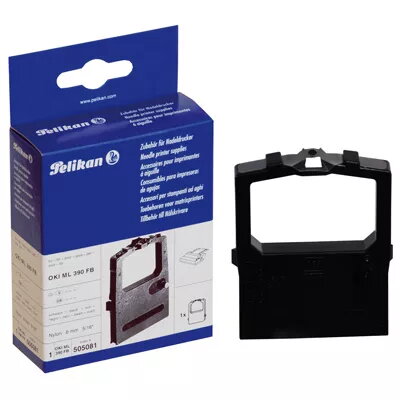
Ribbon Pelikan 1 Nylon Re-Inking OKI Microline 390 FB
The Pelikan 1 Nylon Re-Inking ribbon is a high-quality printing accessory specifically engineered to be compatible with the OKI Microline 390 FB printer series. This ribbon provides a reliable alternative to original manufacturer supplies, ensuring consistent print quality and performance for your daily document production needs. With a length of 1.8 meters and a width of 8 mm, it is designed to fit seamlessly into your printing hardware, maintaining the operational standards required for professional office environments.
Choosing this Pelikan ribbon offers significant benefits, including excellent print clarity and a high page yield that supports efficient workflow management. The product is manufactured to meet rigorous quality standards, providing a cost-effective solution without compromising on the output quality of your text and graphics. Furthermore, the inclusion of a 3-year warranty demonstrates the manufacturer's commitment to reliability and customer satisfaction, making it a dependable choice for businesses looking to optimize their printing expenses.
This ribbon is specifically designed for impact dot-matrix printers and is not compatible with inkjet, laser, or thermal transfer printers. It may not be suitable for users requiring high-resolution photo printing or color graphics, as it is intended for monochrome text and data output.
To install the ribbon, first ensure the printer is powered off and the print head has cooled down. Open the printer cover and locate the ribbon cartridge housing. Carefully remove the old ribbon cassette by releasing the locking mechanism. Insert the new Pelikan ribbon cartridge, ensuring it clicks securely into place. Gently rotate the tension knob on the cartridge to take up any slack in the ribbon, ensuring it sits correctly between the print head and the platen. Close the printer cover and perform a test print to verify proper alignment.
For optimal print quality and to extend the life of your print head, replace the ribbon as soon as the text becomes faint. Avoid touching the inked surface of the ribbon during installation to prevent smudging and ensure clean output.
{{highlightedFeature.featureTitle}}:
{{getProductFeatureValueById(product, highlightedFeature.featureId)}}
{{ productComparisonGenerationError }}