A curated selection of maximum value offers!
In cart {{totalProductsCount}} item(s)
Your cart is empty
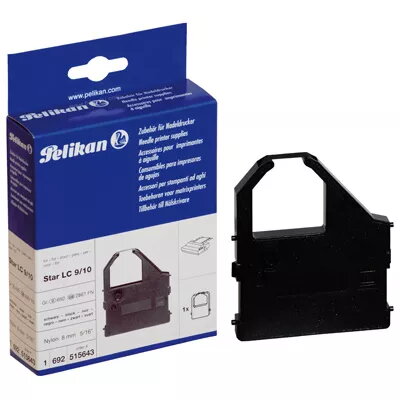
Nylon Ribbon Pelikan 1 Nylon
The Pelikan 1 Nylon ribbon is a reliable and high-quality printing accessory designed to serve as a cost-effective alternative for Star Micronics printers, including models such as the LC 10 and LC 1000. Engineered for durability and consistent performance, this black nylon ribbon ensures clear, legible text and graphics for your daily printing tasks. By choosing Pelikan, you benefit from a product that balances professional print quality with significant value, backed by a three-year manufacturer warranty.
This nylon ribbon offers exceptional print clarity and longevity, making it a dependable choice for high-volume printing environments. Its robust construction minimizes the risk of fraying or ink smudging, ensuring that your documents maintain a professional appearance over time. Furthermore, the product is designed for seamless compatibility, allowing for quick and easy installation without compromising the integrity of your printer hardware. The combination of high yield and an attractive price point makes it an ideal solution for both home and office use.
This ribbon is specifically engineered for compatible Star Micronics dot matrix printers and will not function in inkjet, laser, or thermal printers. It is also not intended for high-resolution photo printing or applications requiring color output beyond standard black.
To install the ribbon, first ensure your printer is powered off and the print head has cooled down. Open the printer cover and locate the existing ribbon cartridge. Carefully remove the old cartridge by releasing the locking mechanism. Insert the new Pelikan 1 Nylon ribbon into the designated slot, ensuring it is properly seated and the ribbon fabric is positioned correctly between the print head and the platen. Gently turn the manual feed knob on the cartridge to take up any slack in the ribbon before closing the printer cover.
Usage recommendations: For optimal print quality and to extend the lifespan of your printer's print head, replace the ribbon as soon as the text begins to appear faint. Store unused ribbons in a cool, dry place away from direct sunlight to maintain ink freshness.
{{highlightedFeature.featureTitle}}:
{{getProductFeatureValueById(product, highlightedFeature.featureId)}}
{{ productComparisonGenerationError }}