
Leave your address - as soon as the price of the product goes down, you'll know about it right away
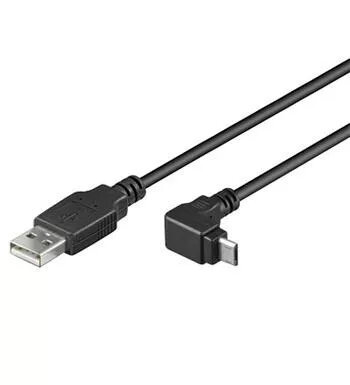
USB Micro-B cable PREMIUMCORD ku2m3f-90, 3 m length, 90° angled connector
In cart {{totalProductsCount}} item(s)
Your cart is empty
USB Micro-B cable PREMIUMCORD ku2m3f-90, 3 m length, 90° angled connector
Leave your address - as soon as the price of the product goes down, you'll know about it right away
USB Micro-B cable PREMIUMCORD ku2m3f-90, 3 m length, 90° angled connector
PREMIUMCORD ku2m3f-90 is a 3 m USB Micro-B (Micro USB 2.0) cable with a 90° angled Micro-B connector, designed for data transfer and device charging. The cable supports USB 2.0 speeds up to 480 Mbps and is intended for connecting devices with a Micro USB port such as smartphones, tablets, digital cameras and other compatible devices. The angled connector reduces strain on ports and allows neater cable routing in confined spaces. The cable includes double shielding and copper conductors (2x AWG28 + 2x AWG28) for reliable signal transmission.
The angled Micro-B connector enables convenient connection in tight spaces and reduces mechanical stress on device ports. USB 2.0 compatibility provides data transfer rates up to 480 Mbps while also supporting charging from a computer USB port. Double shielding and copper conductors improve signal integrity and reduce interference. The 3 m length gives extended reach for flexible device placement.
Connect the standard USB-A plug to a computer, charger or USB hub and insert the 90° angled Micro-B connector into the device's Micro USB port. Ensure the connector orientation matches the port before inserting. For data transfer, allow the device to establish a connection with the PC and use the device's file management or synchronization software. For charging, verify that the host port provides sufficient current.
Use the angled Micro-B connector to reduce bending stress on the device port; avoid sharp bends along the cable length and disconnect by pulling the connector housing rather than the cable. Verify device compatibility with Micro USB ports listed by manufacturer models before use.
{{highlightedFeature.featureTitle}}:
{{getProductFeatureValueById(product, highlightedFeature.featureId)}}