Powerful EcoFlow stations for energy anywhere!
In cart {{totalProductsCount}} item(s)
Your cart is empty
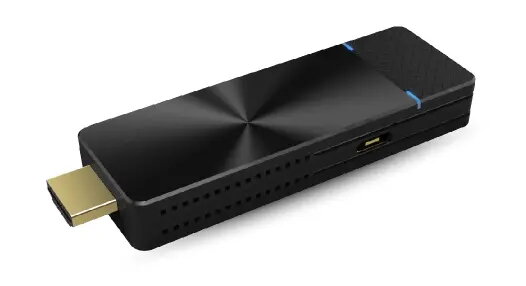
PureLink EZCast Pro Dongle II Wireless Presentation System, 4K Resolution, Wi-Fi 5
The PureLink EZCast Pro Dongle II is a professional-grade wireless presentation system engineered for seamless content sharing in modern meeting rooms and educational settings. Built with the powerful AM8270 processor and 1GB of DDR3 memory, this compact device enables high-performance screen mirroring with support for resolutions up to 4096 x 2160 pixels. By utilizing advanced Wi-Fi 5 (802.11ac) technology with a 2T2R MIMO antenna, it ensures stable and high-speed data transmission, making it an ideal solution for demanding multimedia presentations.
This wireless presentation system offers significant improvements over previous generations, featuring a robust hardware design that handles resource-intensive tasks with ease. The integration of 5GHz Wi-Fi technology provides the necessary bandwidth for smooth 4K video streaming, while the versatile ProCast app enables efficient one-to-many screen mirroring, eliminating the need for complex and expensive cabling. Furthermore, the device supports cross-platform compatibility, allowing users to switch effortlessly between different operating systems and mirroring protocols without manual configuration changes.
This device may not be suitable for environments with extremely high levels of wireless interference that could disrupt the 5GHz signal. Additionally, it is designed primarily for presentation and screen mirroring tasks and may not be the optimal solution for high-latency gaming or professional video editing workflows that require a hardwired connection.
To use the PureLink EZCast Pro Dongle II, connect the device to an HDMI-enabled display or projector and ensure it is powered via the DC source. Once connected, install the necessary software, such as the ProCast or EZCast Pro app, on your laptop or mobile device. Follow the on-screen instructions to pair your device with the dongle, allowing you to begin wireless screen mirroring or document streaming immediately.
For the best performance, ensure the dongle is placed in an area with minimal physical obstructions to maintain a strong and stable Wi-Fi signal during your presentations.
{{highlightedFeature.featureTitle}}:
{{getProductFeatureValueById(product, highlightedFeature.featureId)}}
{{ productComparisonGenerationError }}