


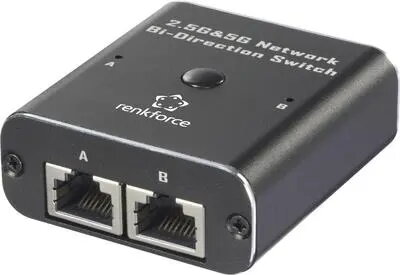
Network switch Renkforce RF-EW-700 2-port 5 GBit/s with USB power supply
Offer for a legal entity, non-cash payment.
Short description


Cheapest delivery:
Unisend LV
Product information
Description
Renkforce RF-EW-700 is a compact 2-port network switch that delivers up to 5 GBit/s per port and is powered via USB. The device is intended to expand wired Ethernet connectivity where router or hub ports are limited, enabling high-speed transfers for home office setups, media streaming devices and small office networks. Its small footprint and USB power option allow flexible placement without the need for a dedicated power adapter.
Advantages
The RF-EW-700 provides two high-speed Ethernet ports with a throughput of 5 GBit/s per port, reducing bottlenecks when connecting multiple wired devices. USB power supply simplifies installation and enables use with USB power sources such as a computer, USB power adapter or power bank. The compact design supports space-constrained environments and makes it easy to add wired connections without rearranging existing network hardware.
Suitable for
- Expanding wired connections for home office equipment (PC, NAS, VoIP phone)
- Connecting streaming media players or smart TVs to a wired network
- Small office or shared workspace with a limited number of switch/router ports
- Temporary network setups where portable, USB-powered switches are convenient
Key specifications
- Number of ports: 2 Ethernet ports
- Port speed: up to 5 GBit/s per port
- Power supply: via USB
- Form factor: compact, desktop
- Intended use: unmanaged switch for basic network expansion
How to use
Connect the RF-EW-700 to your existing router, modem or primary switch using an Ethernet cable, then attach the devices you want to network to the remaining port(s). Provide power to the switch via a USB cable connected to a USB power source such as a computer USB port, a USB wall adapter or a power bank. No software installation or configuration is required for basic operation; the device functions as an unmanaged switch and forwards Ethernet frames automatically.
Usage recommendations
Use high-quality Cat5e or Cat6 Ethernet cables to ensure reliable 5 GBit/s connections and place the switch in a ventilated, dry area away from heat sources. If using a power bank or a low-current USB port, verify that it can supply sufficient current for stable operation. For permanent installations, pair the switch with a stable USB power adapter to avoid unintended power interruptions.


