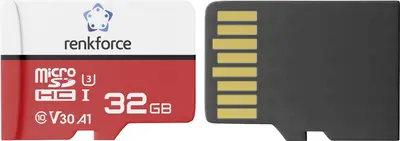
The Renkforce RFEmSD32 microSDHC 32 GB memory card Class 10 A1 V30 UHS-I with SD adapter is a reliable and high-performance storage solution designed to meet the demands of modern mobile devices, cameras, and portable electronics. Offering a capacity of 32 GB, this memory card provides ample space for storing your photos, Full HD and 4K videos, applications, and essential documents. Featuring the UHS-I interface, Class 10 speed rating, A1 Application Performance Class, and V30 Video Speed Class, it ensures fast data transfer rates and smooth execution of mobile apps directly from the card.
Advantages
This microSDHC memory card delivers exceptional performance for everyday digital tasks. The integration of the A1 standard ensures that applications load quickly and run smoothly on compatible smartphones and tablets, significantly enhancing the user experience. Additionally, the V30 Video Speed Class guarantees a sustained write speed necessary for capturing high-resolution 4K Ultra HD video without stuttering or dropped frames. The inclusion of a standard SD card adapter further increases its versatility, allowing the microSD card to be easily used in devices with full-sized SD slots such as digital cameras, laptops, and card readers.
Suitable for
- Expanding storage capacity on smartphones and tablets
- Recording 4K Ultra HD and Full HD videos on action cameras and drones
- Running mobile applications smoothly with A1 performance
- Transferring data between cameras, laptops, and mobile devices using the included SD adapter
This memory card may not be suitable for professional, high-end broadcast setups or multi-camera systems that require massive storage capacities exceeding 32 GB or specialized industrial-grade endurance memory cards for continuous 24/7 write cycles under extreme environmental conditions.
Key specifications
- Capacity: 32 GB
- Card Type: microSDHC
- Speed Class: Class 10, UHS-I
- Application Performance Class: A1
- Video Speed Class: V30
- Included Accessories: SD adapter
To use the Renkforce RFEmSD32 memory card, first ensure your host device is powered off or safely unmounts existing storage. Insert the microSDHC card into the designated card slot of your smartphone, tablet, action camera, or drone. If you need to use the card in a standard SD slot, securely insert the microSD card into the provided SD adapter before placing it into the device. Format the card through your device settings prior to initial use to ensure optimal compatibility and file system organization.
What to consider before purchase
- Verify that your smartphone, tablet, or camera supports microSDHC cards up to 32 GB capacity
- Check if your intended use benefits from A1 application performance and V30 video recording speeds
- Consider whether 32 GB is sufficient for your media storage needs or if a higher capacity is required
For optimal longevity and data integrity, back up your important files regularly to an external drive or cloud storage, and avoid removing the card from the device while data transfer or recording is actively in progress.