
Leave your address - as soon as the price of the product goes down, you'll know about it right away
RoGer RCA to HDMI Adapter with Audio — Composite A/V to HDMI Converter
In cart {{totalProductsCount}} item(s)
Your cart is empty
RoGer RCA to HDMI Adapter with Audio — Composite A/V to HDMI Converter
Leave your address - as soon as the price of the product goes down, you'll know about it right away
RoGer RCA to HDMI Adapter with Audio — Composite A/V to HDMI Converter
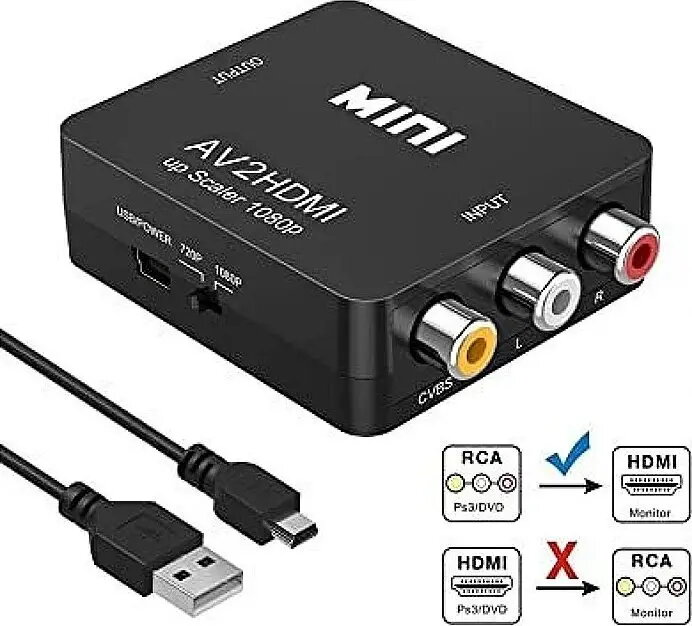
The RoGer RCA to HDMI Adapter with Audio converts composite A/V signals (RCA: yellow video, red and white audio) into a single HDMI output, enabling connection of legacy devices to modern HDMI displays and TVs. The compact converter accepts analog video and stereo audio from DVD players, VCRs, older game consoles and other composite-output equipment, then processes and outputs a digital HDMI signal compatible with HDTVs, monitors and capture devices. The device supports simple plug-and-play operation and is intended for situations where an HDMI-only display must receive input from an analog source.
This RCA to HDMI adapter provides integrated audio pass-through and real-time signal conversion without requiring additional software. Its compact form factor and straightforward connections minimize setup complexity. The converter supports stable output across common resolution formats and is suitable for direct connection to televisions, monitors, or HDMI capture devices for digitizing analog footage. It requires only power and the appropriate RCA and HDMI cables to operate.
Connect the composite video (yellow) and stereo audio (red and white) cables from the source device to the corresponding RCA input jacks on the adapter. Plug an HDMI cable from the adapter's HDMI output into the HDMI input on the display or capture device. Provide power to the adapter using a compatible USB power supply connected to the adapter's power input. Power on the source device and the display; the adapter will convert the analog signal to HDMI for immediate use. Adjust the display’s input selection and, if necessary, the source device’s output settings to achieve the correct signal format.
Use good-quality RCA and HDMI cables to minimize signal degradation. When capturing or digitizing analog video, ensure the capture device resolution matches the adapter’s output for optimal compatibility. If picture format or color issues appear, verify the source device is set to the appropriate composite standard (NTSC or PAL) and try reconnecting cables with the devices powered off before restarting.
{{highlightedFeature.featureTitle}}:
{{getProductFeatureValueById(product, highlightedFeature.featureId)}}